ProfiMessage
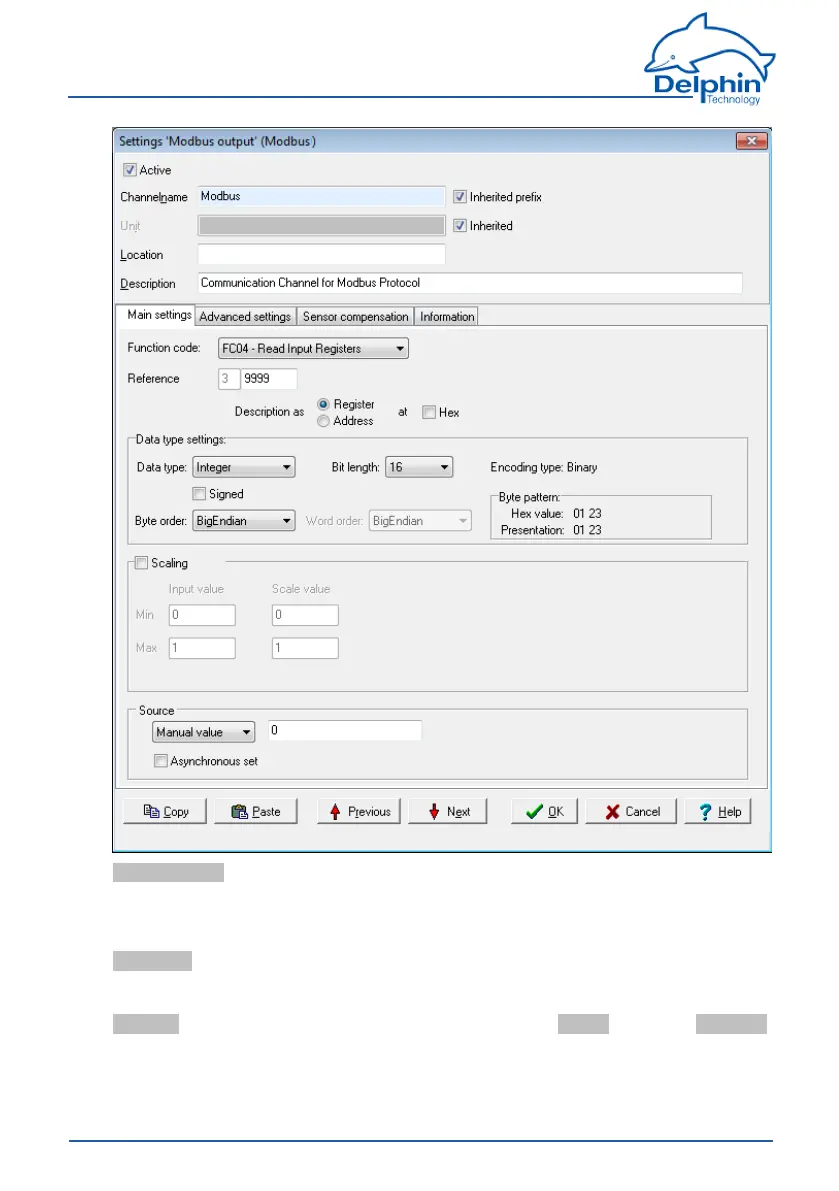
Function code:Selectwhatistoberead(input)orwritten(output).Onlyper-
mitteddatawillbeavailable,forexampleFC01toFC04fortheinputsandFC05/06
aswellasFC15/16fortheoutputs.Thesettinginfluencesthevaluesthatcanbe
configuredinDatatypesettings.
Reference:Thenumberinfrontoftheinputfieldindicatesthememorypageand
thusthetabtype.
Inputismadeindecimalformbydefault,andisrestrictedtovalidvalues.Using
Show asyoucanspecifywhethertheinputistobeused as an Addressor as a Tab
,andwhetheritshouldfollowdecimalorhexadecimal(Hex)notation.
Data type settings
166
Delphin Technology AG
Dezember 2015
ProfiMessage Manual


 To Next Page