ProfiMessage
4.2 ProfiMessage device configuration
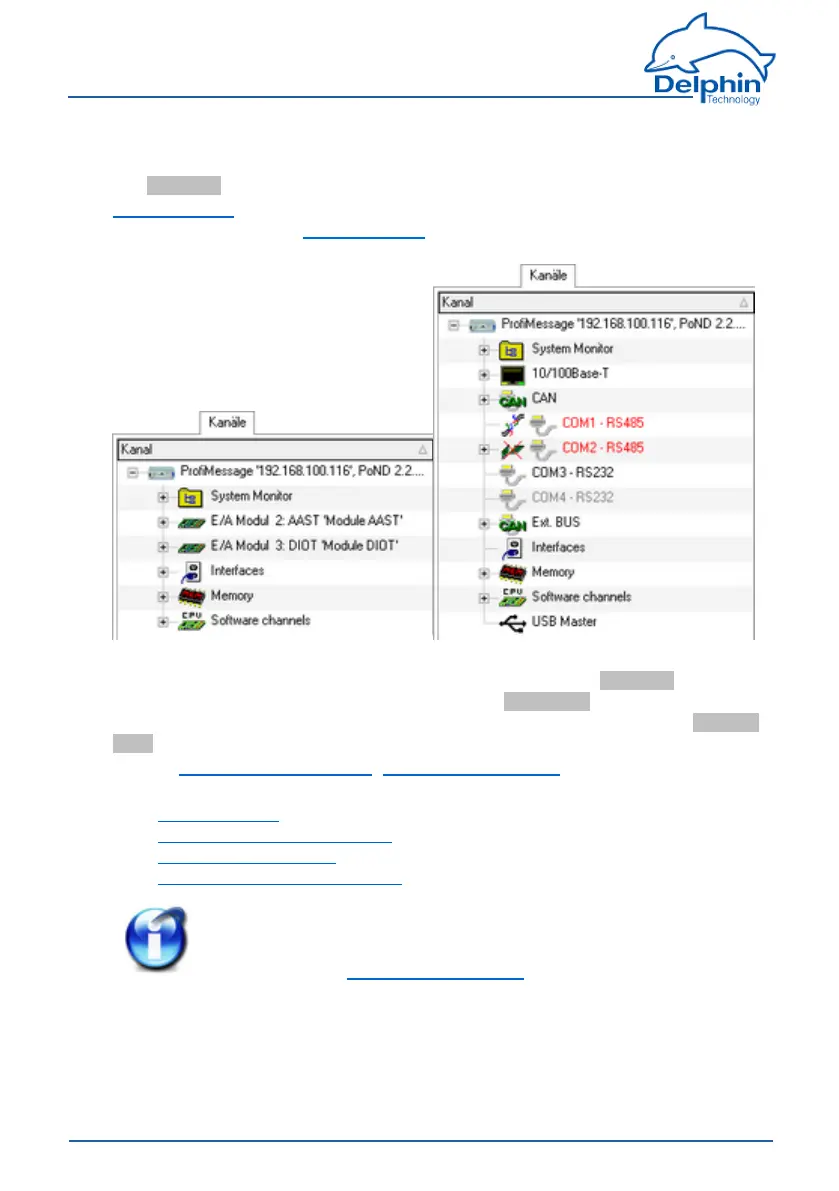
TheChannelstab'stoplevelisthedevicelevelinDataServiceConfiguratorThe
hardwareview(rightpanel)displaysthevarioussysteminterfaces,memoryand
softwarechannels.Thehardwareview(rightpanel)displaysthevarioussystem
interfaces,memoryandsoftwarechannels.
ThisSectionexplainsthesettingsthatyoucanmakeforthedeviceitself.This
takesplacevia"ProfiMessage'192.168.100.116'..."intheChannelstabin
DataServiceConfigurator(seeexample).UsethePropertiescontextmenuto
amendadevicenameandIDortoenteradescriptionforthedevice.UseMainset-
tingscontextmenutochangenetworkandNTPsettings.
RefertoConfiguringmaindevice,Networksettings,NTP
Forexplanationsofothersettings,see:
l Devicememoryforinternalmemory
l ConfiguringmodulechannelsforI/Omodules
l ConfiguringinterfacesforCAN,COMandPROFIBUSinterfaces
l Configuringsoftwarechannelsforsystemmonitoringandcalculations
Info
Forgeneralinformationonconfigurationdialogs(includingheader
andfooter),seeSettingsforalldialogs.
4.3 Connecting slave devices
SlavedevicescanonlybeconnectedwithProfiMessagedevices.TheProfiMes-
sagesystemusesCAN-busandDelphinCANProtocoDelphinl(DCP)toconnectto
52
Delphin Technology AG
Dezember 2015
ProfiMessage Manual


 To Next Page