ProfiMessage
Scaling
Entertwopointsfromthesensor'scharacteristiccurve,ifpossible,thelowerand
uppervertexes.Valuesfromthesourcearethenlinearlyconvertedintotherange
ofspecifiedoutputvalues.Fornon-linearcharacteristics,useSensor com-
pensation.RefertotabSensorcompensation.Thespecifiedrange(intheexample
0to0.5bar)isusedasthedefaultforthedisplayareaingraphicsofProfiSignal.
Thechannelreceivesthestatus"scalerangeoverrun"for"scalerangeunderrun"
whennotwithintherange.Channelstatusvaluesareavailableinstatusmon-
itoring.TheOutput range definesthelimitsofthecurrentorvoltageoutput.
4.6.7 Digitaloutput
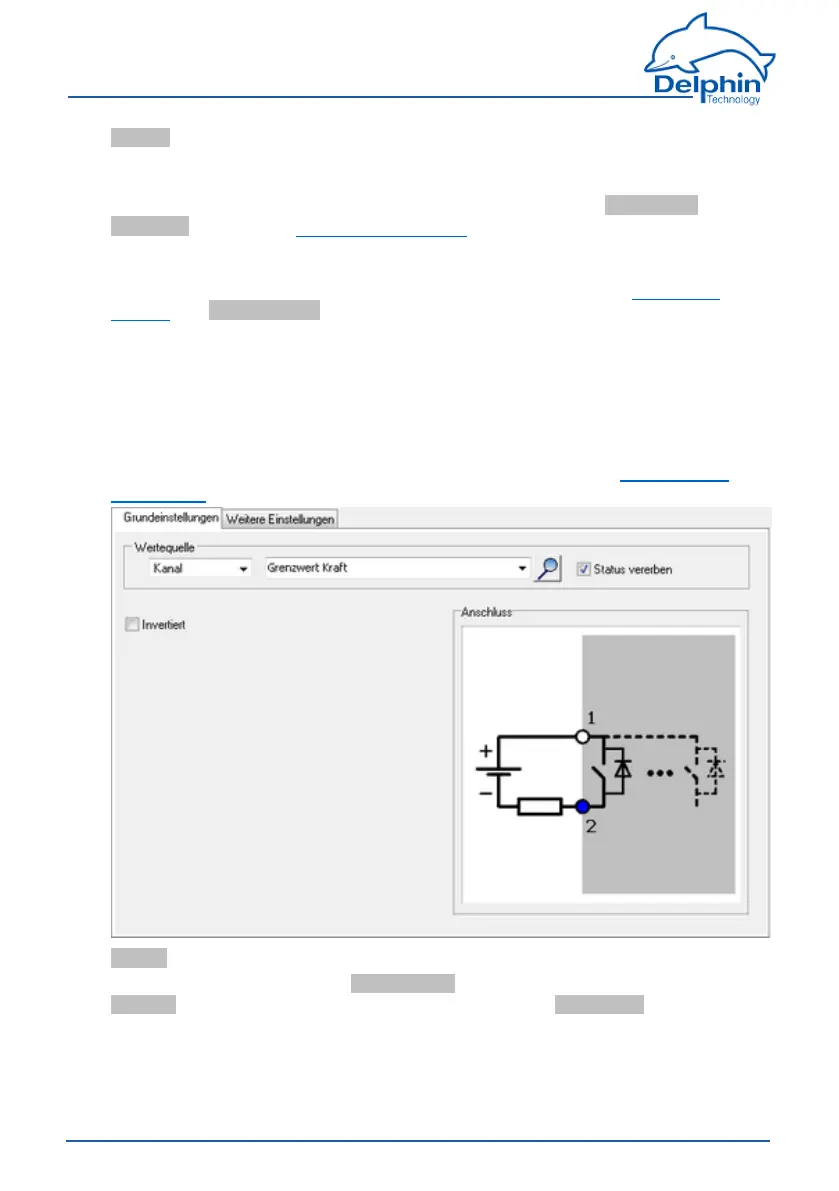
ThedigitaloutputcorrespondstoaswitchthatiseitherON(thetwooutputter-
minalsareconnected,theinputis"High")orOFF(nocurrentflowbetweenthe
twooutputterminals,theinputis"Low").Anexternalvoltagesourcemaybe
necessary(seewiringdiagraminthedialogue).Beawareofthemaximumper-
mittedcurrentsandvoltagesforthedigitaloutput,(refertotheTechnicalspe-
cifications).
Source
Entereitheraconstantvalue(Manual value)orselectanexistingchannelfrom
Channel,fromwhichthevaluecanbeoutput.SelectingApplicationenablestheout-
putvaluetobemanuallysetviatheDataServiceConfiguratororautomaticallyset
viaaProfiSignalapplication.
95
Delphin Technology AG
Dezember 2015
ProfiMessage Manual


 To Next Page