ProfiMessage
l from15m:1000kbaud(standardsetting)
l upto20m:500kBaud
l upto45m:333.3kbaud
l upto60m:250kBaud
l upto150m:100kbaud
Thebaudratemustbethesamefortransmissionandreception.Therefore,
determinefirstlythebaudratefortheequipmentcommunicatedwithandusethis
valuetosettheCANconnection’sbaudrate.
Thedetailinbracketsshowsforwhichprotocolthisbaudrateisavailable(CiA=
CANinautomation,DCP=DelphinCANprotocol).
Extended ID
ACANsystemidentifiesdatanotbydeviceaddresses,butbyidentifierswithina
message.TheCANspecificationdefinesidentifiersateither11or29bitsin
length.Thesettingdetermineswhichidentifierlengthisused.
Whenenabled,thisoptioncanbeusedwitheitheran11-bitor29-bit(CAN2.0B)
identifier.Whennotenabled,datatransmissionontheCANbusislimitedtoan11-
bitidentifier(CAN2.0A)andnoothersettingcanbemadewithCANbuschannels.
4.8.2.1 CANprotocol
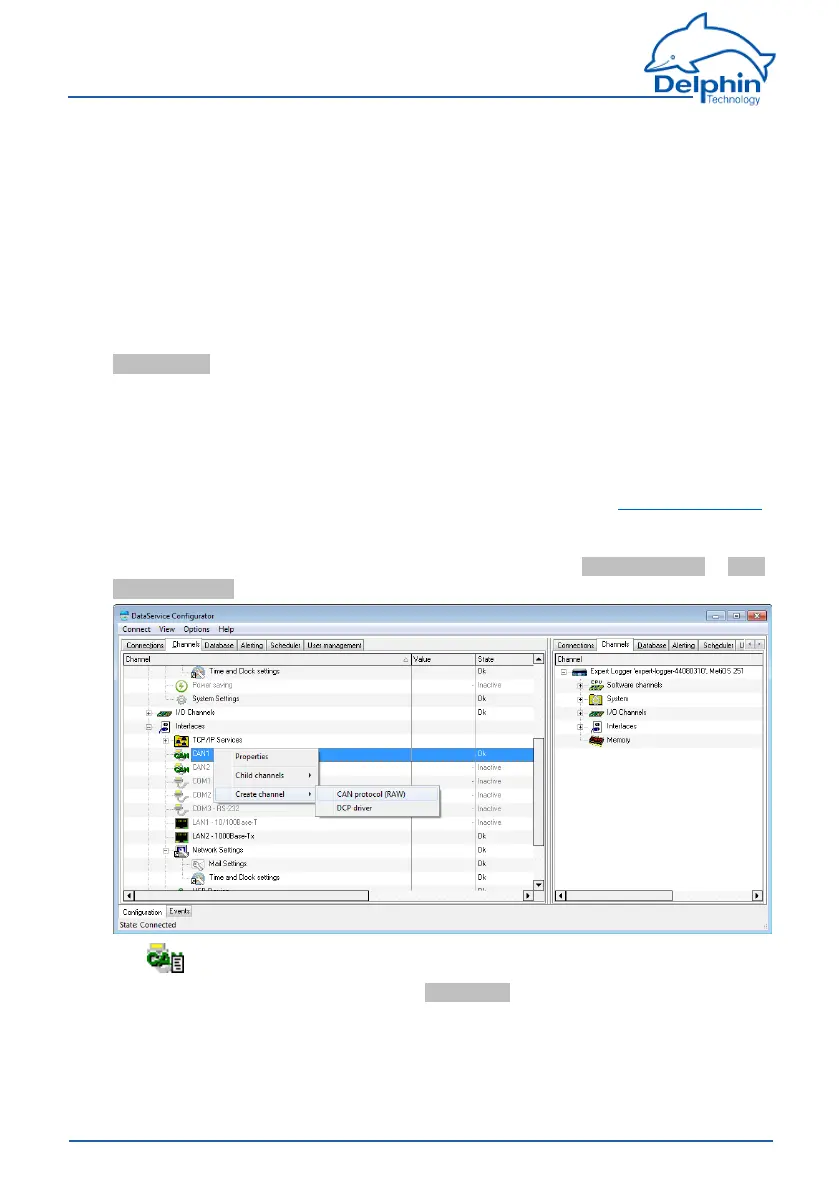
CreateachannelfortheCANprotocolviathecontextmenuCreate channel → CAN
protocol (RAW)oftheCANconnection.
The symbolisthendisplayedfortheCANprotocol.
Double-clicktheCANprotocolorselectPropertiesfromthecontextmenutodisplay
theconfigurationdialogue.Usethedialoguetoenteraname,locationanddescrip-
tionfortheCANprotocol.
170
Delphin Technology AG
Dezember 2015
ProfiMessage Manual


 To Next Page