Function Reference
PDC and VPS
5
5-29
Switching off the VPS Signal
The VPS signal generated in the TV line 16 is switched off by:
•
Select the
digital
menu.
•
Select
VPS Data Set
using the
é
or
ê
softkeys (F2 or F1).
•
Press the
edit
softkey (F3).
•
Select the VPS Data set
Off
by the
ê
softkey (upper position in the
digital VPS
menu).
•
Press the
enter
softkey (F5).
The instrument returns to the
digital
menu and indicates
VPS Data Set Off
.
If you select a 525 line system the VPS signal is automatically switched off by the
instrument.
Changing VPS Data
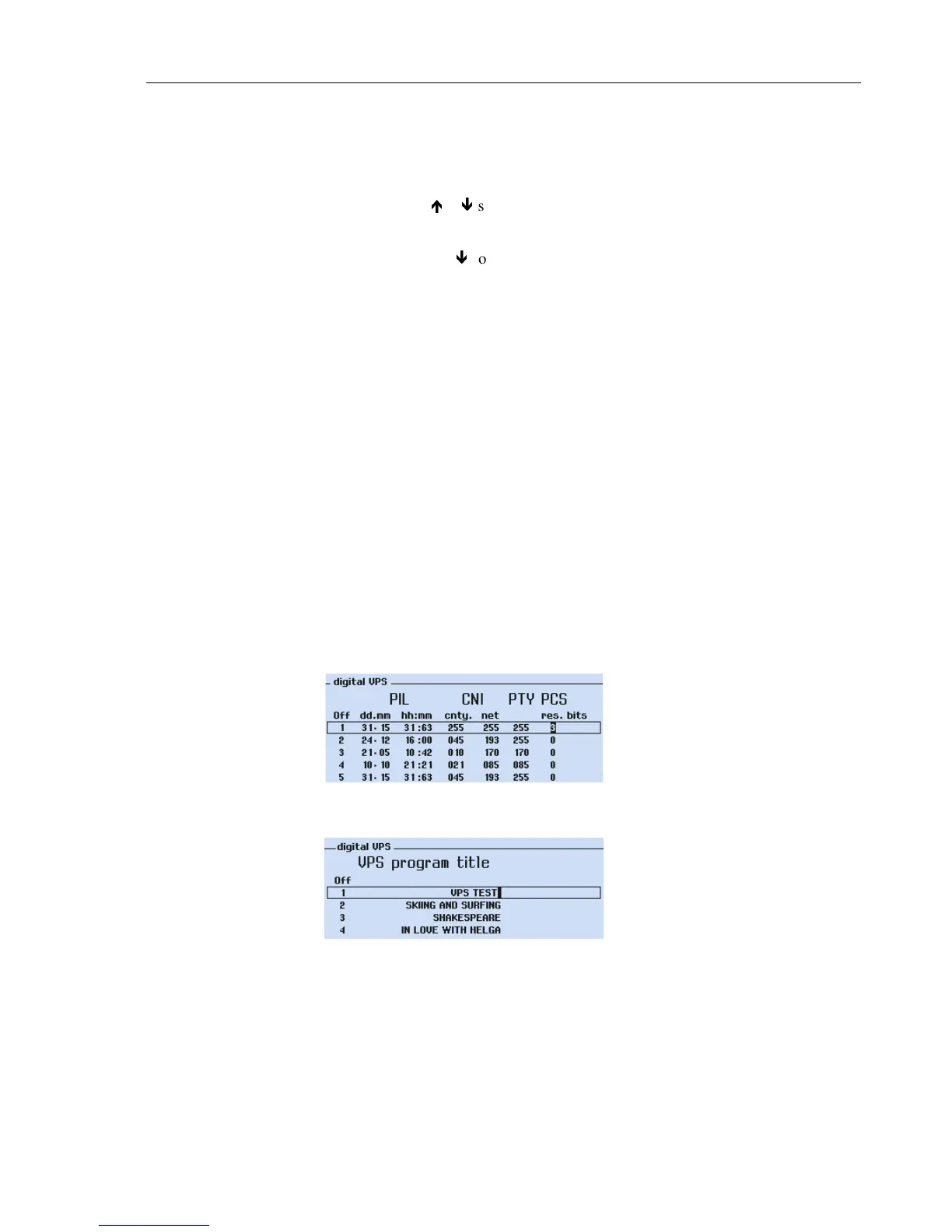
You can program new VPS data sets 1 to 4. You should have specific knowledge of the
relationships and construction of VPS data. For details, see Table 5-9. The instrument
does not check the consistency and correctness of allowed VPS data input. The size of
the numerical values for the various parameters is limited by the number of bits provided
for this in the VPS code, so that random numbers cannot be entered. The maximum VPS
data input values respectively bits are shown in Figure 5-25 in the Data Set 1. Further-
more you can change the text of the VPS Program Titles for VPS data sets 1 to 4.
The displayed VPS data, date, and time on Teletext Page 300, are identical to the con-
tents of the VPS data sets 1 to 9. When you have programmed the VPS data sets 1 to 4,
the timer data, date, and time are automatically changed.
An example of user programmed VPS data (data set 1) is shown in Figures 5-25
and 5-26.
Figure 5-25. VPS Data Set 1, User Programmed Data
Figure 5-26. VPS Data Set 1, User Programmed Title
Remark:
VPS Data Sets 5 to 9 have fixed data and are not programmable by the user.



 To Next Page