How to Use the Instrument
Introduction
4
4-3
Introduction
Chapter 4 explains the TV Signal Generator and describes the different test patterns and
application examples for test patterns.
Operating via Keyboard
General Information
This section describes the principle of the user interface and the submenus. It explains,
by means of examples, how to use the keys and popup menus to select parameters and
settings. For detailed technical information about TV systems, sound systems, test
patterns, and parameters see Chapter 7, Specifications. A description and examples for
the application of the test patterns are given in this chapter under the topic 'Description
and Application of the Test Patterns.'
Display
The
main
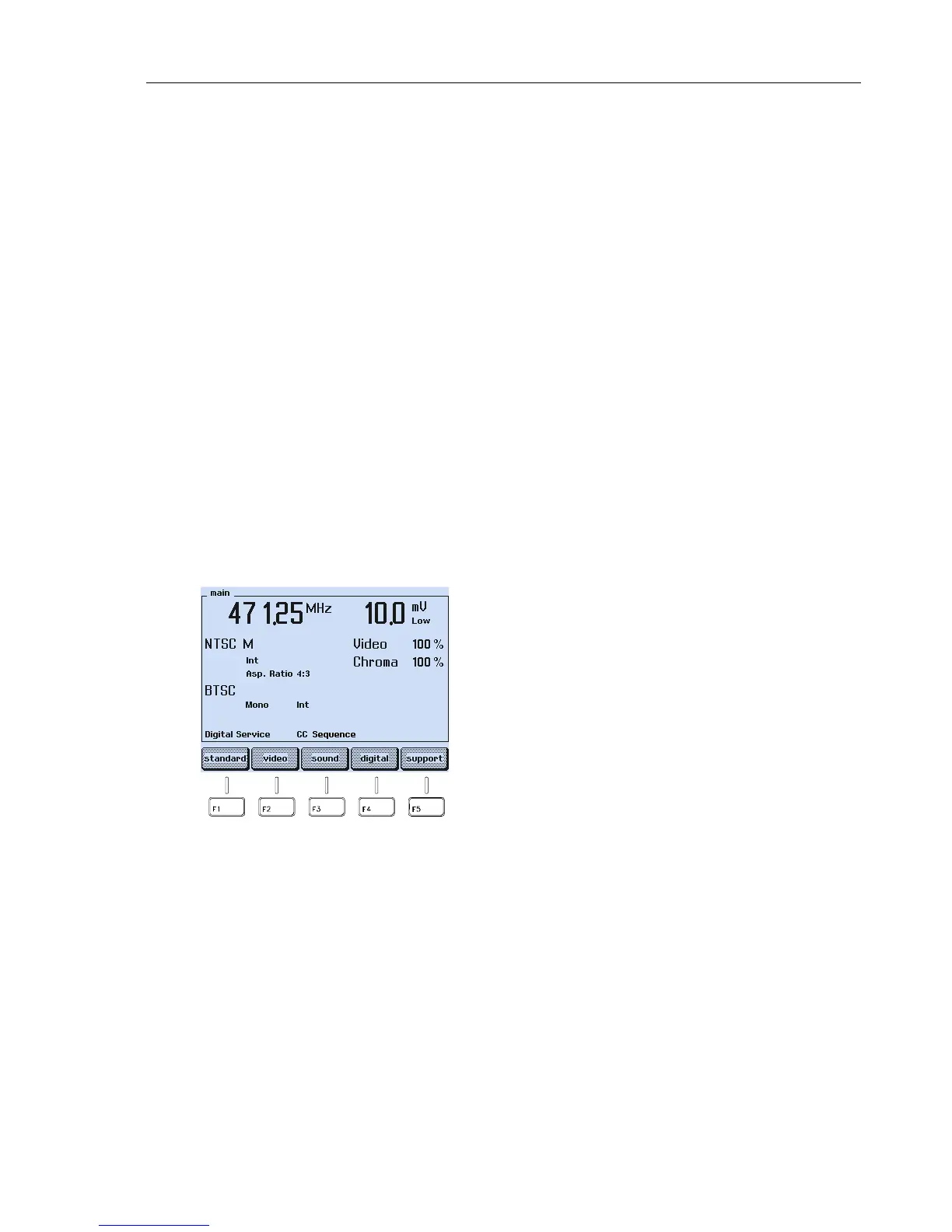
menu shows a summary of the most important current settings. The displayed
information depends on the selected TV and sound system. For a complete overview of
the selectable parameter and displayed information, see the Menu Tree in the Appendix F.
For example:
Figure 4-1. Main Screen
The labels in the lowest row of the display show the current functions of the assigned
softkeys F1 to F5. From the
main
screen, you can call up five submenus using the
softkeys to select different settings:
Vision carrier frequency: 471.25 MHz
Vision carrier level: 10.0 mV
Level range: Low (up to 10 mV)
TV system: NTSC M
Video source: Intern
Aspect Ratio: 4:3
Video amplitude: 100%
Chroma amplitude: 100%
Sound system: BTSC
Sound mode: Mono
Sound source: Internal
Digital Services: Closed Caption (CC)



 To Next Page