How to Use the Instrument
Operating via Keyboard
4
4-11
•
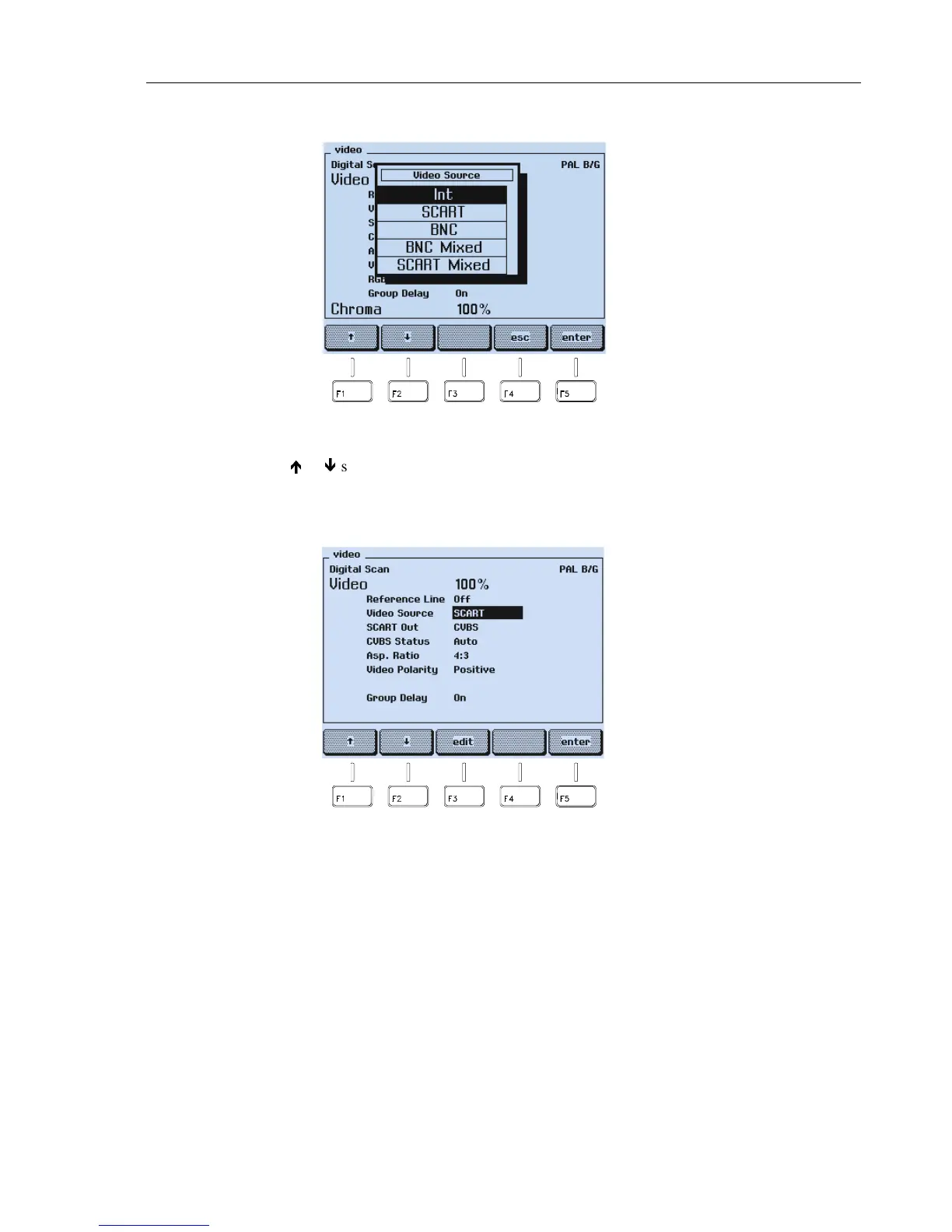
A popup menu appears.
Figure 4-14. Video Source Settings
•
Press the
é
or
ê
softkey (F1 or F2) to select the required video source, for example,
SCART
.
•
Press the
enter
softkey (F5) to confirm your selection.
Figure 4-15. Selected Video Source
You can also select the video source directly with the
VIDEO
key
INT/EXT
. Pressing this
key briefly toggles to the internal video source if an external was selected. Pressing this
key briefly if the internal video source is selected the instrument toggles to the last
selected external source, for example, BNC. Pressing this key longer than one second
calls up the popup menu for the video source selection. For details about external video
sources, see Chapter 5, Section ‘External Video Modulation.’
The
VIDEO
key
VIDEO ON/OFF
switches the video amplitude on or off.
The
VIDEO
key
CHROMA ON/OFF
switches the chroma amplitude on or off (only if the
internal video source is selected).
How to set the values for the video and chroma amplitudes is described in this chapter
under the topics ‘Video Amplitude Setting’ and ‘Chroma Amplitude Setting’.



 To Next Page