Triggered, 2 Direction
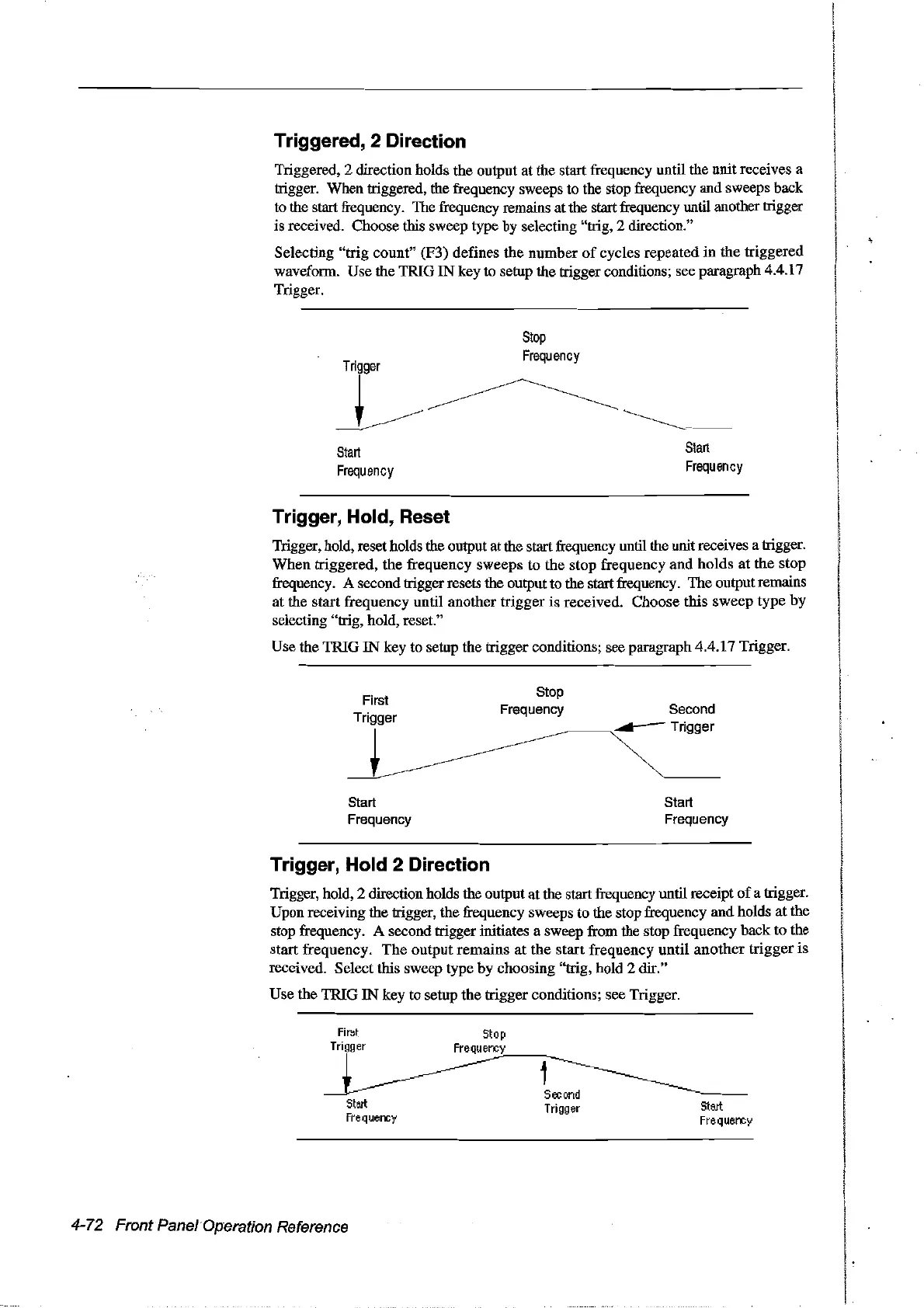
Triggered, 2 direction holds the output at the start frequency until the unit receives a
trigger. When triggered, the frequency sweeps to the stop frequency and sweeps back
10
the start frequency. The frequency remains atthe start frequency until another trigger
is received. Choose tbis sweep type by selecting "trig, 2 direction."
Selecting
"trig
count" (F3) defines the number
of
cycles repeated
in
the triggered
waveform. Use the TRIG
IN
key to setup the trigger conditions; see paragraph 4.4.17
Trigger.
Tr
~~
-:-.--
Start
Frequency
Stop
Frequency
Start
Frequency
Trigger, Hold, Reset
Trigger, hold, reset holds the output at the start frequency until the unit receives a trigger.
When
triggered, the frequency sweeps to the stop frequency
and
holds
at
the stop
frequency. A secondtrigger resets the output to the startfrequency.
The
output remains
at the start frequency until another trigger is received. Choose this sweep type by
selecting "trig, hold, reset."
Use the TRIG
IN
key to setup the trigger conditions; see paragraph 4.4.17 Trigger.
First
Trigger
~
Start
Frequency
Stop
Frequency Second
~
Start
Frequency
Trigger, Hold 2 Direction
Trigger, hold, 2 direction holds the output at the start frequency until receipt
of
a trigger.
Upon receiving the trigger, the frequency sweeps to the stop frequency and holds at the
stop frequency. A second trigger initiates a sweep from the stop frequency back to the
start frequency.
The
output remains
at
the start frequency until
another
trigger is
received. Select fuis sweep type
by
choosing "trig, hold 2 dir."
Use the TRIG
IN
key to setup the trigger conditions; see Trigger.
First
Stop
Tri
gg
er
Fre
qu
erx:y
~~-----
~~
~OO.
&~
Fre
q
uerx:y
Fre
Cl
uerx:y
4-72 FrontPanelOperation Reference
Artisan Technology Group - Quality Instrumentation ... Guaranteed | (888) 88-SOURCE | www.artisantg.com



 To Next Page