G.3.3.14 Trigger Level, 0 Vdc
This screen displays:
14: Trig Leve
1
OV
Sync Out: 50% ±
2%
sqr
o cal:
2020.
prev 0
o stop next 0
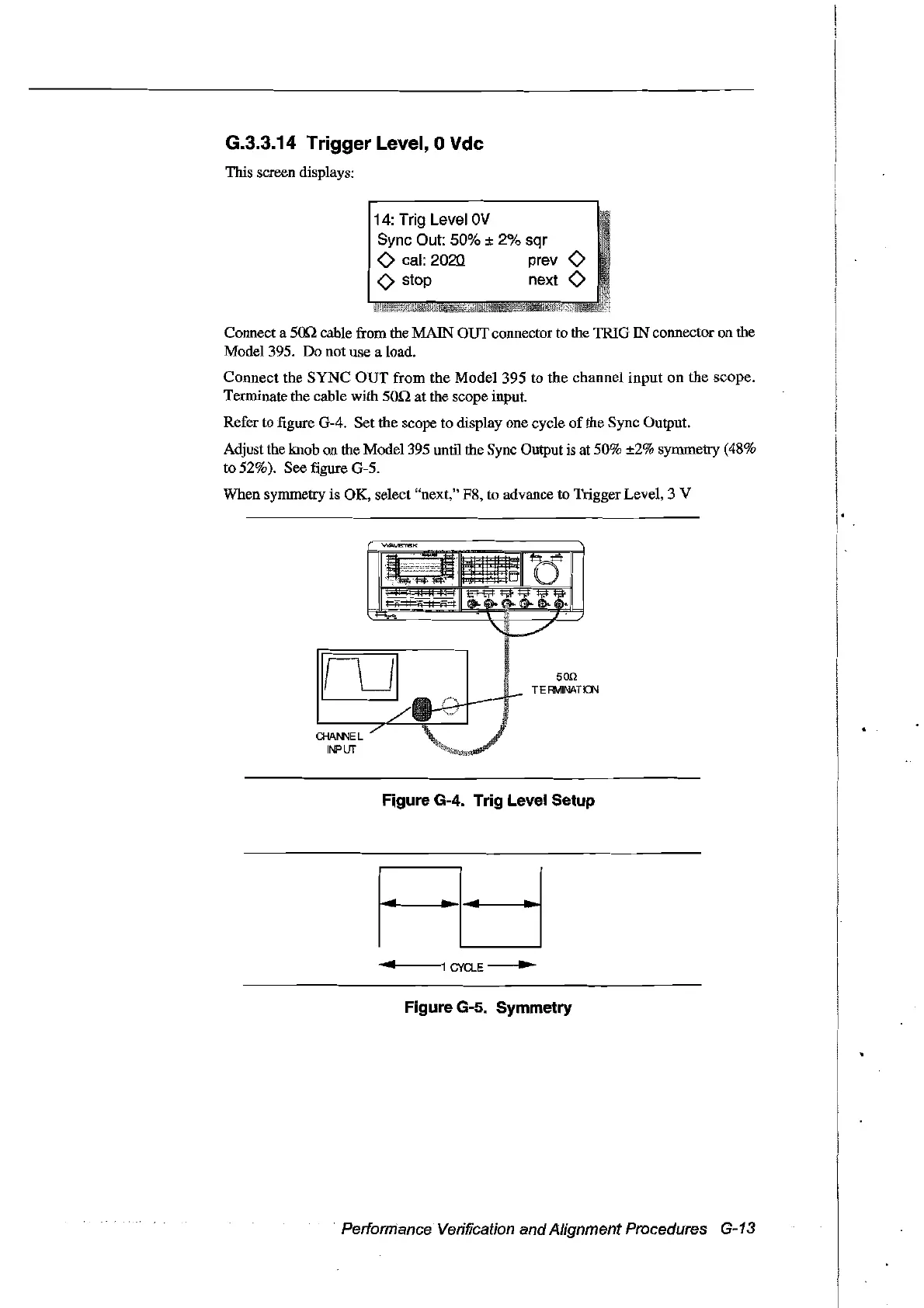
Connect a smcable from the MAIN OUT connector to the TRIO IN connector on the
Model 395.
Do
not use a load.
Connect
the
SYNC
OUT
from
the
Model 395 to the channel
input
on
the scope.
Terminate the cable with
son
at
the scope input.
Refer to figure
0-4.
Set the scope to display one cycle
of
the Sync Output.
Adjust the knob on the Mode1395 until the Sync Output is at 50% ±2% symmetry (48%
to 52%). See figure
0-5.
When symmetry is Ol(, select "next," F8, to advance to Trigger Levet, 3 V
CHA!II"4EL
INPUT
50Q
TE
RIv1INA
TIQ\l
Figure G-4. Trig Level Setup
....
~-
.......
-.---1
CYCLE
...
Figure G-5. Symmetry
Performance Verification
and
Alignment Procedures G-13
Artisan Technology Group - Quality Instrumentation ... Guaranteed | (888) 88-SOURCE | www.artisantg.com



 To Next Page