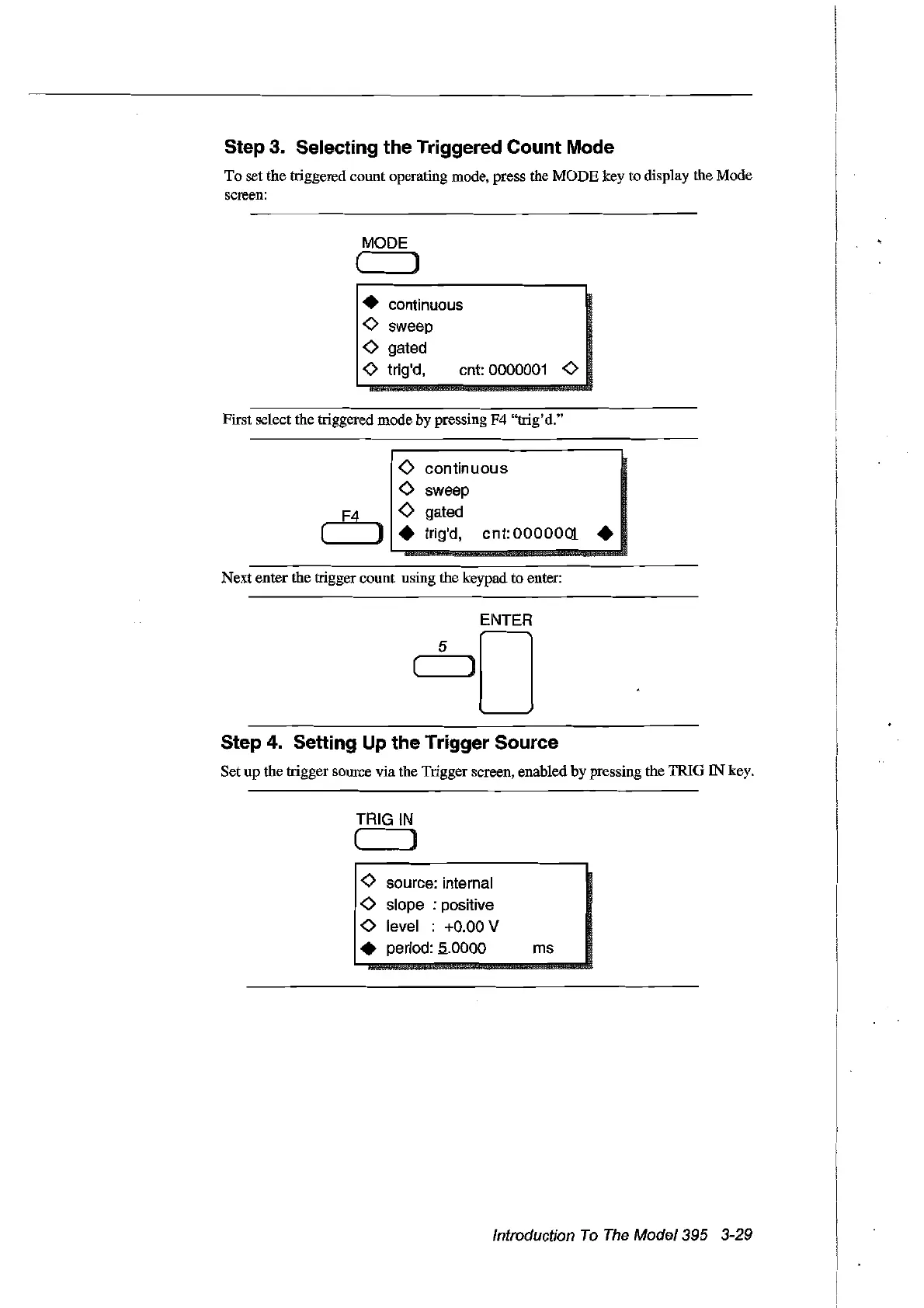
Step 3. Selecting the Triggered Count Mode
To
set the triggered count operating mode, press the
MODE
key to display the Mode
screen:
MODE
( )
• continuo
us
<>
sweep
<>
gated
<>
trig'd, cnt: 0000001
<>
First select the triggered mode by pressing F4 "trig'd."
<>
continuous
<>
sweep
F4
<>
gated
( )
•
trig'd,
cnt:
0000001
•
Nextenter the trigger count using the keypad to enter:
Step 4. Setting Up the Trigger Source
Set up the trigger source via the Trigger screen, enabled by pressing the TRIG IN key.
TRIGIN
( ]
<>
source: internai
<>
slope : positive
<>
level : +0.00 V
• period:
.5..0000
ms
Introduction
To
The
Model395 3-29
Artisan Technology Group - Quality Instrumentation ... Guaranteed | (888) 88-SOURCE | www.artisantg.com



 To Next Page