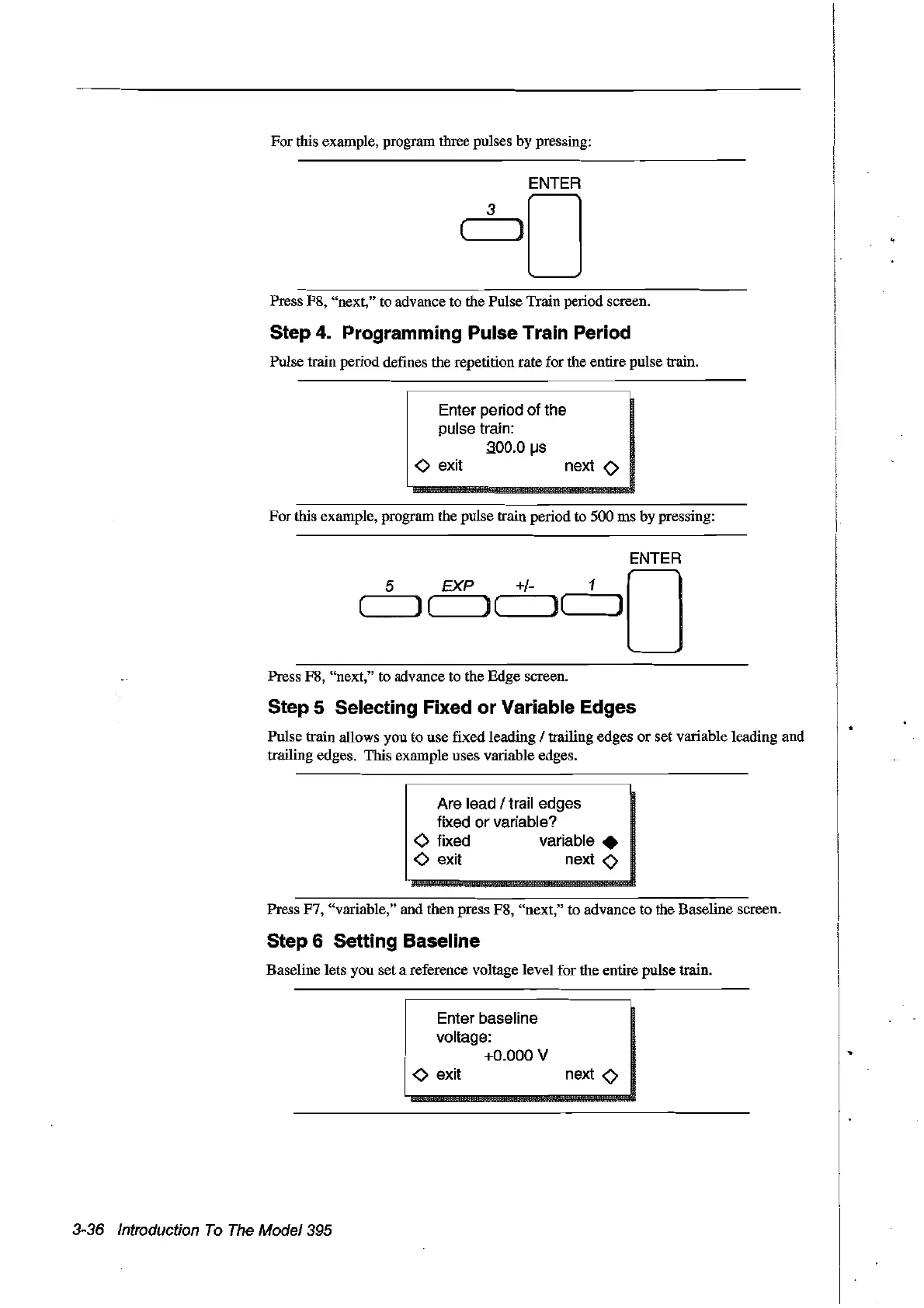
For fuis example, program three pulses by pressing:
Press F8, "next," to advance to the Pulse Train period screen.
Step 4. Programming Pulse Train Period
Pulse train period defines the repetition rate for the entire pulse train.
Enter period of the
pulse train:
.300.0
IJs
<>
exit next 0
Forfuis example, program the pulse train period to 500 ms by pressing:
ENTER
5 EXP +/- 1 0
(
le
Je
)(~--J)
Press F8, "next," to advance to the Edge screen.
Step 5 Selecting Fixed or Variable Edges
Pulse train allows you to use fixed leading 1trailing edges
or
set variable leading and
trailing edges. This example uses variable edges.
Are lead / trail edges
fixed
or
variable?
o fixed variable •
<>
exit next 0
Press F7, "variable," and then press F8, "next," to advance to the Baseline screen.
Step 6 Setting Baseline
Baseline lets you set a reference voltage level for the entire pulse train.
Enter baseline
voltage:
+0.000
V
3-36 Introduction
Ta
The
Model395
<>
exit
next
0
Artisan Technology Group - Quality Instrumentation ... Guaranteed | (888) 88-SOURCE | www.artisantg.com



 To Next Page