Cockpit Reference Guide for the Cirrus SR2x with Perspective Touch+ by Garmin
190-02954-01 Rev. A
144
AFCS
Flight
InstrumentsEIS
Nav/Com/
XPDR/Audio
Flight
Management
Hazard
AvoidanceAFCS
Additional
FeaturesAnnun/AlertsAppendixIndex
Flight
InstrumentsEAS
Audio and
CNS
Flight
Management
Hazard
AvoidanceAFCS
Additional
Features
Abnormal
OperationAnnun/AlertsAppendixIndex
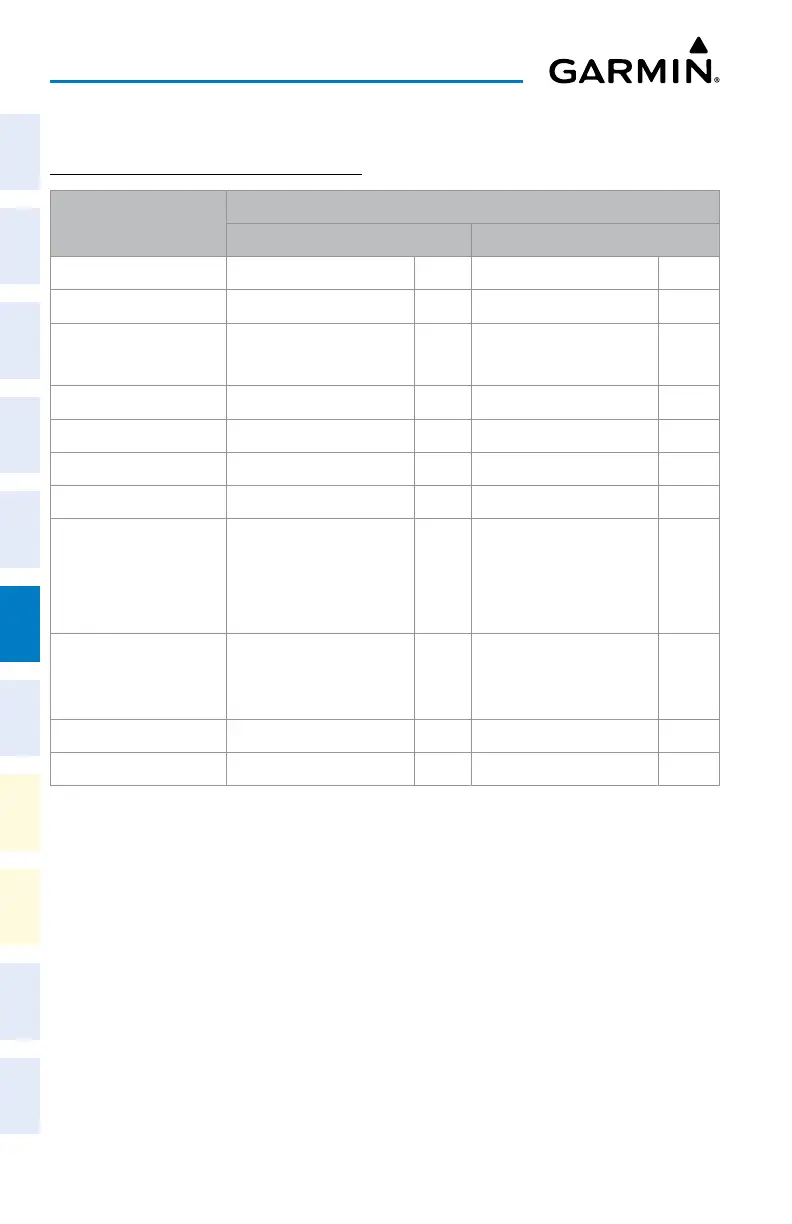
FLIGHT DIRECTOR OPERATION
ACTIVATING THE FLIGHT DIRECTOR
Control Pressed
Modes Selected
Lateral Vertical
FD Key Roll Hold (default) ROL Pitch Hold (default) PIT
AP Key Roll Hold (default) ROL Pitch Hold (default) PIT
TO/GA Switch
Takeoff (on ground)
Go Around (in air)
TO
GA
Takeoff (on ground)
Go Around (in air)
TO
GA
ALT Key Roll Hold (default) ROL Altitude Hold ALT
FLC Key Roll Hold (default) ROL Flight Level Change FLC
VS Key Roll Hold (default) ROL Vertical Speed VS
VNV Key Roll Hold (default) ROL Vertical Path Tracking
1
VPTH
NAV Key Navigation
2
GPS
VOR
LOC
BC
Pitch Hold (default) PIT
APR Key Approach
2
GPS
VAPP
LOC
Pitch Hold (default) PIT
HDG Key Heading Select HDG Pitch Hold (default) PIT
LVL Key Level LVL Level LVL
1
Valid VNAV flight plan must be entered before VNV Key press activates flight director.
When the VNV Key is pressed in conjunction with another mode selection, a ‘V’ is displayed
with the selected mode annunciation.
2
The selected navigation receiver must have a valid VOR or LOC signal or active GPS course
before NAV or APR Key press activates flight director.
Flight Director Activation












 To Next Page