Cockpit Reference Guide for the Cirrus SR2x with Perspective Touch+ by Garmin
190-02954-01 Rev. A
Appendix
290
Flight
InstrumentsEIS
Nav/Com/
XPDR/Audio
Flight
Management
Hazard
AvoidanceAFCS
Additional
FeaturesAnnun/AlertsAppendixIndex
Flight
InstrumentsEAS
Audio and
CNS
Flight
Management
Hazard
AvoidanceAFCS
Additional
Features
Abnormal
OperationAnnun/AlertsAppendixIndex
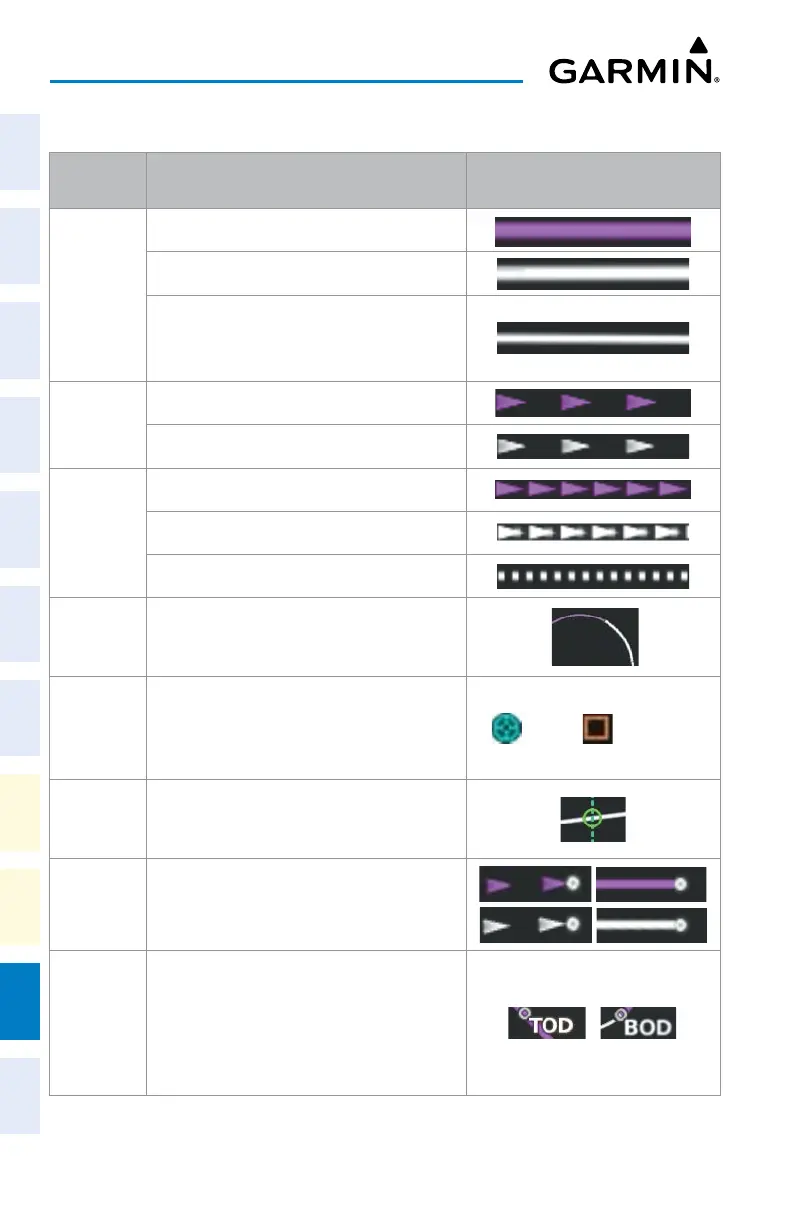
FLIGHT PLANNING
Symbol
Name
Description Symbol
Course Leg
Course leg currently flown
A future course leg in the current phase of flight
A course leg in either a previously flown course
leg, or a future course leg not in the current
phase of flight
Heading Leg
Heading leg currently flown
Future heading leg
Roll Steering
Path
1
Turning path currently flown
Turning path for the next flight plan leg
Turning path beyond the next flight plan leg
Turn
Anticipation
Arc
Displayed when sequencing to the next flight
plan leg through a fly-by waypoint, a lead turn is
created, adjusting for groundspeed
Fly-Over
Waypoint;
Along Track
Waypoint
Displayed as a fly-over waypoint;
Displayed when an along track offset waypoint
is created.
(flyover); (along track)
Fixes
Fixes intersect the flight plan. The symbol
represents either just a fix or when the fix is
made into a flight plan fix waypoint.
Flight Path
Fix
A fix that terminates: manually, at a specified
altitude, or at a specified distance or radial when
flying a heading
Top of
Descent
(TOD) and
Bottom of
Descent
(BOD)
When vertically navigating, the system will
display where the aircraft will begin complete
the descent.












 To Next Page