Cockpit Reference Guide for the Cirrus SR2x with Perspective Touch+ by Garmin
190-02954-01 Rev. A
20
Engine & Airframe Systems
Flight
InstrumentsEIS
Nav/Com/
XPDR/Audio
Flight
Management
Hazard
AvoidanceAFCS
Additional
FeaturesAnnun/AlertsAppendixIndex
Flight
InstrumentsEAS
Audio and
CNS
Flight
Management
Hazard
AvoidanceAFCS
Additional
Features
Abnormal
OperationAnnun/AlertsAppendixIndex
ICE PROTECTION
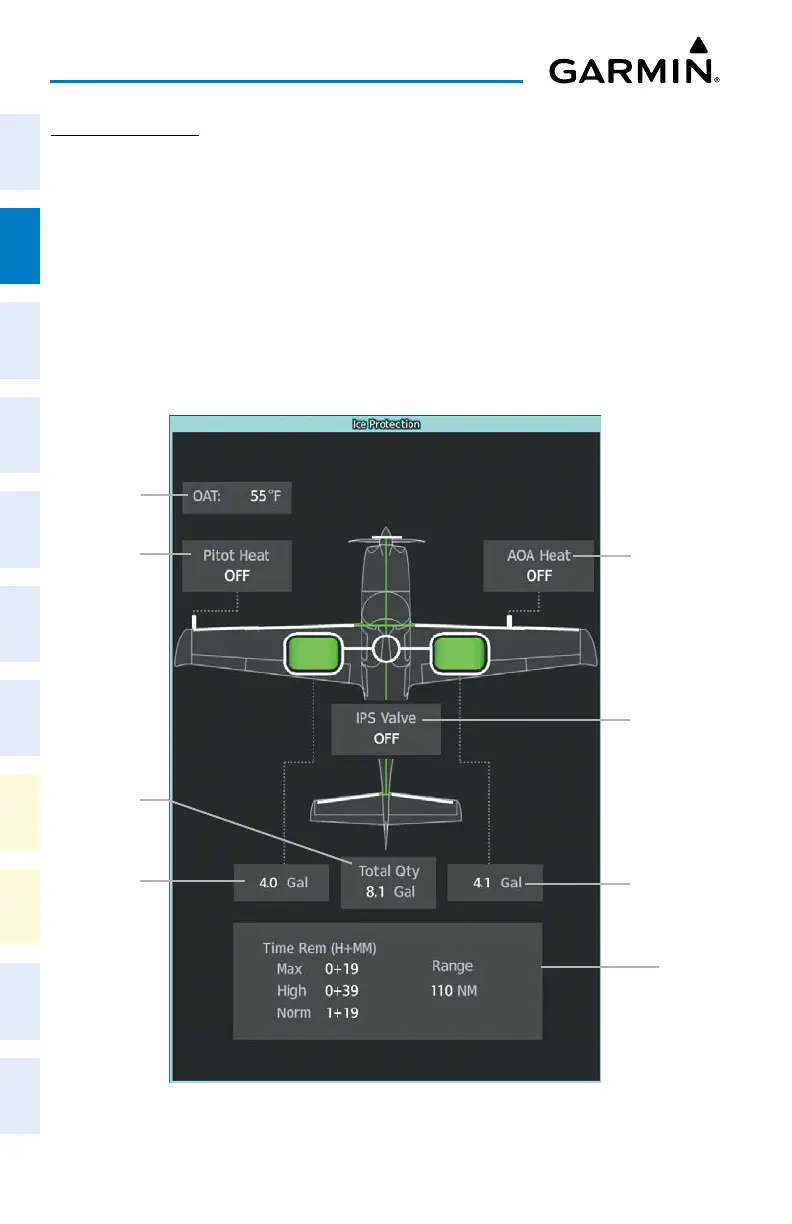
If the Ice Protection System is equipped, the ‘Ice Protection’ Synoptic Page uses a simpli-
fied diagram of the aircraft’s ice protection system to display the system status. Lines between
objects indicate connections to the Ice Protection System. Green lines indicate flow. White
lines indicate there is no flow. Objects in green are active. Cyan objects are manually selected.
Objects in white are inactive. Amber objects, text/background, or lines indicates an abnormal
or caution state. Red objects, lines, or text/background indicates a warning state. IP Valve
status will read in white if off, green if auto-selected, cyan if manually selected, or black on an
amber background if in an abnormal status.
Accessing the Ice Protection Synoptics:
From MFW Home, touch Aircraft Systems > Ice Protection.
Ice Protection Synoptics
AOA Heat
Status
Outside Air
Temperature
(OAT)
Right
Tank
Total
IPS Endur-
ance Status
Pitot Heat
Status
Left Tank
Total
Total IPS
Fluid
IPS Valve
Status












 To Next Page