Cockpit Reference Guide for the Cirrus SR2x with Perspective Touch+ by Garmin
190-02954-01 Rev. A
Appendix
289
Flight
Instruments EIS
Nav/Com/
XPDR/Audio
Flight
Management
Hazard
Avoidance AFCS
Additional
Features Annun/Alerts Appendix Index
Flight
Instruments EAS
Audio and
CNS
Flight
Management
Hazard
Avoidance AFCS
Additional
Features
Abnormal
Operation Annun/Alerts Appendix Index
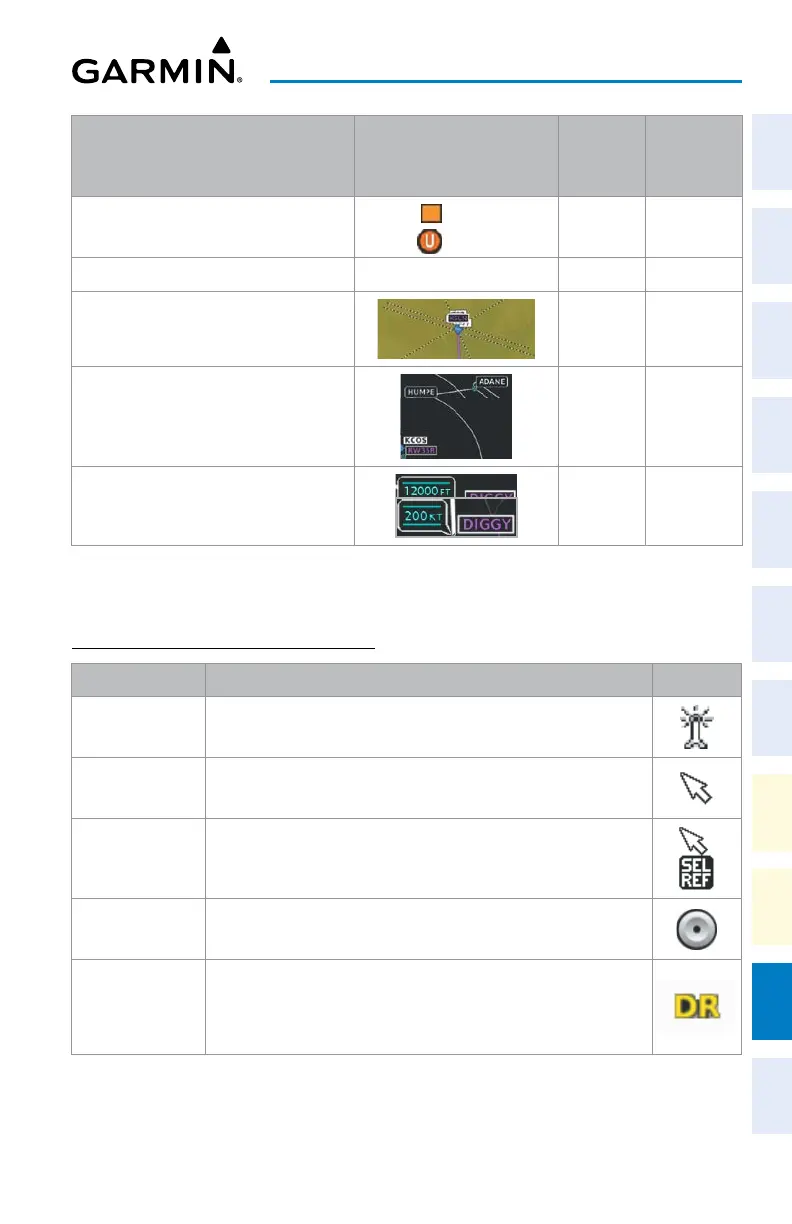
Aviation Symbols Symbol
Default
Range
(nm)
Maximum
Range
(nm)
User Waypoint
(Route)
(Airport)
1000 1000
SafeTaxi
®
See Additional Features 1.5 5
Runway Extension 7.5 150
Missed Approach Preview On/Off
N/A N/A
Altitude/Speed Constraints
1000 1000
1
Not located in the United States
Aviation Symbol Information
ADDITIONAL MAP DISPLAY ITEMS
Symbol Name Description Symbol
ARTCC Frequency
or FSS Frequency
Displayed when using the Nearest Frequencies function
Map Pointer
Displayed when panning (see Using Map Displays in Flight
Management)
Measuring Pointer Displayed when measuring bearing and distance
No heading
aircraft icon
Replaces the normal aircraft icon when aircraft GPS location is valid,
but the heading is invalid
Dead reckoning
aircraft icon
‘DR’ text displayed over the aircraft icon when the GPS solution is
invalid
Miscellaneous Map Symbols












 To Next Page