Cockpit Reference Guide for the Cirrus SR2x with Perspective Touch+ by Garmin
190-02954-01 Rev. A
16
Engine & Airframe Systems
Flight
InstrumentsEIS
Nav/Com/
XPDR/Audio
Flight
Management
Hazard
AvoidanceAFCS
Additional
FeaturesAnnun/AlertsAppendixIndex
Flight
InstrumentsEAS
Audio and
CNS
Flight
Management
Hazard
AvoidanceAFCS
Additional
Features
Abnormal
OperationAnnun/AlertsAppendixIndex
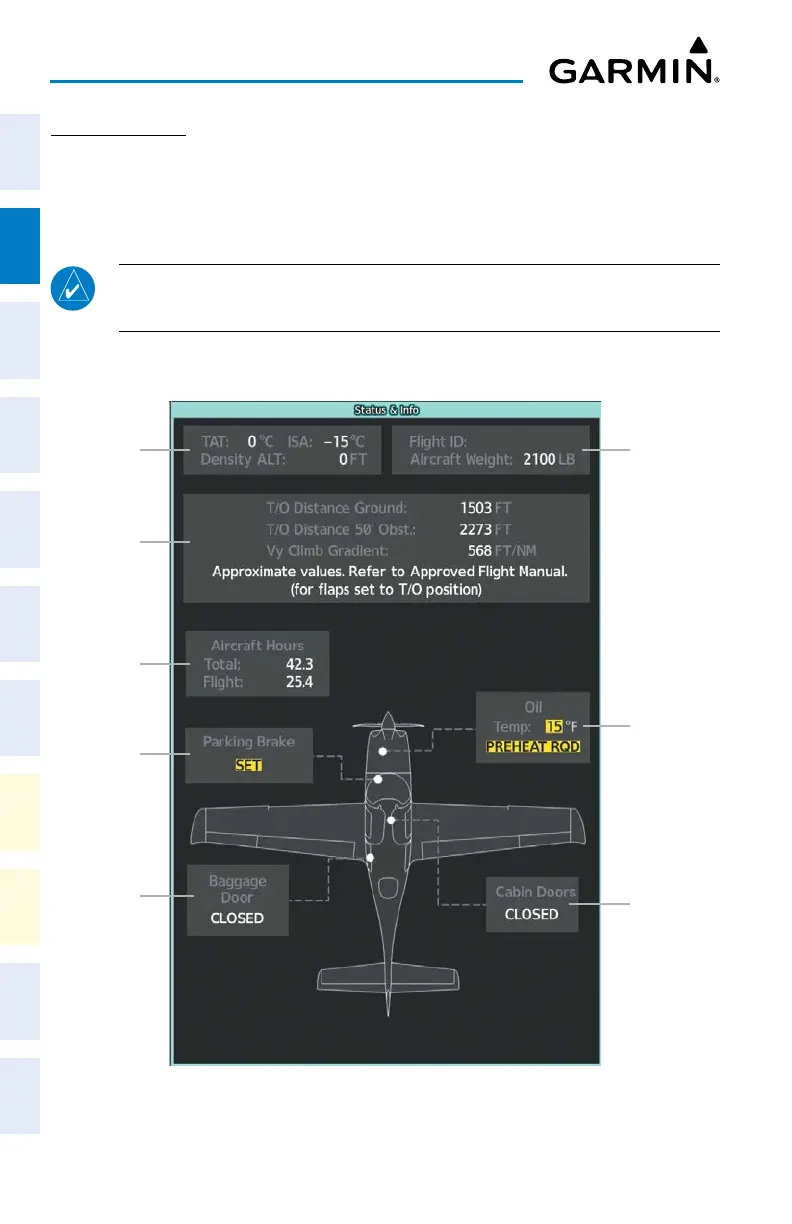
STATUS & INFO
The ‘Status & Info’ Synoptics Page shows temperatures, aircraft information, landing infor-
mation, hours, parking brake status, and door status. The Takeoff/Performance data block will
change based on the aircraft status. Takeoff performance is shown when the aircraft is on the
ground, landing performance is shown when the aircraft is in the air.
NOTE:
Performance Values are approximated from the Approved Flight Manual.
Please refer to the Approved Flight Manual for more information.
Accessing the Aircraft Status & Info Synoptics:
From MFD Home, touch Aircraft Systems > Status & Info.
Status and Info
Parking
Brake
Position
Baggage
Door
Status
Aircraft
Hours
Display
Landing/
Takeoff
Performance
Air Data
Oil
Status
Cabin
Door
Status
Flight ID
and Weight












 To Next Page