Cockpit Reference Guide for the Cirrus SR2x with Perspective Touch+ by Garmin
190-02954-01 Rev. A
188
Flight
InstrumentsEAS
Audio and
CNS
Flight
Management
Hazard
AvoidanceAFCS
Additional
Features
Abnormal
OperationAnnun/AlertsAppendixIndex
Abnormal Operation
If pitch exceeds +30˚/-20˚ or bank exceeds 65˚, some information displayed on the PFD is
removed. The Altimeter, Airspeed, Attitude, Vertical Speed, and Horizontal Situation indica-
tors remain on the display and the Bearing Information, Alerts, and Annunciation windows
can be displayed during such situations. The following information is removed from the PFD
when the aircraft experiences unusual attitudes:
• Traffic Annunciations
• AFCS Annunciations
• Flight Director Command Bars
• Inset Map
• True Airspeed
• Groundspeed
• Wind Data
• System Time
• Minimum Descent Altitude/Decision
Height display
• Vertical Deviation, Glideslope, and Glide-
path Indicators
• Altimeter Barometric Setting
• Selected Altitude
• VNAV Target Altitude
• Selected Heading
• Selected Course or Desired Track
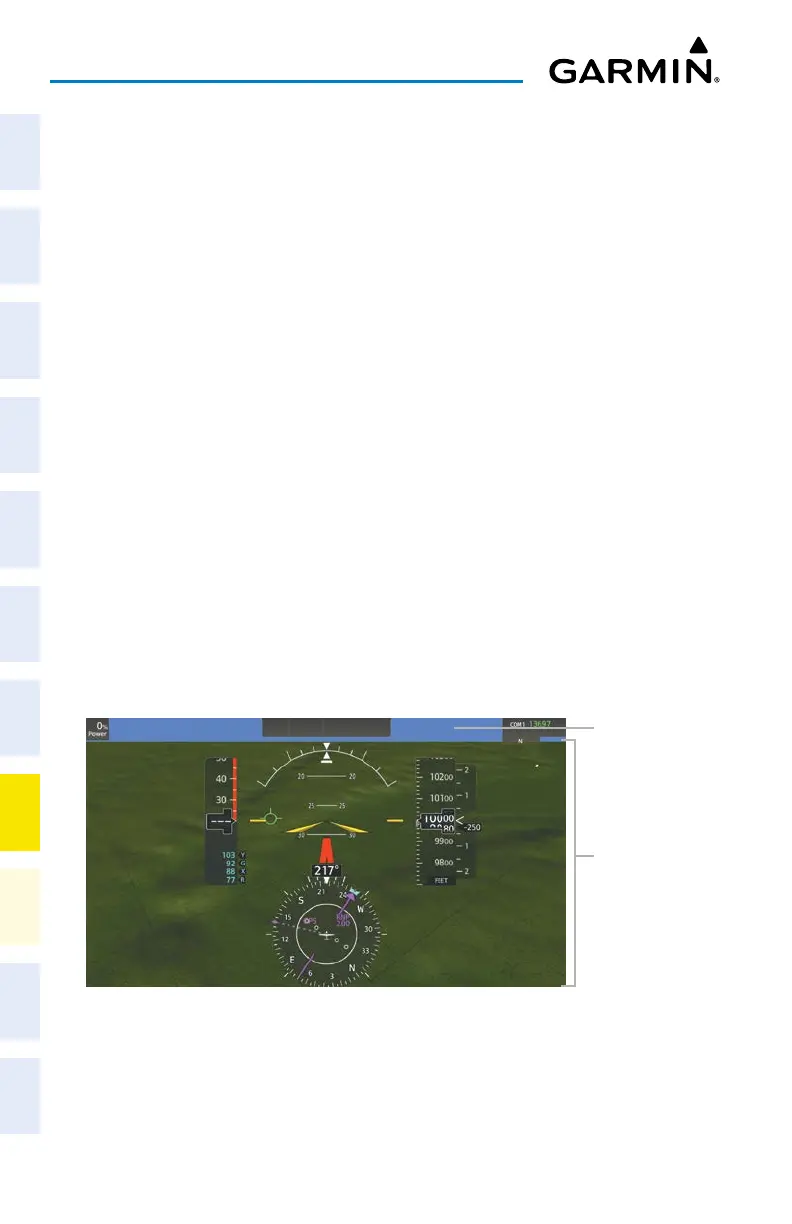
SVT UNUSUAL ATTITUDES
During extreme pitch attitudes, the display shows either a brown or blue colored bar at the
top or bottom of the screen to represent earth or sky. The blue colored bar is also displayed
when terrain gradient is great enough to completely fill the display. This is intended to prevent
losing sight of the horizon during extreme pitch attitudes.
Blue Sky Bar with Full Display Terrain
Blue Band
Terrain Com-
pletely Fills
Display
STANDBY FLIGHT DISPLAY
Selecting the Altimeter Barometric Pressure Setting on the Standby Flight Display:
Turn the lower knob on Touchscreen Controller to select the desired setting.












 To Next Page