Cockpit Reference Guide for the Cirrus SR2x with Perspective Touch+ by Garmin
190-02954-01 Rev. A
Appendix
285
Flight
Instruments EIS
Nav/Com/
XPDR/Audio
Flight
Management
Hazard
Avoidance AFCS
Additional
Features Annun/Alerts Appendix Index
Flight
Instruments EAS
Audio and
CNS
Flight
Management
Hazard
Avoidance AFCS
Additional
Features
Abnormal
Operation Annun/Alerts Appendix Index
SCREEN CLEANING
Screen Cleaning mode temporary deactivates touch input on the Touchscreen Controller
screen to facilitate cleaning. The screen can be cleaned using a microfiber or soft cotton cloth
lightly dampened with clean water. Do not use chemical cleaning agents, as these may damage
the coating on the glass surface.
Cleaning the Touchscreen Controller screen:
1) From MFW Home, touch Utilities > Screen Cleaning.
2) The Touchscreen Controller indicates the screen may be cleaned. Clean the screen as
needed.
3) Press or turn any knob to return to the ‘Utilities’ Screen.
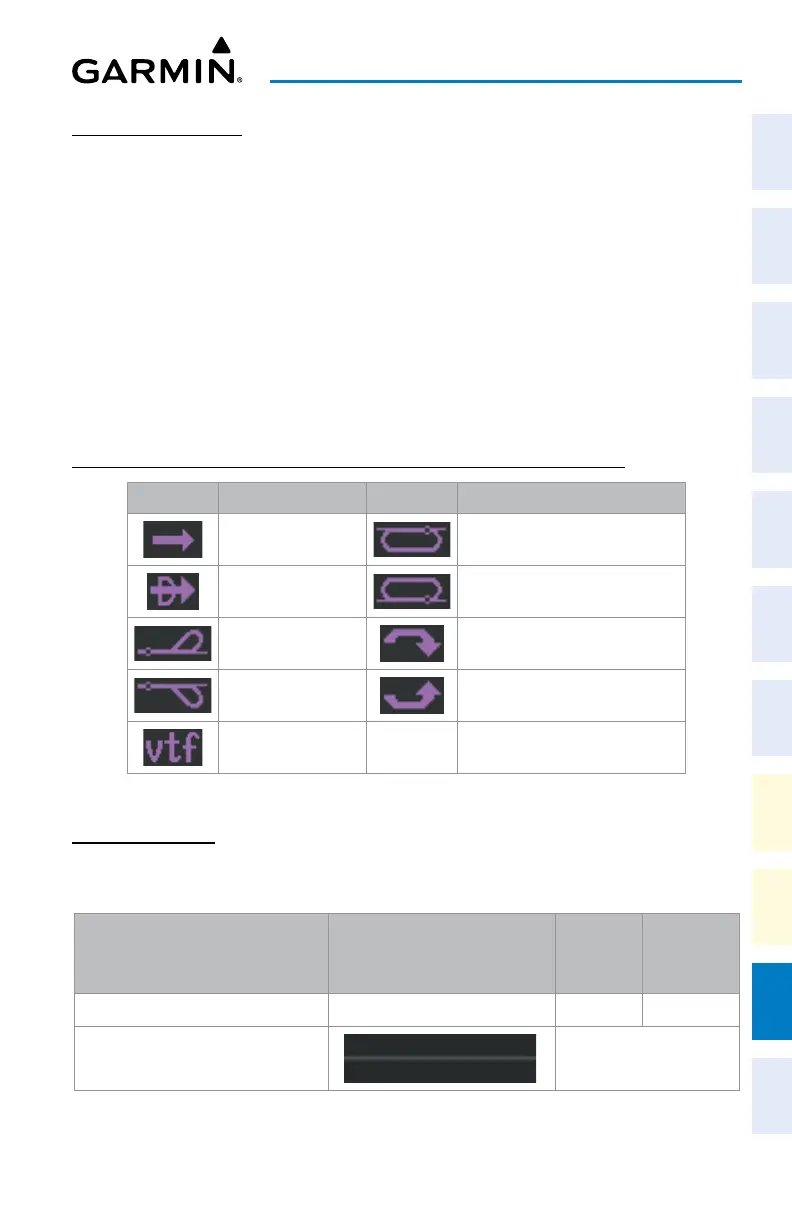
MAP SYMBOLS
PFW NAVIGATION STATUS BOX / MFW NAVIGATION DATA BAR
Symbol Description Symbol Description
Active Leg Right Holding Pattern
Direct-to Left Holding Pattern
Right Procedure Turn Right DME Arc / Radius to Fix Leg
Left Procedure Turn Left DME Arc / Radius to Fix Leg
Vector to Final
Navigation Symbols
LAND SYMBOLS
The following table describes items that are configured on the Land Tab on the 'Map Set-
tings' Screen. See the Hazard Avoidance Section for more information on Obstacles.
Land Symbols Symbol
Default
Range
(nm)
Maximum
Range
(nm)
Obstacles (Point and Wire) See Hazard Avoidance Section
10 25
Roads
see below












 To Next Page