Cockpit Reference Guide for the Cirrus SR2x with Perspective Touch+ by Garmin
190-02954-01 Rev. A
162
Additional Features
Flight
InstrumentsEIS
Nav/Com/
XPDR/Audio
Flight
Management
Hazard
AvoidanceAFCS
Additional
FeaturesAnnun/AlertsAppendixIndex
Flight
InstrumentsEAS
Audio and
CNS
Flight
Management
Hazard
AvoidanceAFCS
Additional
Features
Abnormal
OperationAnnun/AlertsAppendixIndex
Deleting a contact:
1) From MFW Home, touch Services > Contacts.
2) Touch the contact you desire to delete.
3) Touch Delete.
4) Touch OK.
Deleting all contacts:
1) From MFW Home, touch Services > Contacts.
2) Touch Options.
3) Touch Delete All Contacts.
4) Touch OK.
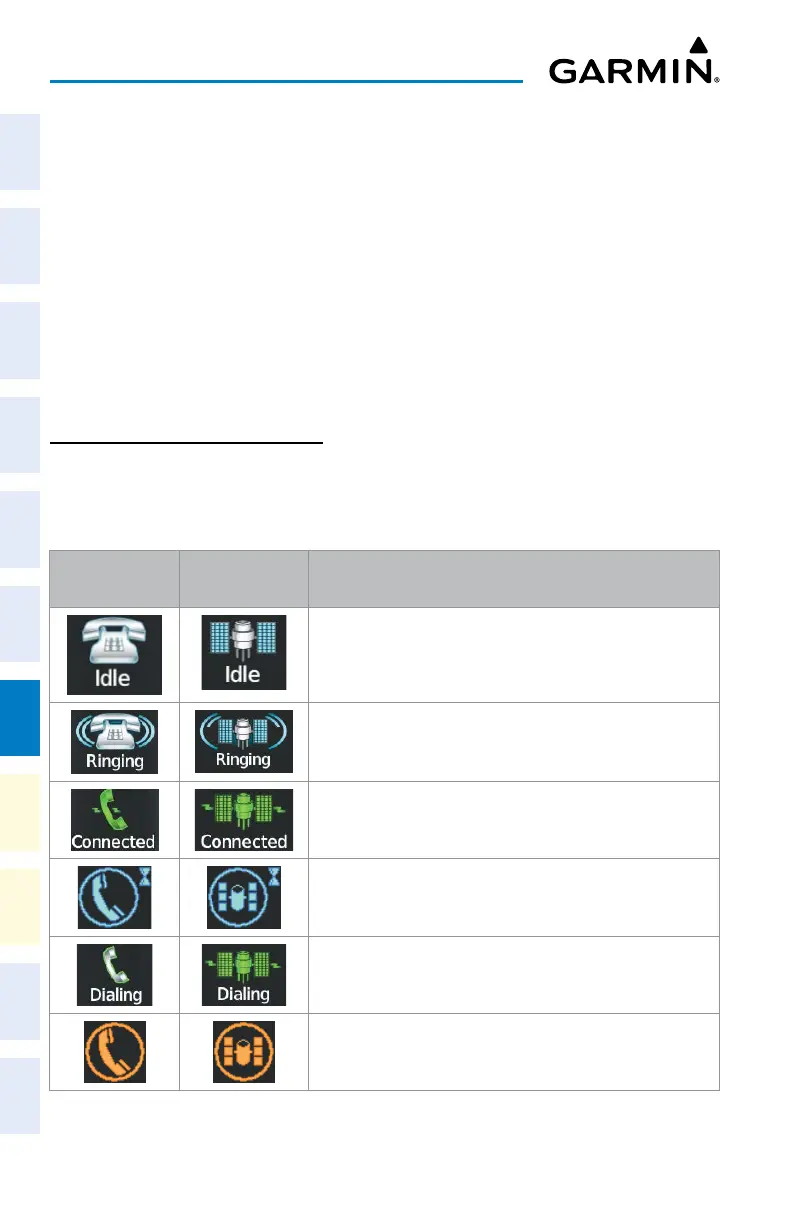
TELEPHONE COMMUNICATION
Viewing the ‘Telephone’ Screen:
1) From MFW Home, touch Services > Satellite Phone.
2) The ‘Satellite Phone’ Screen is displayed.
Internal
Phone
External
Phone
Description
Phone is Idle
Phone is ringing
Phone has a dial tone (off hook) or connected to another phone
Phone dialed is busy
Phone is dialing another phone
Phone has failed












 To Next Page