Cockpit Reference Guide for the Cirrus SR2x with Perspective Touch+ by Garmin
190-02954-01 Rev. A 163
Additional Features
Flight
Instruments EIS
Nav/Com/
XPDR/Audio
Flight
Management
Hazard
Avoidance AFCS
Additional
Features Annun/Alerts Appendix Index
Flight
Instruments EAS
Audio and
CNS
Flight
Management
Hazard
Avoidance AFCS
Additional
Features
Abnormal
Operation Annun/Alerts Appendix Index
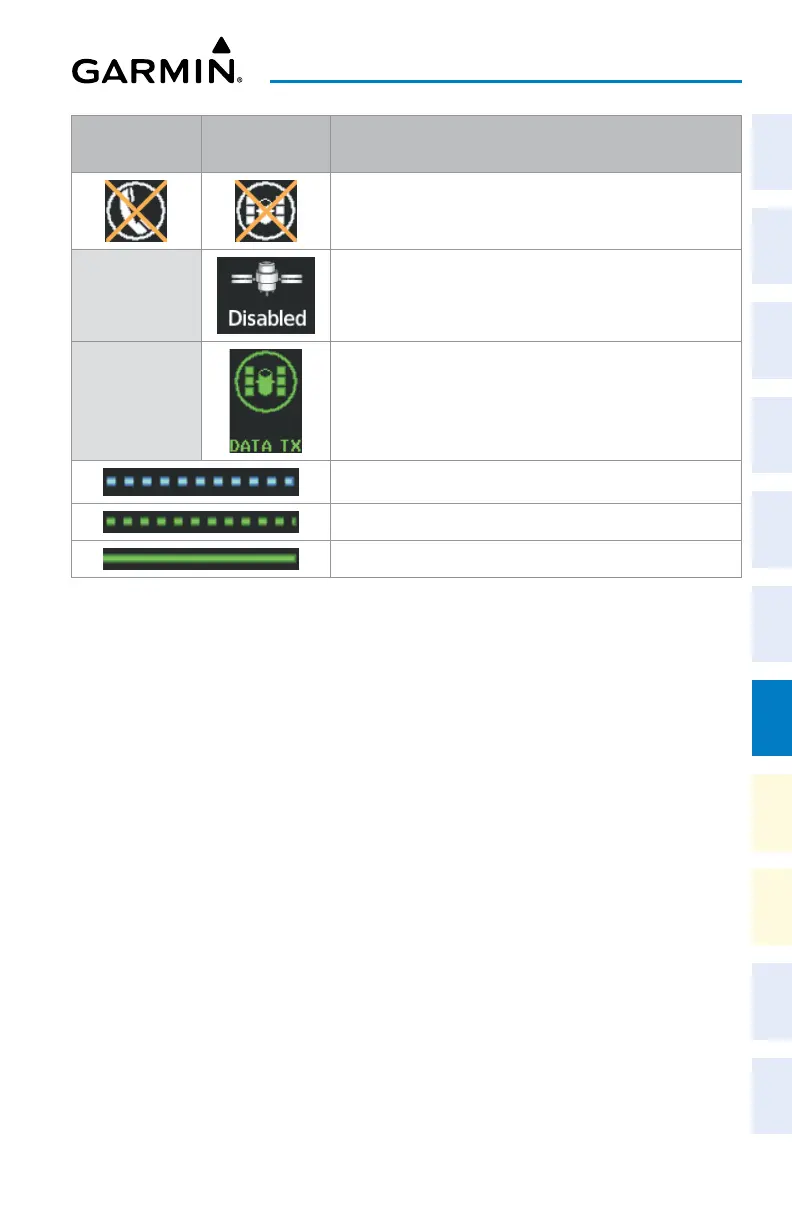
Internal
Phone
External
Phone
Description
Phone status not known
Phone is disabled
Phone is reserved for data transmission
Calling other phone or incoming call from other phone
Other phone is on hold
Phones are connected
Telephone Symbols
Enabling/disabling the Iridium Telephone System:
1) From MFW Home, touch Services > Satellite Phone.
2) Touch the Iridium #1 Button to display the ‘Satellite Phone - Iridium #1 Transceiver’
Screen.
3) Touch the Disable Iridium Transmission Button to disable the transceiver. A green
annunciator indicates Iridium transmission is disabled. Touch the button again to enable
the transceiver. A gray annunciator indicates Iridium transmission is enabled.
Answering a call:
1) Touch the flashing PHONE Button. The ‘Notifications’ Screen is displayed.
2) Touch the Answer Button. The call is now connected as indicated. Touching the Ignore
Button extinguishes the new call annunciation and the call remains disconnected.
3) When the call is finished, touch the End Call Button to disconnect the call.
Making an external call using a telephone number:
1) From MFW Home, touch Services > Satellite Phone.
2) Touch the Cockpit Phone Button. The ‘Satellite Phone - Cockpit’ Screen is displayed.
3) Touch the Dial Button. The phone number entry screen is displayed.
4) Using the number keys, enter the phone number.












 To Next Page