Cockpit Reference Guide for the Cirrus SR2x with Perspective Touch+ by Garmin
190-02954-01 Rev. A
Appendix
267
Flight
Instruments EIS
Nav/Com/
XPDR/Audio
Flight
Management
Hazard
Avoidance AFCS
Additional
Features Annun/Alerts Appendix Index
Flight
Instruments EAS
Audio and
CNS
Flight
Management
Hazard
Avoidance AFCS
Additional
Features
Abnormal
Operation Annun/Alerts Appendix Index
PFW TOUCHSCREEN CONTROLLER SCREENS
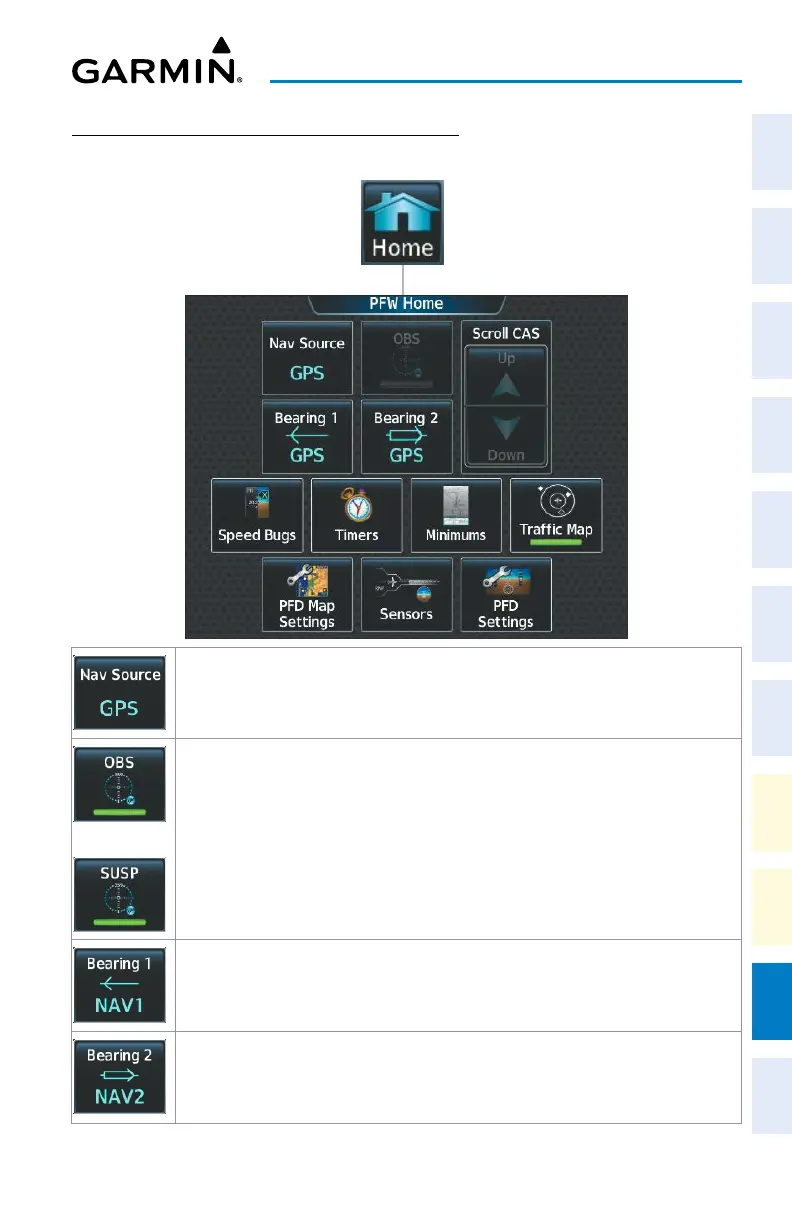
PFW Home
Cycles through GPS, LOC1/VOR1 and LOC2/VOR2 navigation modes on the CDI
or
Selects OBS mode on the CDI when navigating by GPS (only available with active leg).
When OBS is active the annunciator is green.
Selects SUSP mode on the CDI when navigating by GPS. When SUSP is active the
annunciator is green.
Displays pop-up window with selection buttons for Bearing 1 Pointer selections Off,
NAV1, NAV2, GPS, ADF, BEST GLIDE, and WPT.
Displays pop-up window with selection buttons for Bearing 2 Pointer selections Off,
NAV1, NAV2, GPS, ADF, BEST GLIDE, and WPT.












 To Next Page