Cockpit Reference Guide for the Cirrus SR2x with Perspective Touch+ by Garmin
190-02954-01 Rev. A
54
Flight Management
Flight
InstrumentsEIS
Nav/Com/
XPDR/Audio
Flight
Management
Hazard
AvoidanceAFCS
Additional
FeaturesAnnun/AlertsAppendixIndex
Flight
InstrumentsEAS
Audio and
CNS
Flight
Management
Hazard
AvoidanceAFCS
Additional
Features
Abnormal
OperationAnnun/AlertsAppendixIndex
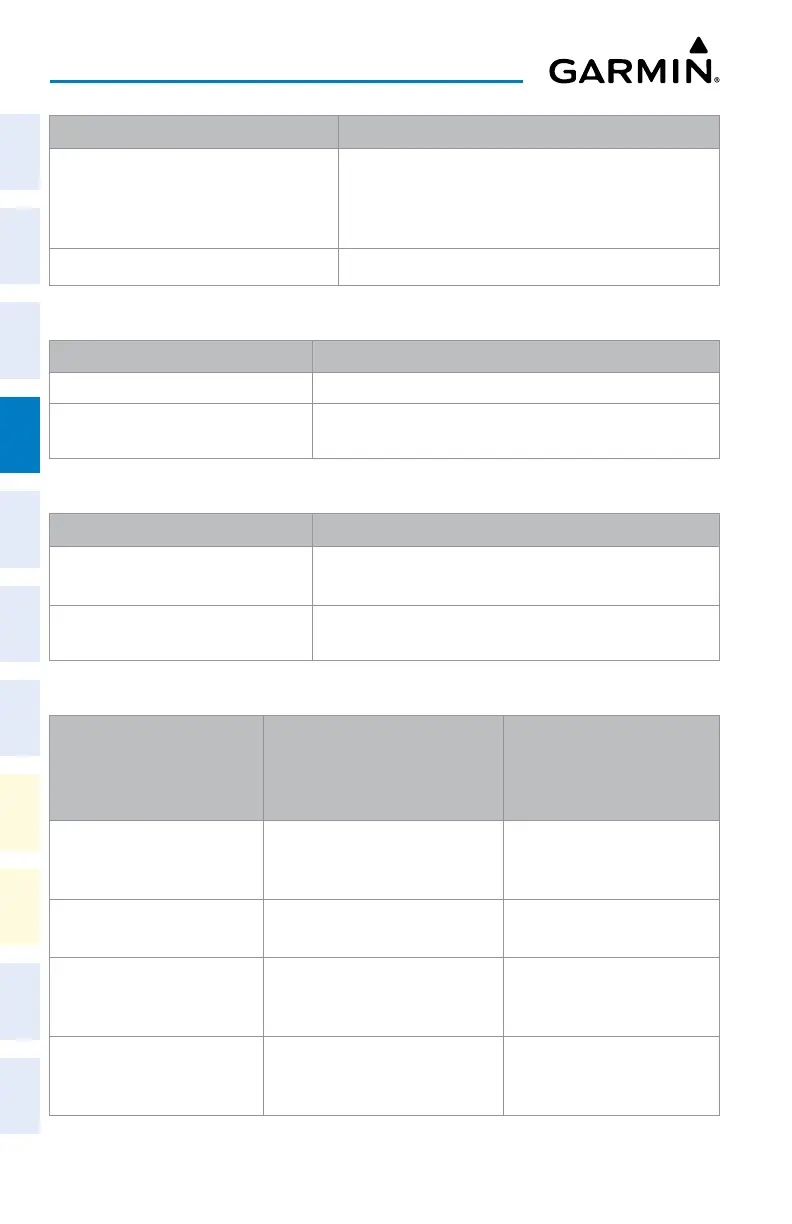
Route Entry Description
"<entry wpt>*<airway1>*<airway2>*"
Or:
"*<airway1>*<airway2>*"
Airway-to-airway transition. Airways must meet at a
transition waypoint recognized by the system.
"<wpt1>*<wpt2>" Direct routing (back-to-back waypoint entry)
Acceptable Route Entry Patterns
Airway to Airway Route Entry Description
"<entry wpt>*<airway>*<exit wpt>" The entry waypoint is specified.
"*<airway>*<exit wpt>"
The entry waypoint already exists in the flight plan and is
selected as the insertion point for the route entry.
Acceptable Airway to Airway Route Entry Patterns
Airway to Airway Route Entry Description
"<entry
wpt>*<airway1>*<airway2>*"
The entry waypoint is specified.
"*<airway1>*<airway2>*"
The entry waypoint is implied (already in the flight plan) by
the insertion point.
Airway to Airway Route Entry Descriptions
Keypad Entry of Route
Segment (In Sequential
Order)
Flight Plan Action
Characters Displayed in
the Route Entry Field After
the Flight Plan Action
“MCI*J24*WELTS*” Review and load J24 airway with
entry point "MCI" and exit point
"WELTS" into flight plan.
WELTS*
WELTS* "JIGSY*" WELTS to JIGSY leg added into
flight plan.
JIGSY*
JIGSY* "J134*FLM*" Review and load J134 airway with
entry point "JIGSY" and exit point
"FLM" into flight plan.
FLM*
FLM* "J24*BIGAL* Review and load J24 airway with
entry point "FLM" and exit point
"BIGAL" into flight plan.
BIGAL*












 To Next Page