IP8820/IP8830/IP8840
Installer Guide
9
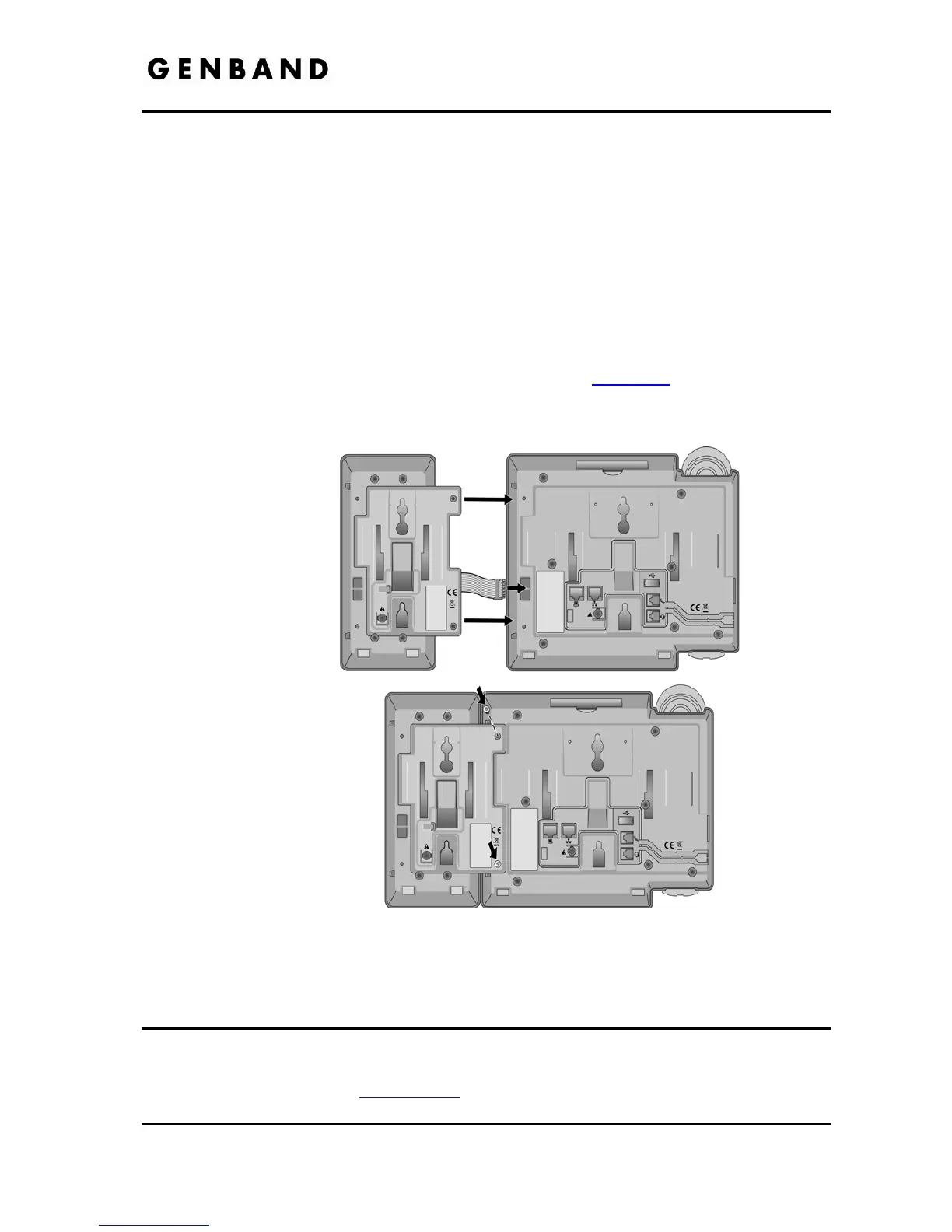
Both models connect to and receive power from the IP8800 series phone. Installation for both
models is described below.
Disconnect the IP phone from power and the LAN
Remove the Foot Stand from the IP phone
On the bottom of the IP phone, remove the plug from the Expansion Module port.
Plug the cable from the Module into the Expansion Module port.
Align the screw holes in the Module Connecting arm with the mounting holes in the IP
phone.
Insert and tighten screws to attach the Expansion Module to the IP phone. Caution, do
not over-tighten as this may strip the plastic in the IP phone.
Install the Foot Stands on the Module and IP Phone, see section 2.2
.
When installing a second module, wire and connect the second module to the first as
described above.
Figure 2.3-1 Expansion Module Installation
2.4 Bluetooth Module Installation
The IP8830 and IP8840 phones can be equipped with an optional Bluetooth module for use with
a customer provided Bluetooth compatible headset. The headset is paired and connected to
the IP Phone as described in section 3.6.11
. The optional module is installed in the slot below
and behind the LCD as shown in Figure 2.4-1. Before inserting the Bluetooth module in the IP



 To Next Page