IP8820/IP8830/IP8840
Installer Guide
11
2.6 Wall Mounting
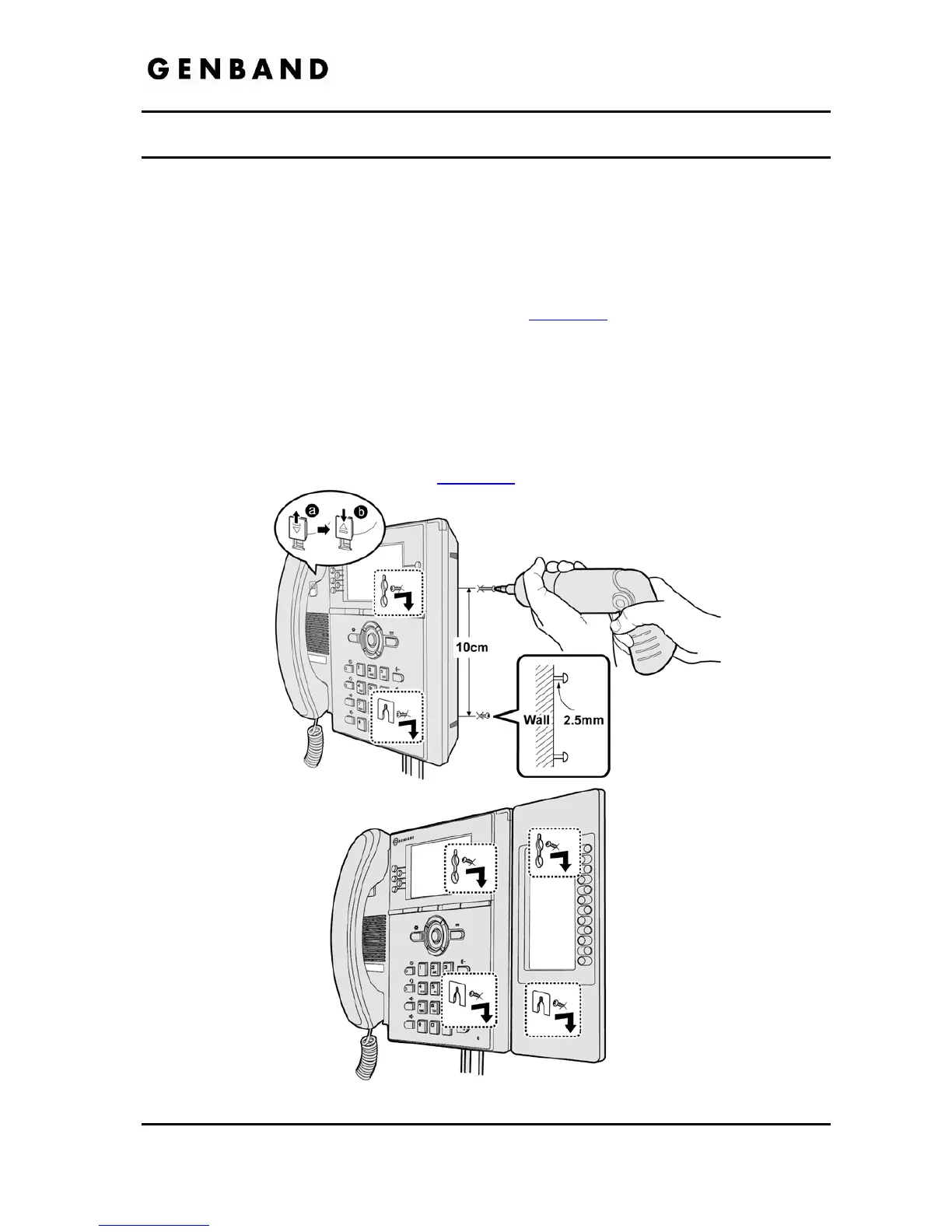
The IP8800 series phones incorporate wall mounting in the base of the phone housing. Using
the instructions below and Figure 2.6-1, wall mount the LIP-8000 phone.
Mark and drill two 7 mm holes for plastic wall anchors with a vertical separation of 10 cm.
Insert two (2) anchors into the holes, then insert and tighten the two (2) screws leaving
about 2.5 mm exposed. Refer to Figure 2.6-1.
Attach all wiring to the IP Phone as described in section 2.1
.
Slide the IP Phone over the screws and assure the phone is secure. Note it may be
necessary to remove the phone and tighten or loosen the screws for a secure mounting.
Also note, the Foot Stand must not be attached to the IP Phone when wall mounting.
Remove the Handset hook from the phone as shown in the figures below. Reverse the
hook and re-install in the LIP-8000 phone so that the hook catches the groove in the
handset receiver.
Complete all wiring as described in section 2.1
.
Figure 2.6-1 IP8800 Wall Mount Installation



 To Next Page