3-58
Chapter 3 Settings and Measurement
Contents General Description
Checks and Preparation
Settings and Measurement
Example of Use Specification
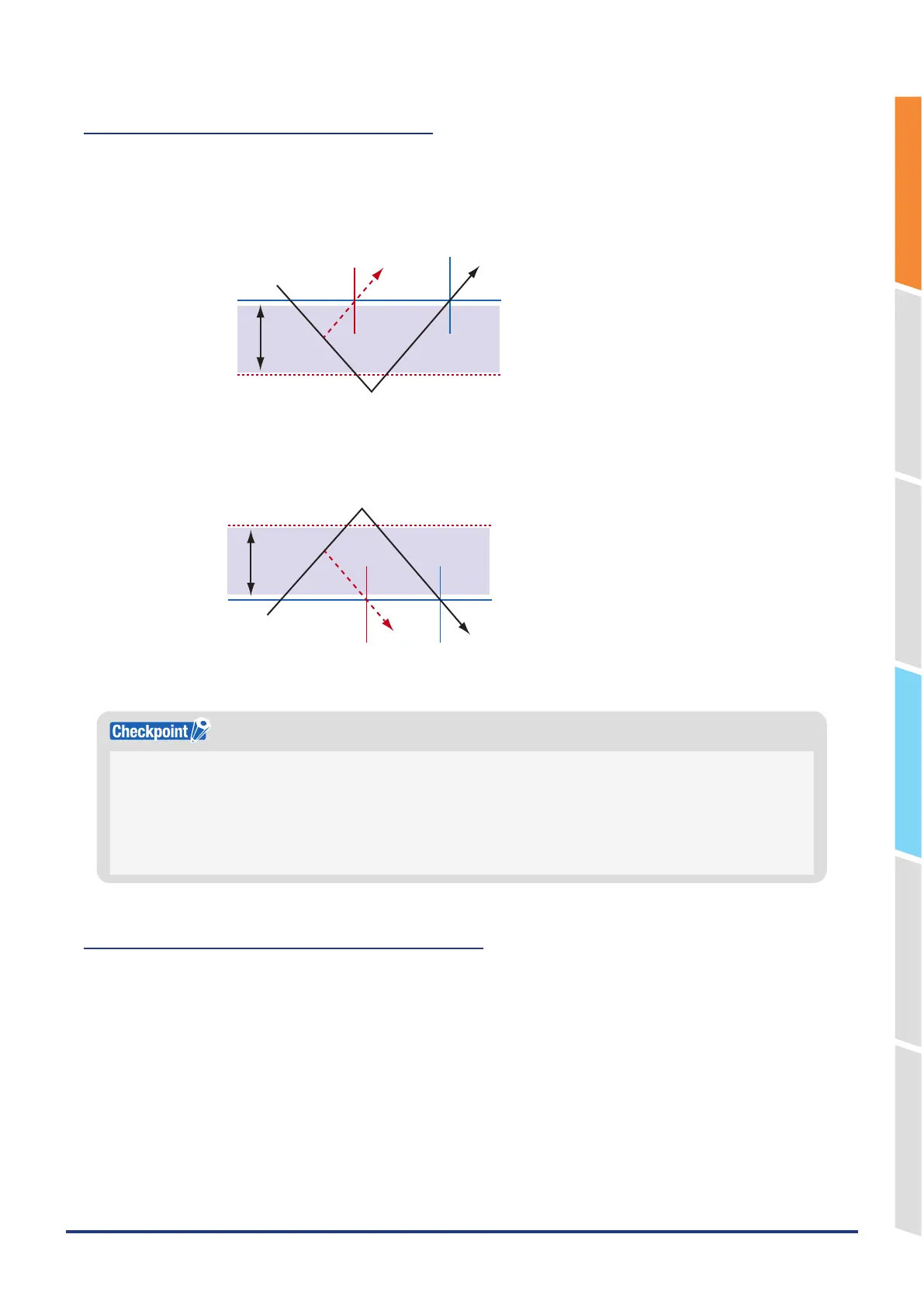
Dead zones of trigger and alarm levels
Trigger and alarm levels are provided with a dead zone to prevent false detection due to noise.
The following figure shows the dead zone.
Mode: Rising
Trigger (alarm) point
Dead zone level
The input signal must be below
the dead zone level once.
<Voltage>
• Level setting value 1% of negative range
(1V range: Level setting value –0.01V)
<Calculation CH>
• 1% of calculation result FS (100000)
(When the decimal point is set to 10.000: –0.100)
<Temperature>
• Level setting value –0.3°C
A trigger (alarm) does not occur
because the input signal is not
below the dead zone level.
Mode: Falling
Trigger (alarm) point
Dead zone level
Trigger (alarm) level
The input signal must be above
the dead zone level once.
A trigger (alarm) does not occur
because the input signal is not
above the dead zone level.
<Voltage>
• Level setting value 1% of positive range
(1V range: Level setting value +0.01V)
<Calculation CH>
• 1% of calculation result FS (100000)
(When the decimal point is set to 10.000: +0.100)
<Temperature>
• Level setting value +0.3°C
•
The upper limit values within the mode range and the lower limit values out of the mode range are dead zone level as
well.
•
When the detected alarm drops below the dead zone level, it is cleared. (When the alarm is not retained)
<Example> When measuring temperature, the level released after the alarm generated is shown below.
– Rising setting: Setting value -0.3℃
– Falling setting: Setting value +0.3°C
•
In the case of pulse, dead zone is not provided.
Copy trigger (level value) and alarm settings
This function copies the trigger (level value) and alarm settings set in any CH to other CHs.
<Confirm>
Copying is not possible in the following cases.
• If the analog input, logic/pulse/calculation CH is different.
• If the input is different.
• If the EU settings are different.
• If the range is different.
• If EU is enabled and the decimal point position is different.
• If the temperature range is different.















 To Next Page