3-91
Chapter 3 Settings and Measurement
Contents General Description
Checks and Preparation
Settings and Measurement
Example of Use Specification
7-3. Auto span adjustment
Automatically adjust the span value based on the displayed data.
7-4. Position
Move the 0 position of the waveform.
By pressing the " " and " " buttons, the 0 position of the waveform moves by 1 division of the chart grid.
In practice, the span is adjusted so that the above action is achieved.
7-5. Trace
Set the waveform trace to Off or On.
Trace is a function that switches the waveform display between Off and On. Even if a trace is set to Off, captured data
is set to On.
If you want to set the data to off as well, set “Input” to Off.
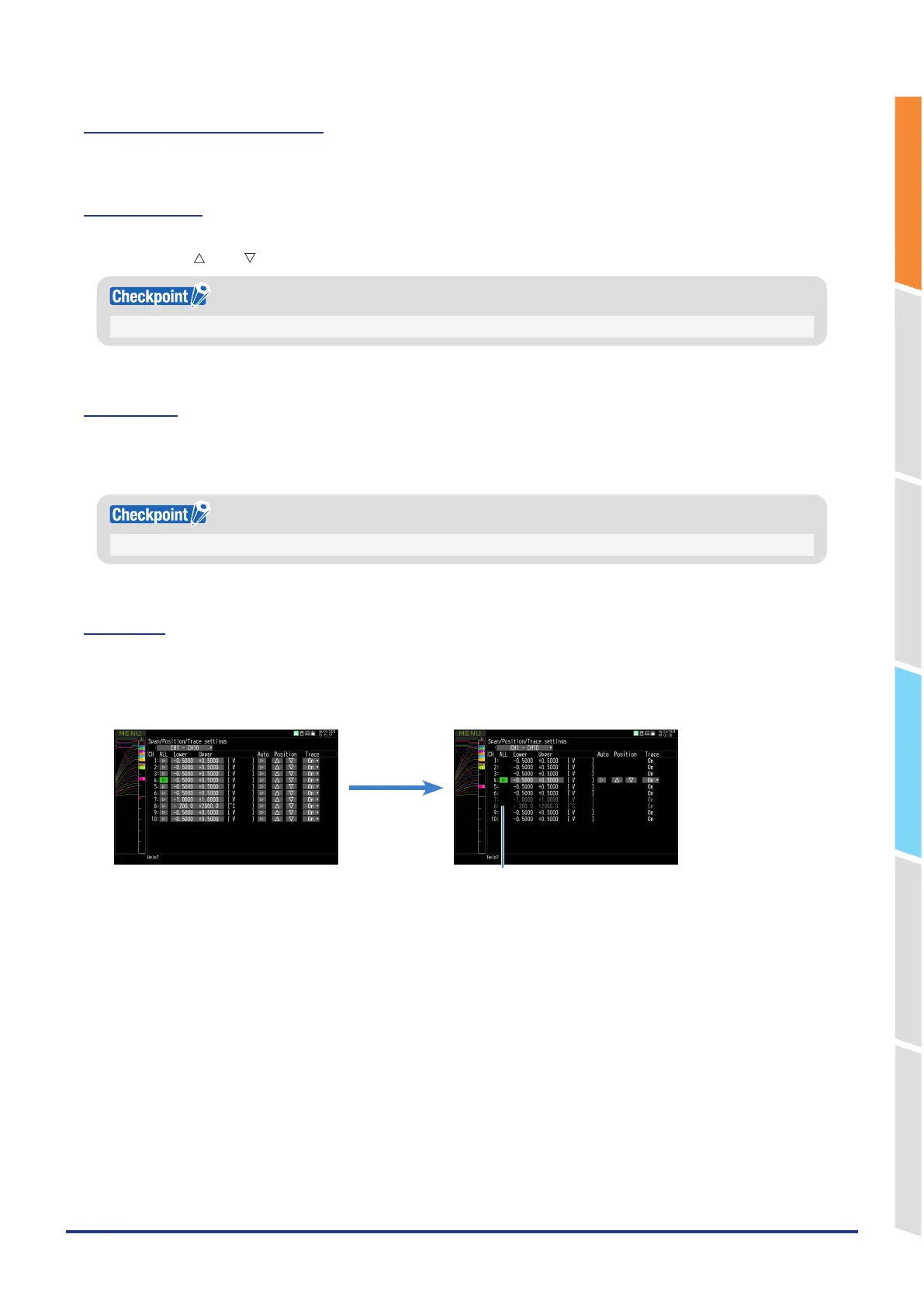
7-6. ALL
Move to the batch change mode.
The batch change mode is a mode in which all channels with the same input and range settings and with EU (scaling)
set to Off are set to the same value at once.
<Normal mode> <Batch change mode>
CHs with different settings that cannot be changed all
at once are displayed the dark.
<Operation procedure>
1. Press the "ALL" button of the CH that you want to use as the standard for setting.
* In the above, CH4 is used as the standard CH.
2. After moving to batch change mode, change the settings you want to change.
When the settings are confirmed, the settings of the CH other than the standard CH are rewritten to the same
settings as the standard CH.















 To Next Page