2-8
CHAPTER 2 Checks and Preparation
Contents General Description
Checks and Preparation
Settings and Measurement
Example of Use Specification
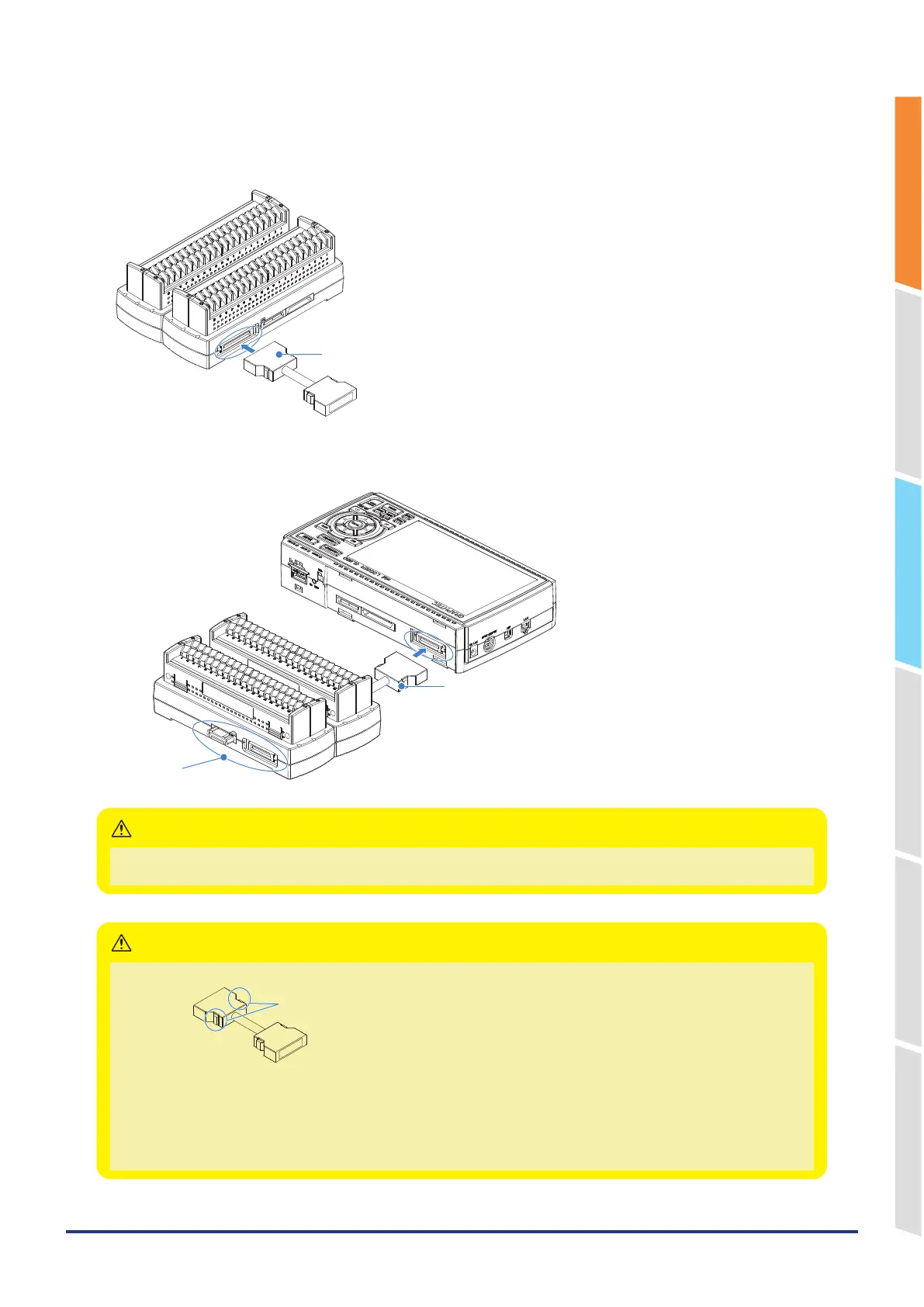
3. Connect the extension terminal connection cable to the extension terminal base.
* Insert the cable connector until it is securely locked.
* Connect in accordance with the connector shape.
Extension terminal connection cable
4. Connect one end of the extension terminal connection cable to the GL860.
* Insert the cable connector until it is securely locked.
Extension terminal connection cable
Do not touch.
While the signal is input to the direct-connected terminal, please do not touch the connector pins and the protruding part
next to the connector.
CAUTION
• How to remove the expansion terminal connection cable
Lock release lever
When you want to remove the expansion terminal connection cable from the GL860 or extension terminal
base, please note the following.
• Always press the both sides of the lock release lever and pull out straightly in a state where the lock is released.
• Please do not forcibly remove or do not pull out in a state where the lock is not released by pressing only the one side of
the lock release lever.
It may cause a connection failure of connector, please be careful when you remove it.
CAUTION















 To Next Page