Skx
Owner’s Manual
112
MIDI
In this mode, you make the basic MIDI settings and the memory
dump operation.
MIDI TEMPLATE
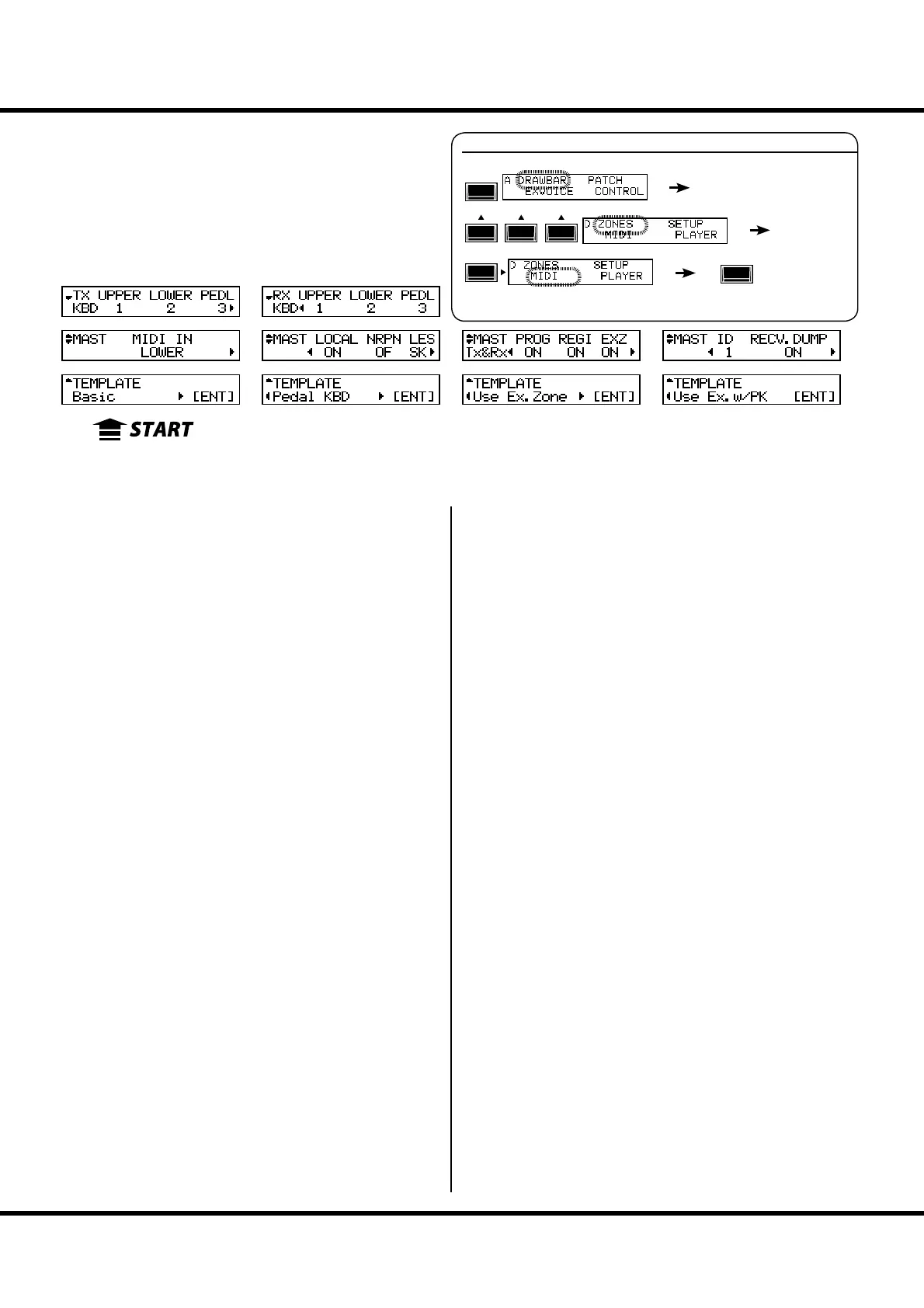
❶ MIDI TEMPLATE
is allows you to recall the MIDI Template you want to use.
Use [][] buttons to select the desired Template and press
the [ENTER] button to make your selection.
See “MIDI TEMPLATE” in the Appendix (P. 139) for details of
each MIDI Template.
MASTER
❷ MIDI IN
is is for switching the MIDI jack function.
LOWER
Incoming MIDI data plays the LOWER part and are retransmitted
to the LOWER channel (#14) of the MIDI OUT jack, regardless of
the settings of the MIDI channel.
PEDAL
Incoming MIDI data plays the PEDAL part and are retransmitted
to the PEDAL channel (#15), regardless of the settings of the MIDI
channel.
LOW + PED
Incoming MIDI data plays the LOWER and the PEDAL parts in ac-
cordance with the MIDI channel settings and are retransmitted
to the LOWER (#14) and the PEDAL (#15) MIDI channel.
SEQUENCE
Incoming MIDI data plays the UPPER, LOWER and PEDAL parts in
accordance with the MIDI channel settings, but is not retransmit.
UPPER
Incoming MIDI data plays the UPPER part and are retransmitted
to the UPPER channel (#13), regardless of the settings of the MIDI
channel.
UPP + PED
Incoming MIDI data plays the UPPER and the PEDAL parts in ac-
cordance with the MIDI channel settings and are retransmitted
to the UPPER (#14) and the PEDAL (#15) MIDI channel.
❸ LOCAL
is switches the Local Control “ON” or “OFF”.
When switched “ON”, the keyboards and the internal sound
engine are connected. When “OFF”, the keyboards and the
sound engine are disconnected no sound is played.
You can use SKX as two di erent equipment; the MIDI key-
board and the sound module at the same time.
❹ NRPN
is switches the transmission/reception of the NRPN (Non-
Registered Parameter Number) “ON” or “OFF”.
On the SKX it is used for transmitting the messages such as the
Drawbar Fold Back or the Leslie ON. e NRPN is transmit-
ted through the UPPER channel.
When switched “ON”, it is transmitted. When “OFF”, not
transmitted.
❺ LESLIE
is is for controlling how to send Leslie Parameters. e Leslie
Parameters sent on UPPER Channel.
SK:
The Leslie Parameters will be sent out on the SKX original NRPN
address and data.
21:
The Leslie Parameters will be sent out for Leslie 21 series NRPN
address and data.
When the Cabinet Number is selected (i.e. by Patch), the param-
eters are sent out also.
NOTE: This parameter will changed automatically when the Leslie
speaker is connected / disconnected.
❻ PROGRAM CHANGE
This switches the transmission/reception of the Program
Change “ON” or “OFF”. When “ON”, transmitted. When
“OFF”, not transmitted.
❼ DRAWBAR REGISTRATION
is switches the transmission/reception of the Drawbar set-
tings “ON” or “OFF”. When “ON”, transmitted. When
“OFF”, not transmitted.
❽ EXTERNAL ZONE
is switches the transmission/reception of the External Zones
as a whole “ON” or “OFF”. When “ON”, transmitted. When
“OFF”, not transmitted.
❾ DEVICE ID
is sets the Device ID for transmission/reception of the Sys-
tem Exclusive messages such as the Memory Dump (#11, 12).
For example, the receiving is neglected, when the Device ID
does not match, even if the messages are the same.
To locate this mode:
See “Function mode” (P. 66) for operation details.
MENU/
EXIT
ENTER
❶
❷
❸
❹
❺
❻
❼
❽
❾
❿
⓭
⓮
⓯
⓰
⓱
⓲



 To Next Page