131
Voice Library
USB
FLASH DRIVE
WORKING WITH VOICE LIBRARY
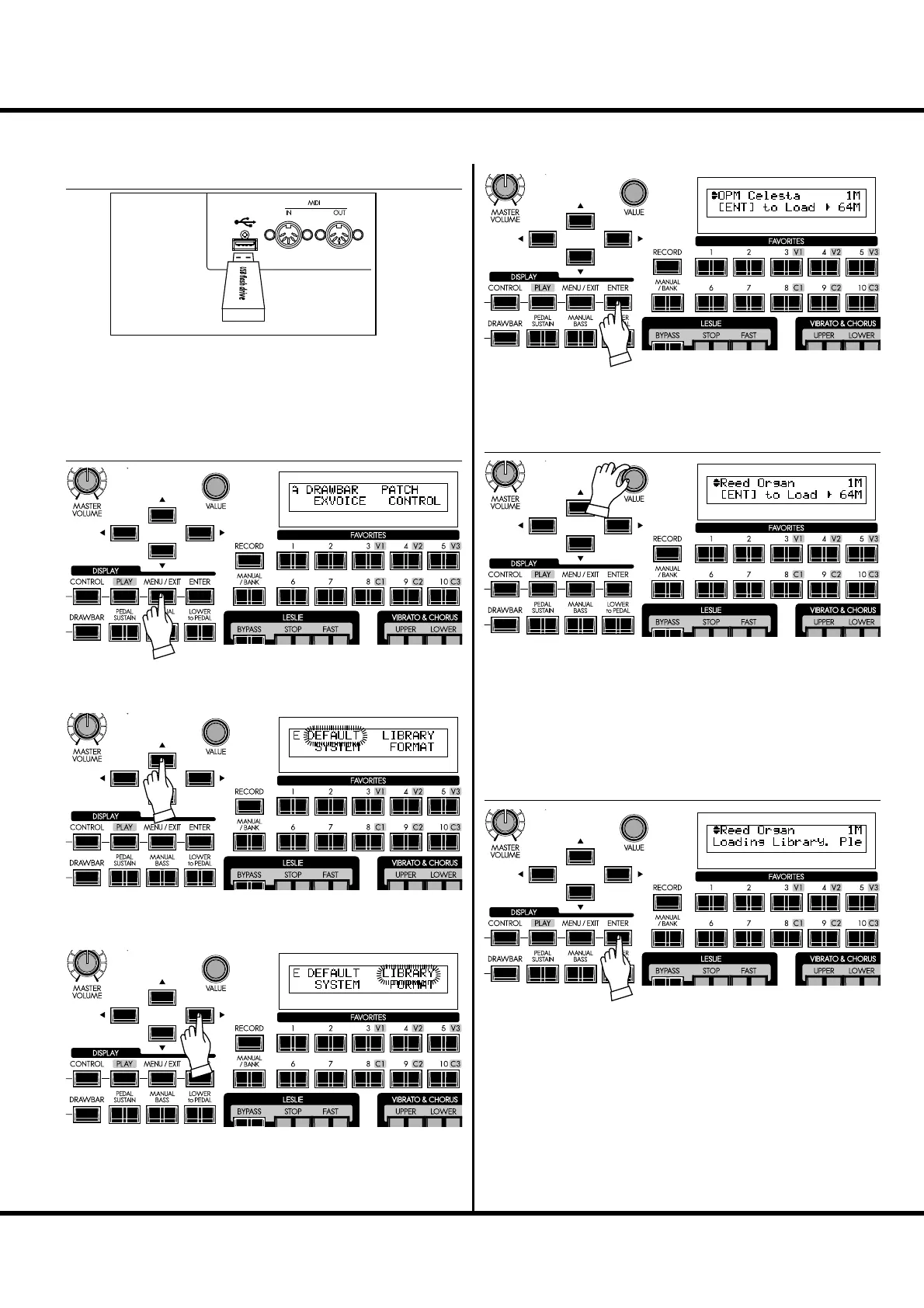
Insert the USB Flash drive to the USB FLASH DRIVE port.
Wait until the display “Confirming USB. Please
wait...” disappears.
LOADING THE VOICE LIBRARY
Display the menu with the [MENU/EXIT] button.
Select the Page E with the [],[] button.
Select LIBRARY with the [] button.
Press the [ENTER] button. Now you have come to the Library
Function mode.
Select the Voice Library you want to additionally register with
the [VALUE] knob or the [],[] buttons.
NOTE: The capacity of the Voice Library le on the upper right of the
display, and the remaining capacity of the SKX on the bottom
right. You can not additionally register larger les than the
remaining capacity.
Press the [ENTER] button. Loading the Voice Library starts. It
may take a while for this procedure to complete.
Required time for registration depends on the capacity. It takes
a maximum of 30 minutes.
① INSERT THE USB FLASH DRIVE
② LOCATE THE LIBRARY MODE
③ SELECT THE VOICE LIBRARY FILE
④ PRESS [ENTER] TO LOAD



 To Next Page