117
Save the Setup
USB
FLASH DRIVE
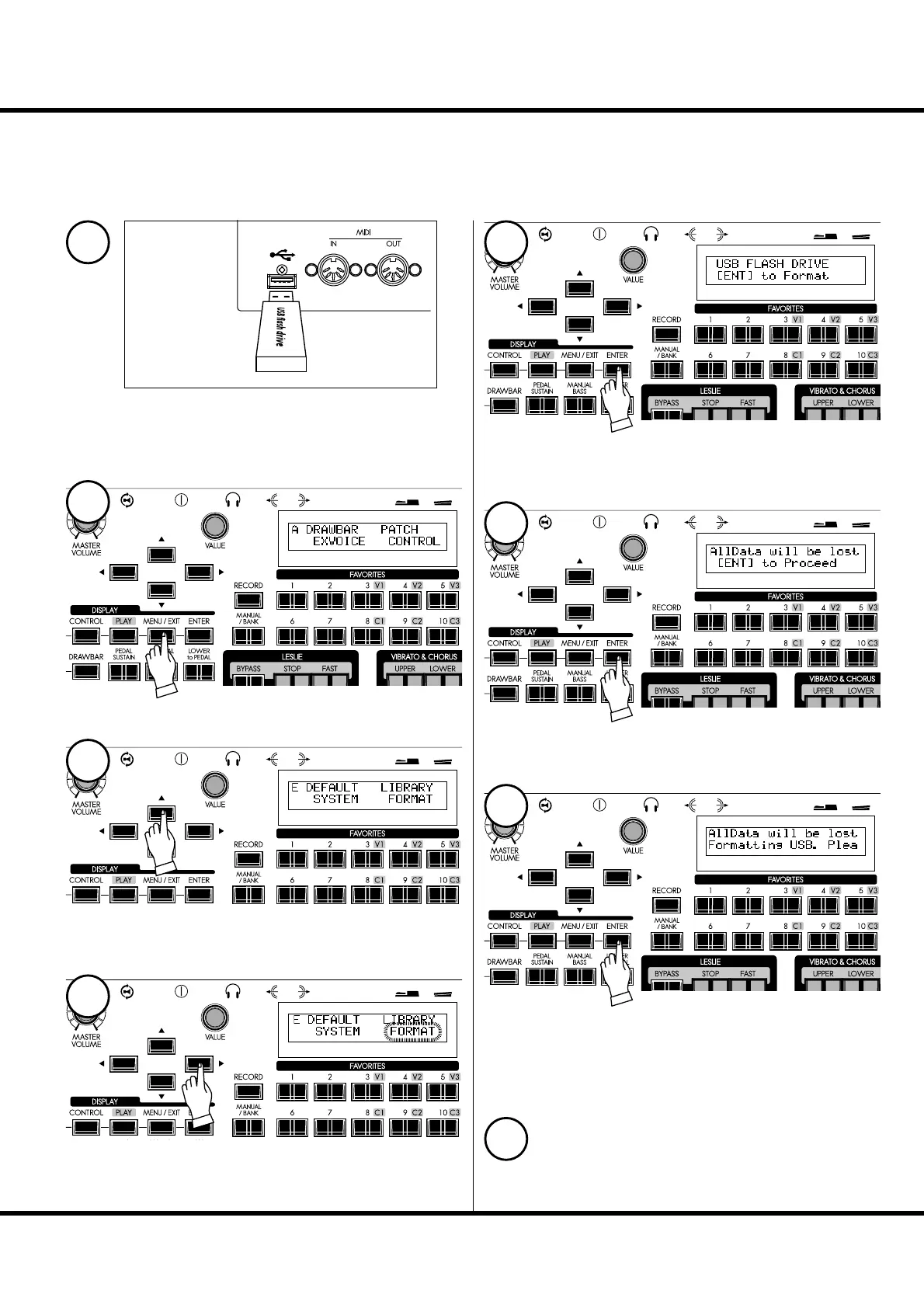
INITIALIZE THE USB FLASH DRIVE
A “fresh” e USB Flash drive must be formatted (or “initialized”). e initializing
procedure is as follows:
NOTE: When initializing is completed, all the contents of the USB Flash drive are erased.
Insert the USB Flash drive to the USB FLASH DRIVE port.
Wait until the display “Confirming USB. Please
wait...” disappears.
Press the [MENU/EXIT] button to display
the Menu.
Select Page E with the [],[] buttons.
Press the [ENTER] button.
e FORMAT (initialize) mode will be displayed.
Press the [ENTER] button.
Con rmation message is displayed.
Press the [ENTER] button.
Initialization starts. It takes about 3 seconds.
NOTE: If you choose to not initialize, just press the [MENU/EXIT] but-
ton.
To return to the Play mode, press the [PLAY] button.
Select the “FORMAT” with the [] button.
1
2
3
5
6
7
8
4



 To Next Page