Skx
Owner’s Manual
34
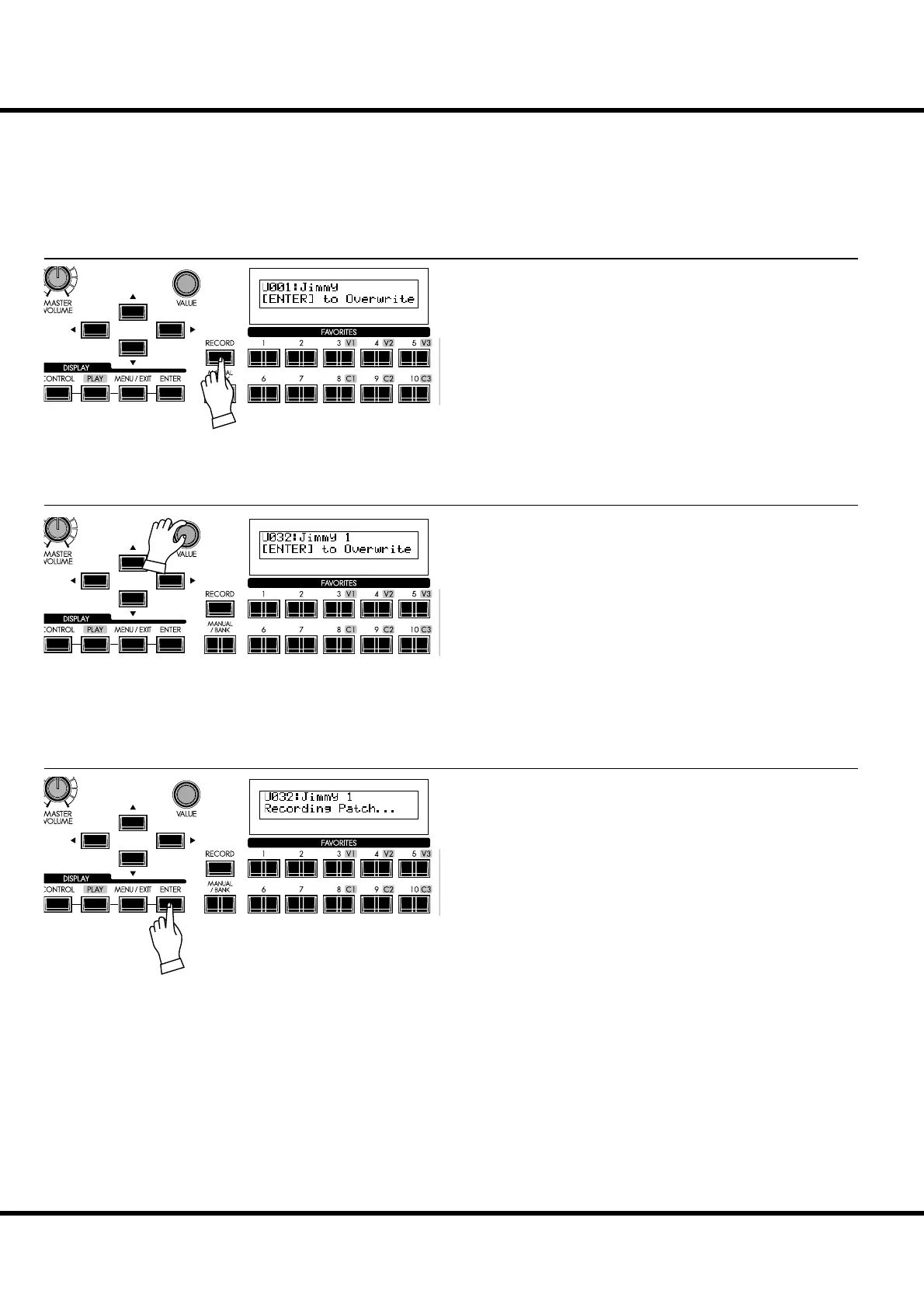
Press the [RECORD] button.
A prompt will appear in the display allowing you to select the
Patch you want to record.
Press the [ENTER] button.
e Patch Number is decided and the display will show, “Re-
cording Patch” for approximately ½ second, after which
the previous mode will return.
e recorded Patch is automatically selected.
NOTE: The user created Patch data is not lost when the power is
turned o and/or disconnected.
RECORD THE PATCH TO MEMORY
All the previous settings can be recorded to any Patch within the range of U001 to U100.
Example: RECORD TO U032
Select the Patch number, this time U032, to record, using the
[VALUE] knob or type the buttons such as [3] [2].
① PRESS THE [RECORD] BUTTON
② SELECT THE PATCH TO RECORD
③ PRESS THE [ENTER] TO DECIDE
TRY CREATING YOUR OWN SOUND - continued



 To Next Page