Skx
Owner’s Manual
124
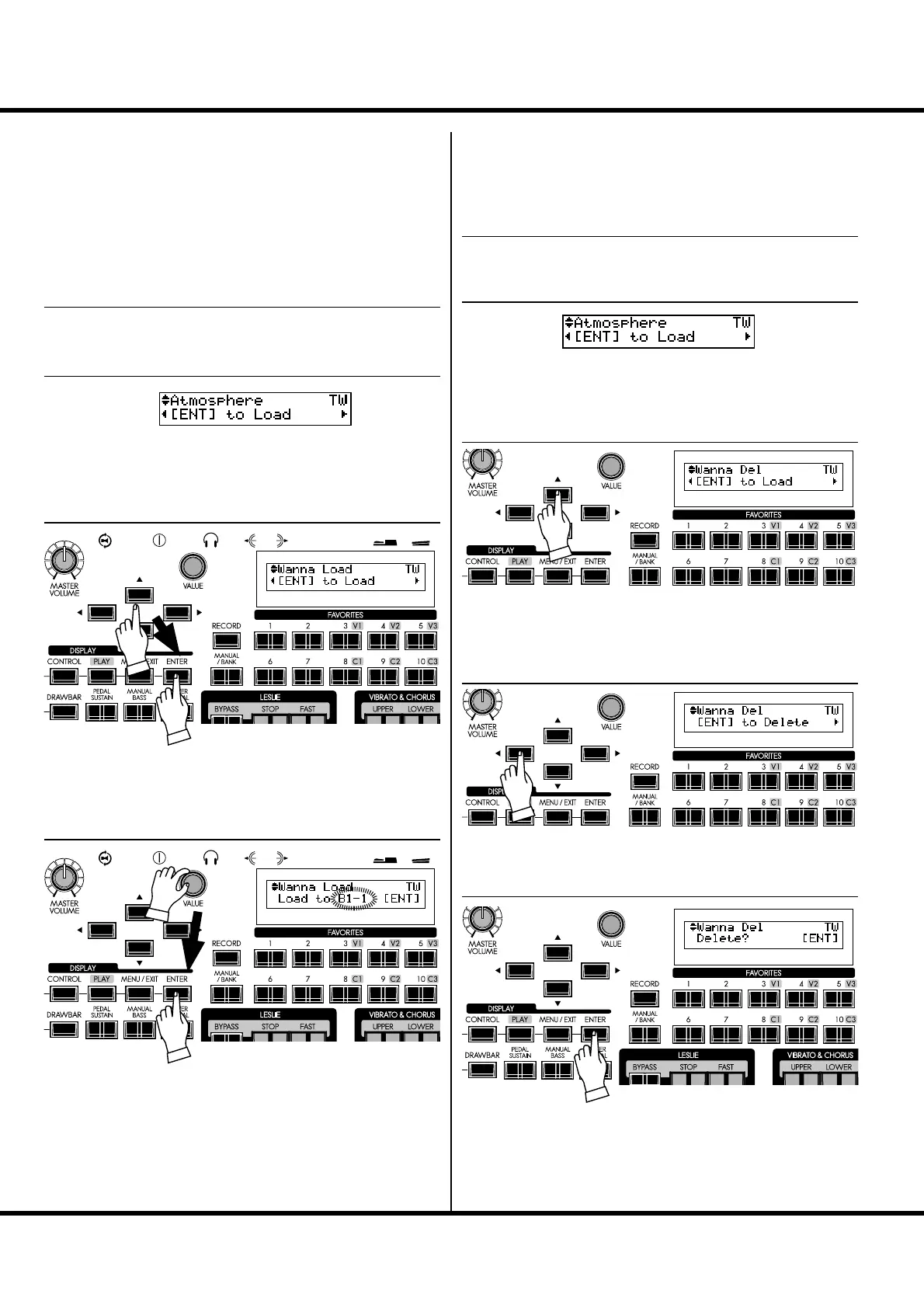
LOADING A CUSTOM TONE
WHEEL
Locate the Custom Number mode with refer to the illustration
of top of previous page.
Select the Custom Tone Wheel le to load with the [],[]
buttons or the [VALUE] knob, and press [ENTER].
NOTE: If you do this operation, a Patch in the SKX are replaced with
the newly loaded Patch. You should save important data be-
forehand (p. 123).
Select the Custom number to be replaced.
Press the [ENTER] button. e Custom Tone Wheel is loaded.
e Tone Wheel set name is shorted in this page. Please refer
below for detail.
B1: B-Type 1
B2: B-Type 2
Ml: Mellow
DELETING A CUSTOM TONE
WHEEL
Select the Custom Tone Wheel le to delete with the [],[]
buttons or the [VALUE] knob.
Press [] button once. “[ENT] to Delete” is displayed.
Press the [ENTER] button. “Delete?” is displayed. Now
press the [ENTER] button again. e Tone Wheel le is de-
leted.
NOTE: If you do not with to delete the Custom Tone Wheel, touch the
[MENU/EXIT] button.
To locate the Custom Number mode, please refer to the illus-
tration of top of previous page.
① INSERT THE USB FLASH DRIVE
Make sure that the USB Flash drive is correctly inserted.
② LOCATE THE CUSTOM NUMBER MODE
③ SELECT THE TONE WHEEL FILE
④ SELECT THE DESTINATION
① INSERT THE USB FLASH DRIVE
Make sure that the USB Flash drive is correctly inserted.
② LOCATE THE CUSTOM NUMBER MODE
③ SELECT THE TONE WHEEL FILE
④ SELECT THE OPERATION
⑤ PRESS [ENTER] TO DECIDE



 To Next Page