127
Music Player
USB
FLASH DRIVE
WORKING WITH THE MUSIC PLAYER
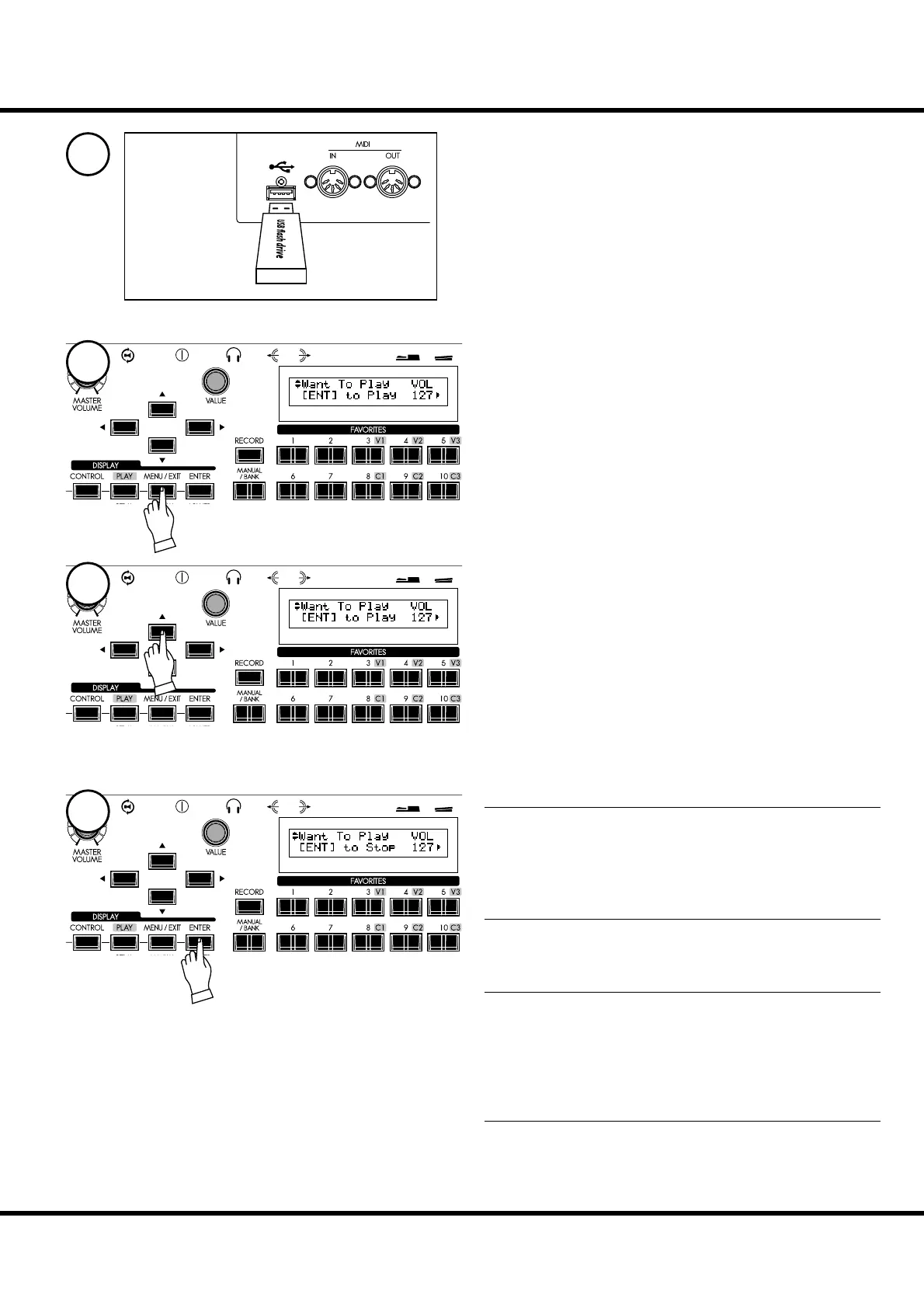
Insert a USB Flash drive to the USB FLASH DRIVE port.
Wait until the display “Confirming USB. Please
wait.” disappears.
Locate Song List mode.
A. Press the [MENU/EXIT] - Page D by [] - PLAYER by
[] - [ENTER] button or,
B. Press both [CONTROL] and [DRAWBAR] buttons si-
multaneously.
Use the [],[] buttons to find and select the audio file
(Song) you wish to play.
TO PLAYBACK
Press the [ENTER] button in this mode.
e selected Song will begin playing. e bottom line of the
display will read:
[ENT] to Stop
TO RETURN TO THE BEGINNING
Press the [] button in this mode.
e Song will rewind and begin playing from the beginning.
TO STOP
Press the [ENTER] button in this mode while the song is play-
ing.
e Song will stop playing and rewind back to the beginning.
e bottom line of the display will read:
[ENT] to Play
TO ADJUST THE PLAY VOLUME
Turn the [VALUE] knob to adjust the play volume in this
mode.
e volume is displayed as “VOL”.
1
2
3
4



 To Next Page