Skx
Owner’s Manual
74
P A T C H
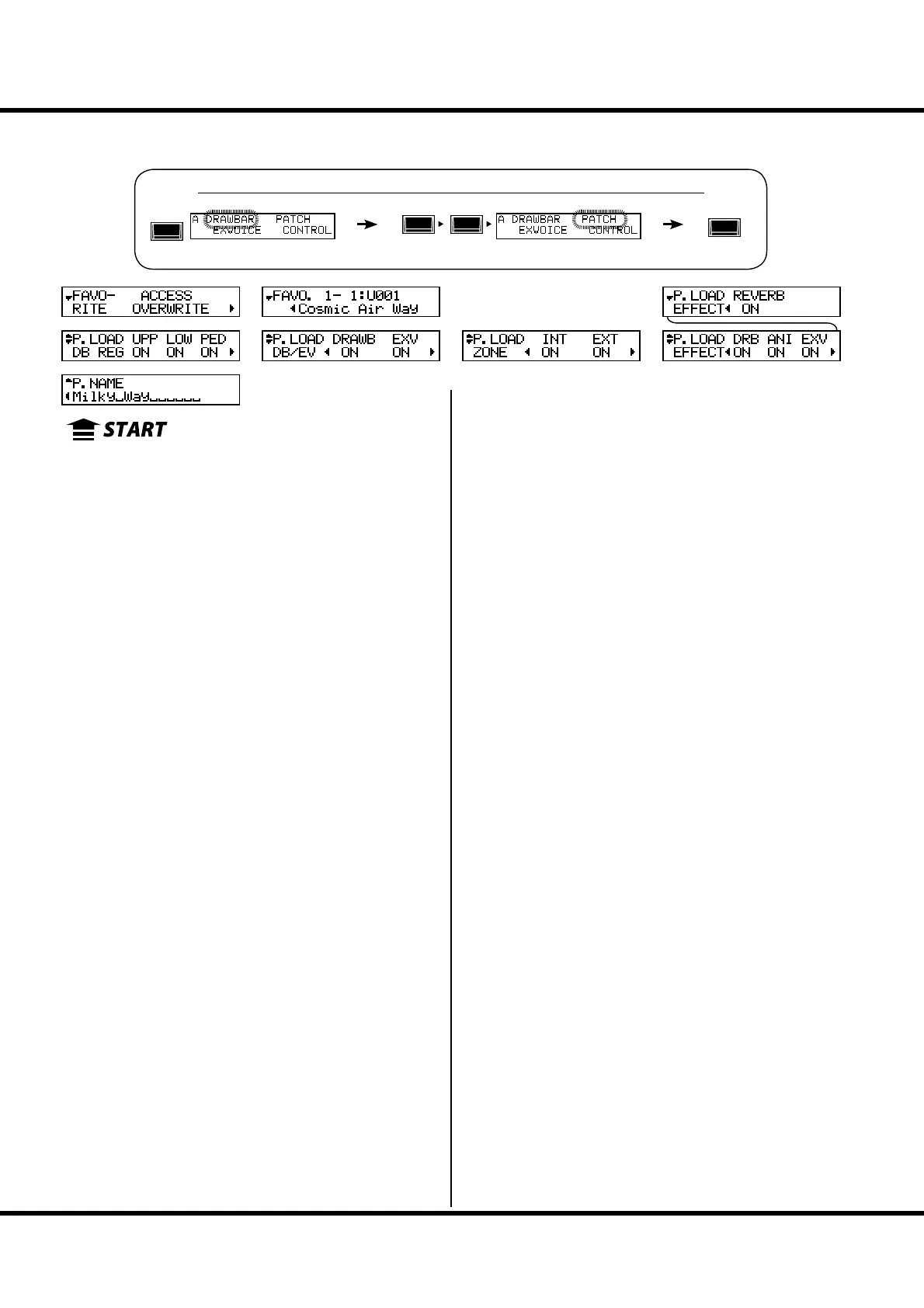
In this mode you a name your Patch, set which parameters load, and how to link to
the Favorite buttons.
To locate this mode:
PATCH NAME
❶ Patch Name (P)
Name the present Patch using up to 15 letters.
Move the cursor by the [][] buttons. en select letters
with the [VALUE] knob.
e Patch name is lost, unless you save the Patch.
NOTE: This parameter (P) is a Patch parameter. It is recorded in each
Patch.
PATCH LOAD
ese are for setting which parameters are loaded when a Patch
is called. Sets whether or not to load:
❷❸❹ PATCH LOAD - DRAWBAR REGISTRATION (G)
Drawbar registration of the UPPER, LOWER and PEDAL
part.
❺ PATCH LOAD - DRAWBAR (G)
e parameters speci c to the Organ Section such as Organ
Type or Percussion.
❻ PATCH LOAD - EXTRA VOICES (G)
Extra Voice parameters.
❼ PATCH LOAD - INTERNAL ZONE (G)
e parameters relating with Internal Zone or Coupler (Pedal
to Lower and Manual Bass).
❽ PATCH LOAD - EXTERNAL ZONE (G)
e parameters speci c to the External Zone to control exter-
nal MIDI equipment.
❾ PATCH LOAD - DRAWBAR EFFECT (G)
e parameters speci c to the Organ Section E ects (Over-
drive, Multi-E ects, Equalizer).
❿ PATCH LOAD - ANIMATION (G)
e parameters speci c to the Leslie, Vibrato & Chorus e ects.
⓫ PATCH LOAD - EXTRA VOICE EFFECTS (G)
The parameters specific to the Extra Voice Section Effects
(Overdrive, Multi-E ects and Equalizer).
⓬ PATCH LOAD - REVERB (G)
e Reverb parameters.
NOTE: Each Patch Load parameter is a Grobal parameter. It is re-
corded when the value is set. Common for each Patch.
FAVORITES
⓭ FAVORITE ACCESS (G)
Allows you to select how the Favorite buttons function.
ASSOCIATE:
Each number button usually calls the related Patch.
If you touch each number button holding down the [RECORD]
button, it relates the number button to the currently selected
Patch.
OVERWRITE:
In addition to above, if you touch each number button holding
down the [RECORD] button, it records the current setting to the
selected Patch.
LOCKED 1-10:
The Favorites and Patches made xed linkage. Each number but-
ton usually calls the corresponding Patch, U001 ... U100 by with
using [ BANK] button together.
If you touch each number button holding down the [RECORD]
button, it records the current setting to the corresponding Patch,
U001 ... U100.
DIRECT:
This is for directly calling the Patch, using each number button.
To call the Patch, rst put in the 3 digit Patch number and then
touch the [ENTER] button.
U001 ... [1], [ENTER]
U010 ... [1], [10], [ENTER]
U100 ... [1], [10], [10], [ENTER]
P001 ... [1], [10], [1], [ENTER]
P010 ... [1], [1], [10], [ENTER]
P100 ... [2], [10], [10], [ENTER]
You can not relate the Patch to each number button.
⓮ FAVORITE - BANK / NUMBER (G)
⓯ FAVORITE - PATCH (G)
Displays and changing the Patches related with each Number
button [1] - [10].
You can enter the these page by pressing and hold the Number
button [1] - [10] also.
NOTE: “G” means “Global”. These parameters will be recorded when
set, and are common in each Patch.
See the “Function mode” (P. 66) for operational details.
MENU/
EXIT
ENTER
❶
❷
❸
❺
❻
❼
❽
❾
❿
⓫
⓬
⓭
⓮
⓯
❹



 To Next Page