97
Setting the Parameters
EFFECTS FOR THE EXTRA VOICE SECTION
OVERDRIVE
⓭ OVERDRIVE - SWITCH
Turns the Overdrive e ect of Extra Voice section “ON/OFF”.
NOTE: While this parameter is “ON”, the stereo sound such as “Stereo Grand” etc. becomes
monaural.
⓮ OVERDRIVE - DRIVE
Controls the distortion amount. e distortion becomes greater as the value is in-
creased.
ere is no knob linked with this e ect, di erent from the Organ section, so the set-
ting is possible only in this mode.
⓯ OVERDRIVE - EXPRESSION
⓰ OVERDRIVE - PREAMP
⓱ OVERDRIVE - OUTPUT LEVEL
e functions of these parameters are the same as those of the Organ section.
MULTI-EFFECTS
⓲ EFFECT TYPE
andtheothereffectparameters
e functions of these parameters are the same as those of the Organ section.
❺
❻
❼
❽
❾
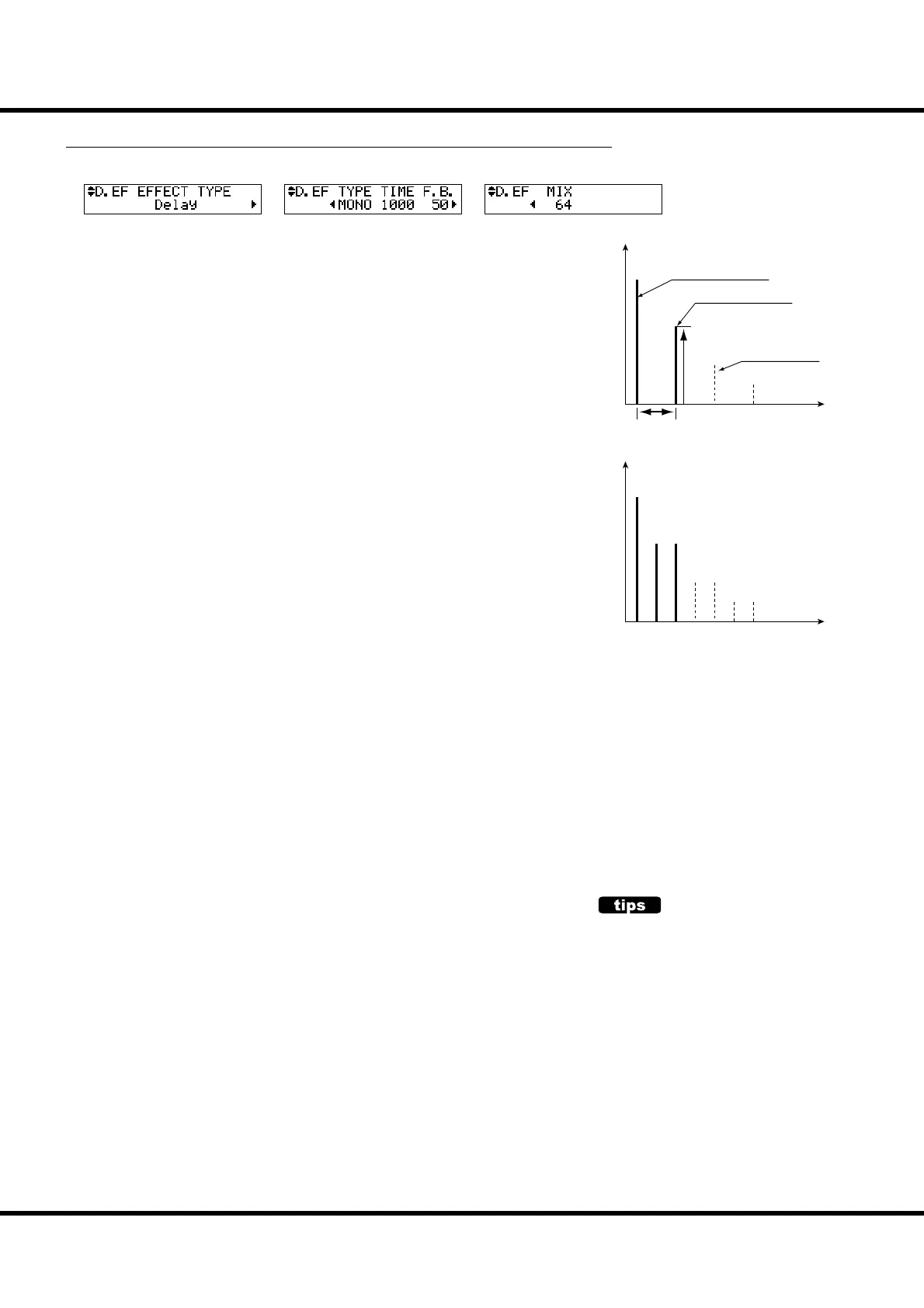
❻ DELAY - TYPE
Select the type of delay here.
MONO:
A simply delayed sound.
RtoL, LtoR:
The delay is alternated in the stereo eld. At RtoL the delayed sound comes from the right,
and at LtoR from the left. Your results may vary when used in a mono idiom, or through a
Leslie Speaker.
❼ DELAY - TIME
Adjusts the delay time. It is linked with the [EFFECT AMOUNT] on the top panel.
e setting range is 10 to 1000 ms.
❽ DELAY - FEED-BACK
Sets the repetition amount of the e ect sound.
e setting range is 0 to 127. e repetition becomes greater as the value is increased.
❾ DELAY - MIX
Adjusts the volume balance between the “dry” and the e ect sound.
e setting range is 0 to 127. At 0, only the “dry” is heard. e e ect level becomes
greater as the value is increased. At 64 the ratio between the “dry” and the e ect
sounds becomes 1:1. At 127 only the e ect sound is heard.
Time
Level
Time
Level
LR
LR
LR
TYPE = PAN
TYPE = MONO
Mix
Original Signal
Eect Signal
Feedback
Delay Time
Delay
is is for adding echo e ects.
NOTE: All the parameters in these modes are
Patch Parameters. They are recorded
into the Patch.
OVERDRIVE AND VOLUME
The Overdrive e ect is realized with ampli es the
audio signal. To get the e ect in full, raise the [EX-
TRA VOICE VOLUME] as possible.
If the sound is too loud by using overdrive e ect,
please let down the OUTPUT LEVEL of the Over-
drive.



 To Next Page