Skx
Owner’s Manual
82
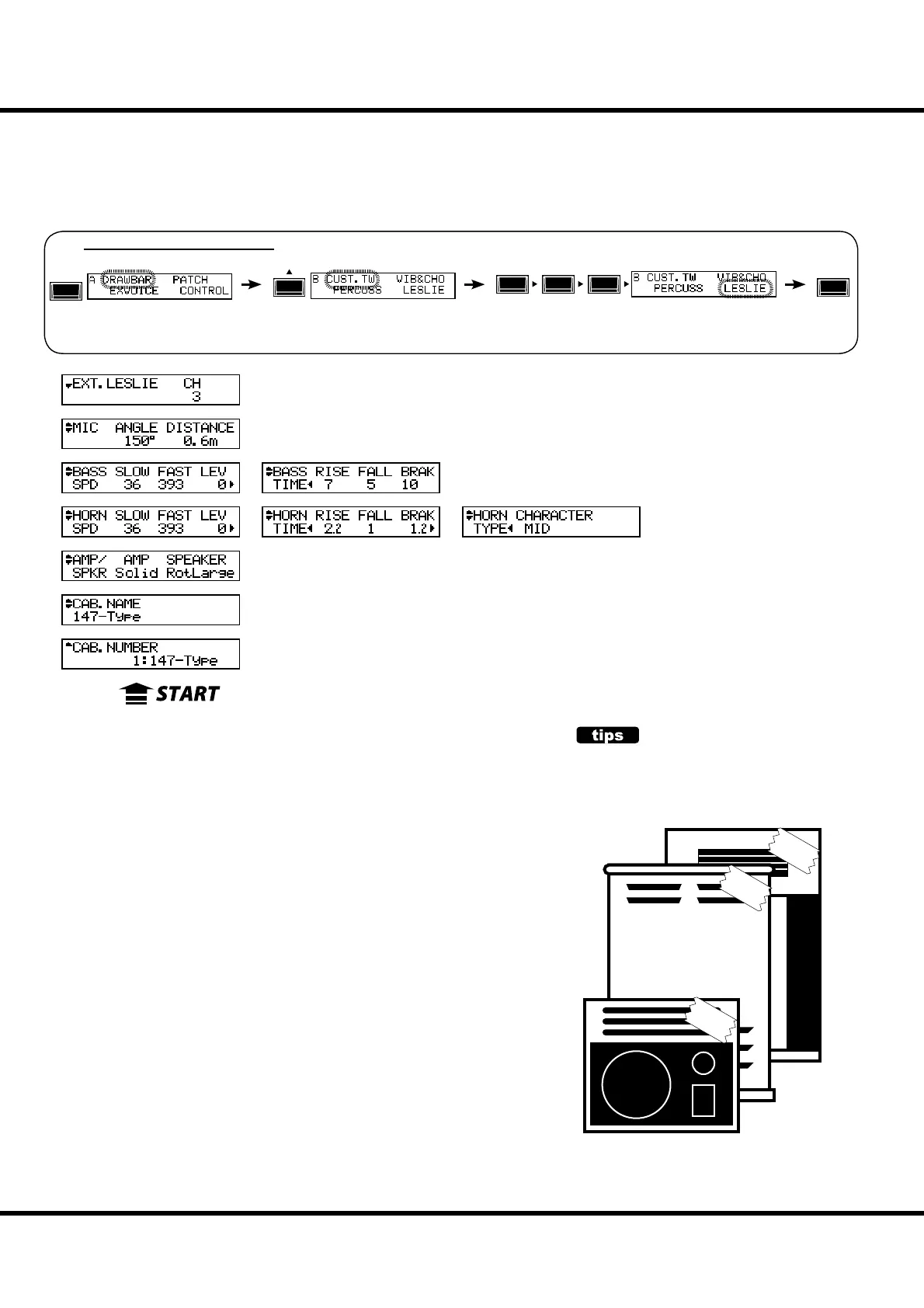
LESLIE
In this mode, the settings are made for the built-in Leslie E ect and
the External Leslie Speaker.
ere are many parameters related to the Leslie functions, to make
this easier to edit and use.
CABINET NUMBER
❶ CABINET NUMBER (P)
Selects the Cabinet Number to use in the Patch.
e setting range is P1 to P8 (non-rewritable) and U1 to U8 (rewritable). If the
Leslie parameter is changed, “*” is displayed on the left side.
LESLIE PARAMETERS
❷ CABINET NAME (L)
Sets the Cabinet Name by up to 10 characters.
Move the cursor with the [][] button and select letters with the [VALUE] knob.
e available characters include: Punctuation Marks (space - . ’ &), Numeric Char-
acters (0 - 9), Upper-case Letters (“A - Z”), and Lower-case Letters (“a - z”).
e name and following (L) parameters are not recorded until the Cabinet Macro is
recorded into memory (See the next paragraph.)
❸ AMP (L)
is is for setting the type of the virtual Power Ampli er.
Solid: Solid-state(transistorized) Ampli er
Tube: Tube Ampli er.
❹ SPEAKER (L)
is is for setting the virtual Speaker.
RotSmall: A small Leslie speaker, such as the Leslie 145
RotLarge: A large Leslie speaker, such as the Leslie 122
Station: A xed speaker, such as the Hammond PR-40
CONCEPT OF THE CABINET NUM-
BER
One Cabinet is equivalent to a virtual Leslie speak-
er made with the Leslie parameter.
This is a Patch parameter.
#1
#2
#3
or, keep pressing either of the [BYPASS], [STOP], [FAST] buttons for a few seconds.
See “Function mode” (P. 66) for operation details.
MENU/
EXIT
ENTER
e built-in Leslie parameters are grouped in macro-settings called
“CABINETS”. You select the CABINET NUMBER in the Com-
bination Presets where this selection is saved as part of the Preset.
To locate this mode:
❶
❷
❸
❹
❺
❻
❼
❽
❾
❿
⓫
⓬
⓭
⓮
⓯
⓰
⓱
⓲
⓳
⓴



 To Next Page