142
17.4 ADVANCED OPTIMIZATION SETTINGS
IMPORTANT NOTE: Change these settings from the recommended settings only if you know what
you’re doing. Random changes can lead to unexpected results.
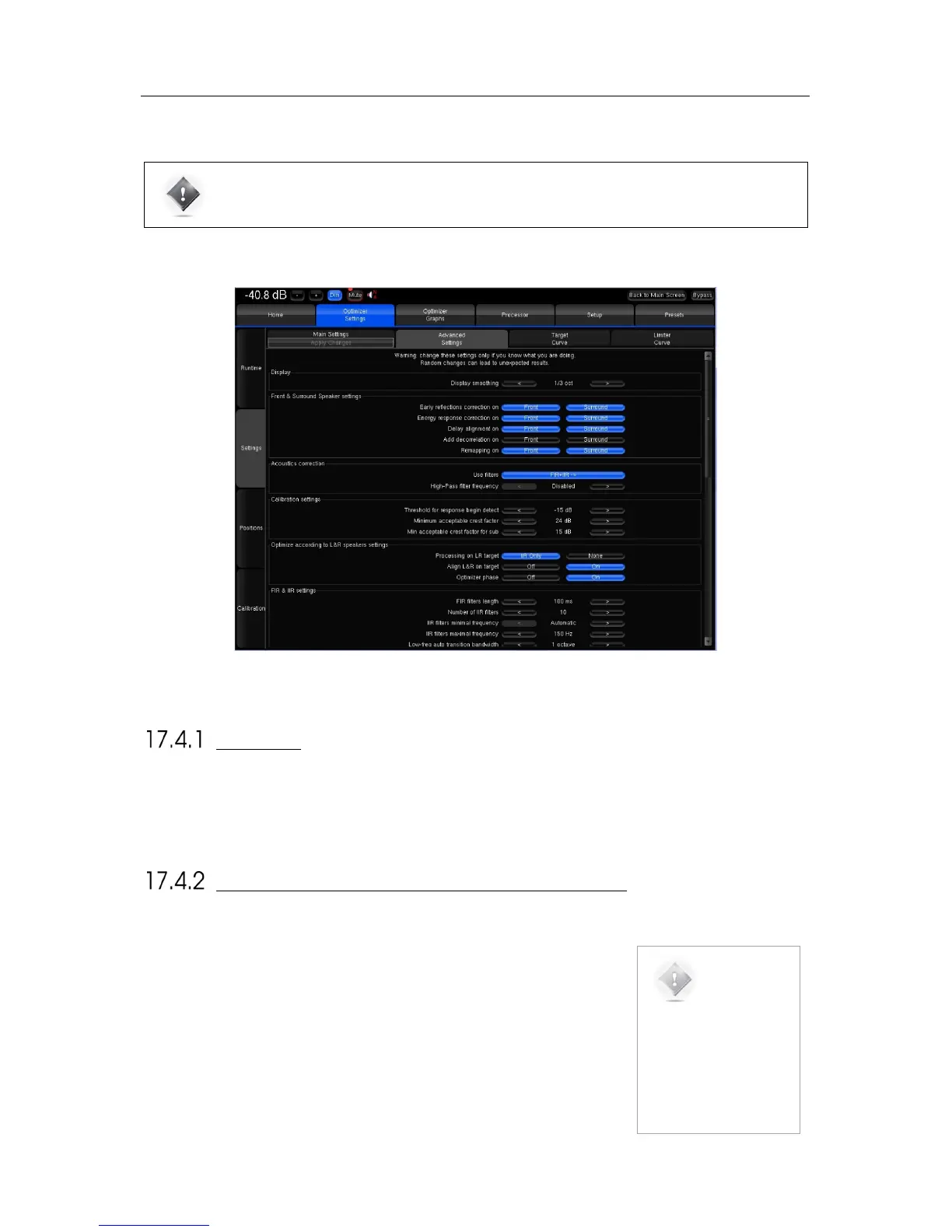
The SDP-75 provides a large set of advanced settings in the Optimizer Settings/Settings/Advanced Settings page:
Figure'104:'Advanced'optimization'settings'
DISPLAY
The Display smoothing defines the smoothing value used to display the before and after Amplitude Response in the
Optimizer Graphs as well as in the pdf document generated while saving preset. Its default value is (1/3 octave). A smaller
value, such as 1/12 octave, can be used to display more details in the frequency response.
FRONT & SURROUND SPEAKER SETTINGS
The following features can be separately enabled/disabled for the front speakers
and for the surround speakers:
• Early reflections correction;
• Energy response correction;
• Delay alignment, e.g. surround delay alignment may or may not be required
depending on the application and recommendations;
• Add decorrelation: the Optimizer can apply a decorrelation algorithm to the
surround channels in order to simulate the diffuse field created by a belt of
surround speakers;
NOTE: Front
speakers are defined as
those whose azimuth is
below 90 degrees.
Conversely, Surround
speakers are defined as
those whose azimuth is
above 90 degrees.



 To Next Page