EasyManua.ls Logo

JBL SDP-75 - Presets Selection; Access to the Front Panel Menu; Light Button; Level and Delay Adjustment Bypass

JBL SDP-75
157 pages
Print Icon
To Next Page IconTo Next Page
To Previous Page IconTo Previous Page
Loading...
57
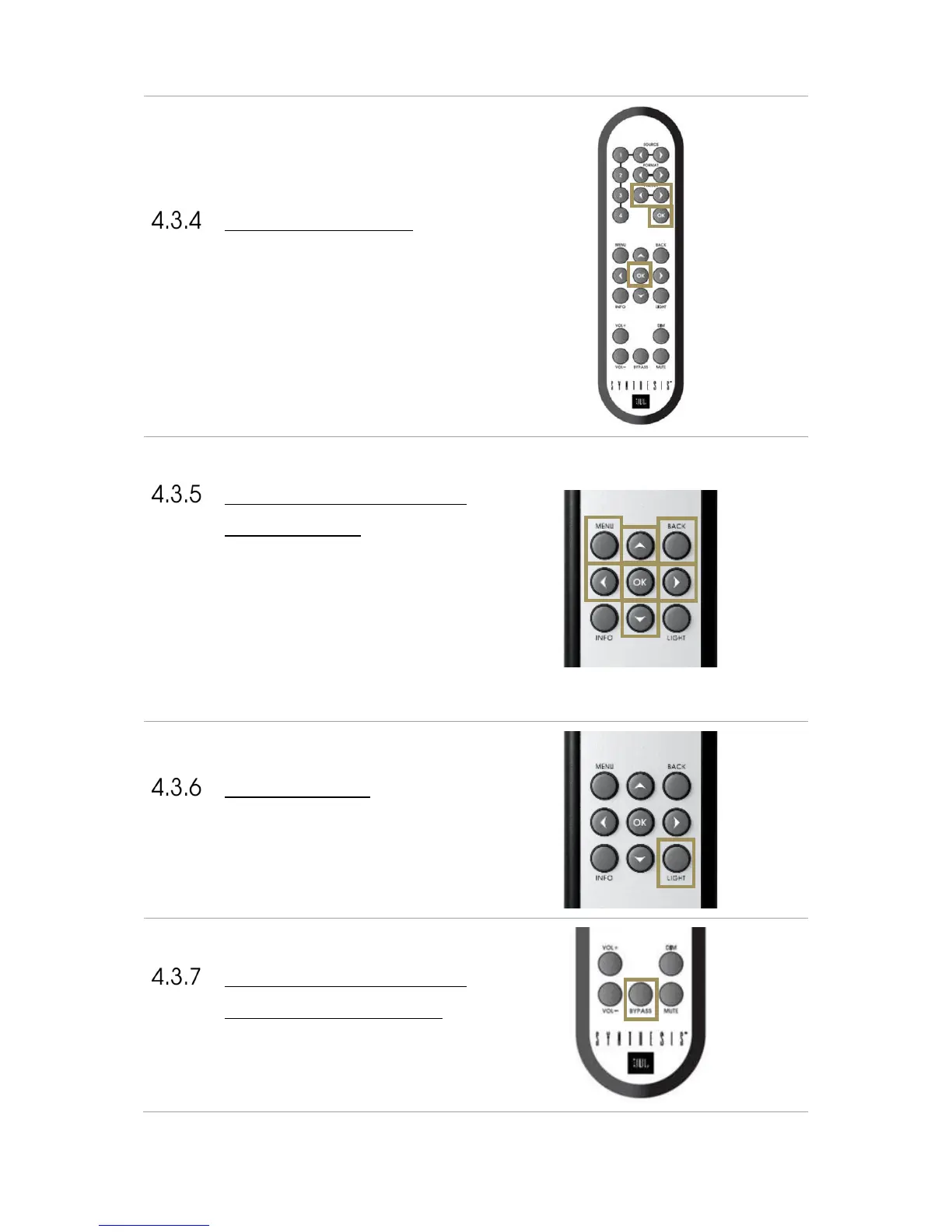
PRESET SELECTION
To switch to another preset:
1. Browse through the presets with the Preset arrow
buttons
2. Push the OK button.
ACCESS TO THE FRONT
PANEL MENU
To access to the Menu :
1. Press on Menu button to access to the Menu
2. Browser with
!
Left,
"
Right,
#
up and
$
down
arrows
3. Validate with the OK button
4. Return with the Back button
LIGHT BUTTON
The Light button allows to turn off the front panel
screen’s backlight. Pressing on another button will
temporarily turn on the backlight to let you know the
settings you are changing. Pressing the Light button will
turn the backlight on again.
LEVEL AND DELAY
ADJUSTMENT BYPASS
The Bypass button allows you to toggle on and off the
Optimizer.
Browse through
Presets
…and confirm with
‘OK’ button
Access to the
Menu
…Browse with the
arrows…
Confirm
with OK
Return with Back
Button
Turn off or on the
backlight

Table of Contents

Related product manuals