85
8.5 SELECT AN INITIAL SPEAKER LAYOUT
We recommend you to start by selecting the initial layout which is most similar to your specific speaker layout, and then
add/remove speakers. Alternatively, you could also create a speaker configuration from scratch.
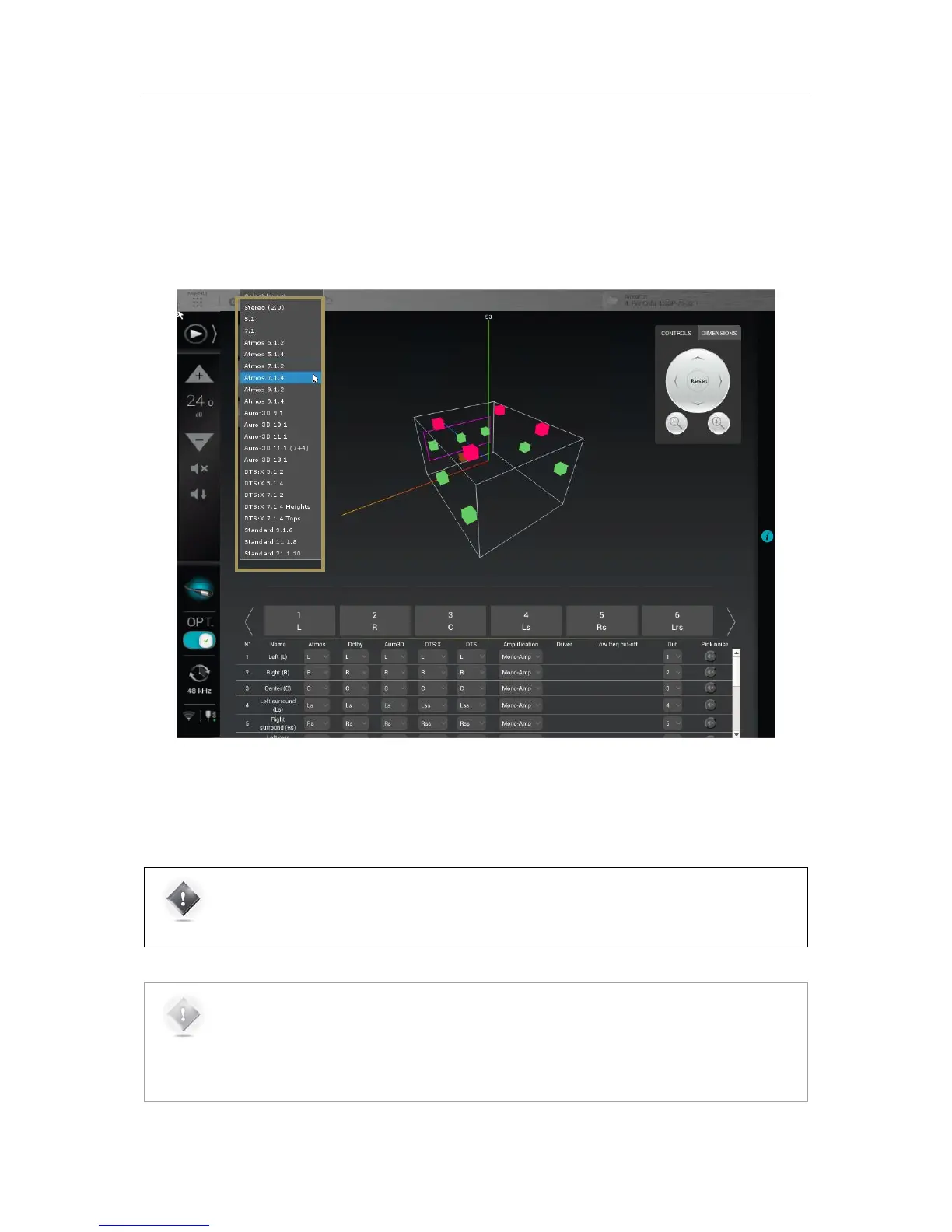
To select an initial speaker layout:
• Go to the Speaker/Room setup tool and click on the Initial Layout drop-down list
• Select the layout template which is most similar to your speaker system.
Figure#60:#Selecting#an#initial#speaker#layout#
If your system is not in the list, you can either select a smaller system and add the missing speakers, or select a bigger
system and remove the extra ones.
IMPORTANT NOTE: it is critical to distinguish speakers from channels because one speaker may be
used to reproduce multiple channels, depending on the audio format which is being played. Therefore,
your final speaker configuration on the SDP-75 must include the same number of amplification
channels as in your audio system.
NOTES:
The Speaker/Room setup tool cannot display more speakers than the total number of available outputs
in your SDP-75 configuration. There are 16-channel, 24-channel and 32-channel SDP-75 models. For
example, if you have a 24-channel SDP-75 model, the Speaker/Room setup tool will display up to 24
speakers.
Channel assignment for each format is one of the next steps.



 To Next Page