91
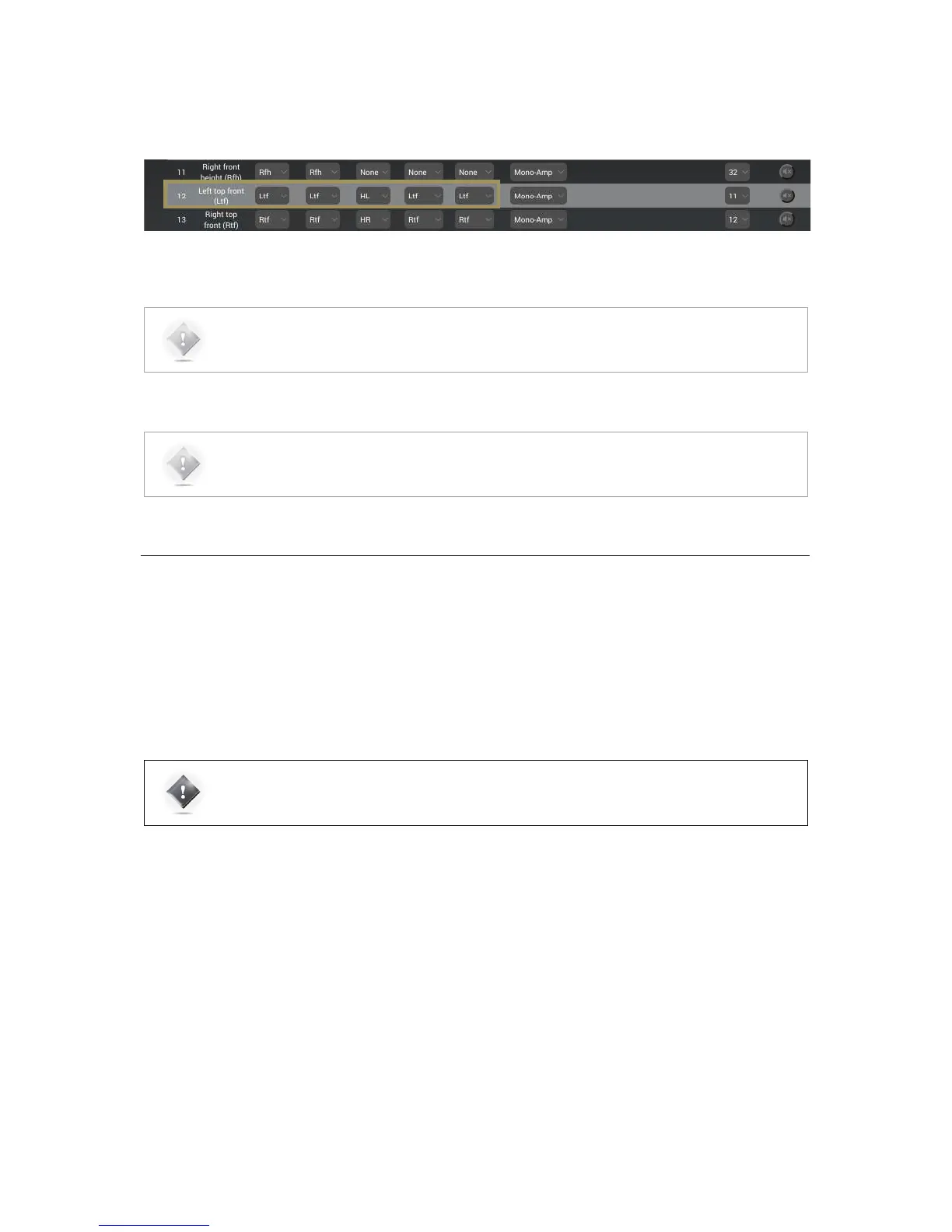
In the example below, the SDP-75 has automatically assigned the Left top front (Ltf) channel, initially specified as an
Atmos speaker, to play the Height Left (HL) channel of Auro3D content.
Figure#64:#Channel#mapping#for#the#Left#top#front#(Ltf)#channel#
8.11 SENDING PINK NOISE TO VERIFY THE
ROUTING OF THE SPEAKERS
As soon as the detailed configuration for each speaker is completed, it is critically important to verify that the routing of
the channels to the speakers is correct, and to correct any errors. Otherwise the consistency of the sound reproduction
will be compromised.
IMPORTANT NOTE: This procedure only helps to verify that the routing is correct from the SDP-75 to
the speakers. In addition to this procedure, when a new source is connected to the SDP-75, you should
also verify that the routing is correct from the source to the SDP-75.
To verify the routing of each speaker:
• Select the speaker by clicking in the 3D view or by selecting the corresponding line in the speaker table;
• Click on the Pink Noise icon;
• Locate the speaker through which the pink noise is being played;
• Verify that the playing speaker matches the selected channel in the SDP-75’s Speaker/Room setup tool;
• If there is no match, fix the routing of the speaker by modifying the assigned Output.
NOTE: The channel labels and speaker positions of each format are available in the appendix of this
document.
NOTE: To configure an array of speakers, please refer to the next chapter : Speaker Arrays



 To Next Page