76
7.5 SWITCHING ACOUSTICS CORRECTION
AND LEVEL / DELAY ALIGNMENT ON/OFF
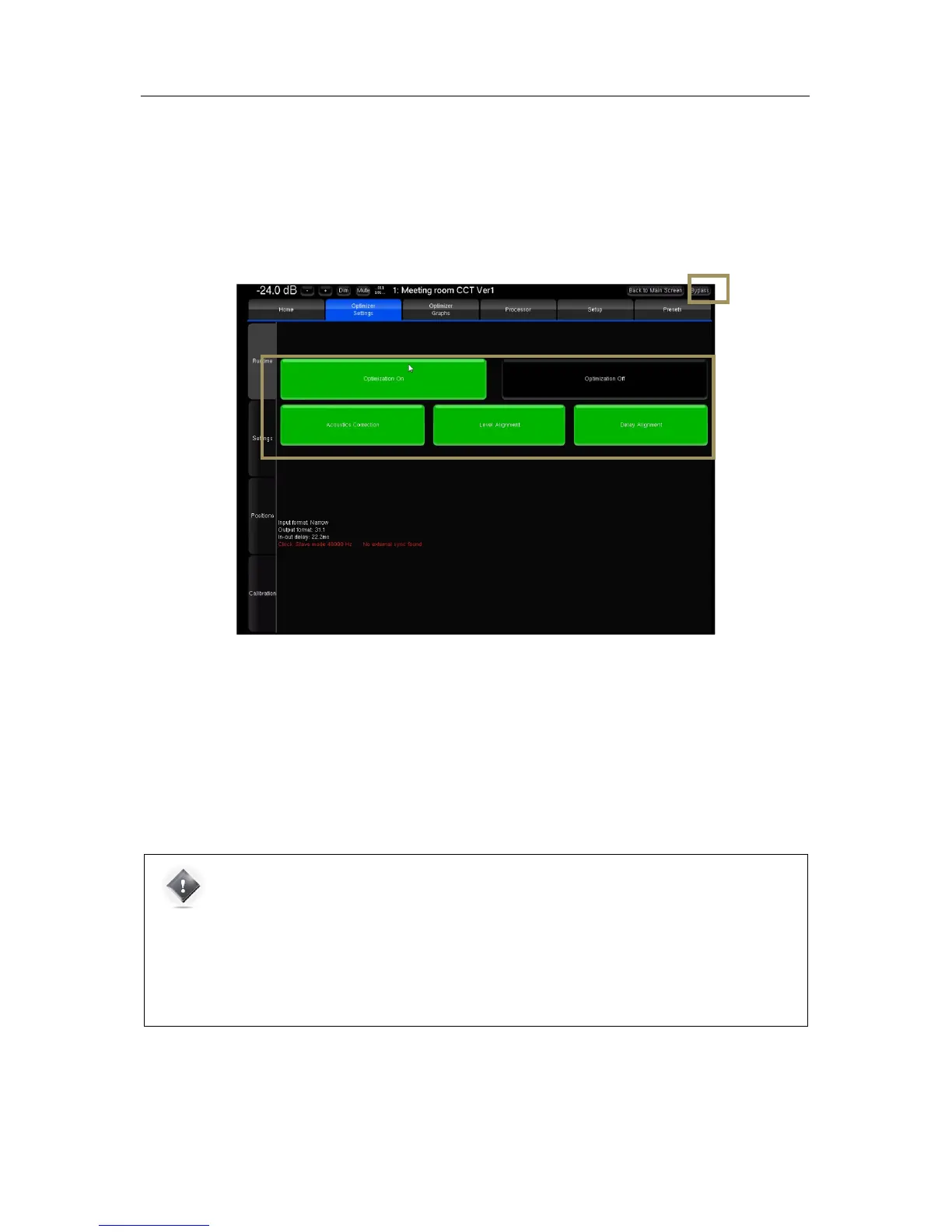
The SDP-75 offers two different ways to compare the sound of your system with or without all Optimization, or selectively
Acoustics Correction, Level Alignment, and Delay Alignment:
• The Bypass button, which is always visible at the top right corner of the Advanced Settings user interface.
• The Optimization On / Optimization Off buttons in the Optimizer Settings/Runtime page.
Figure#53:#switching#optimization#on /o f f#in #th e #A d v anced#user#int erf a ce #
Optimization On/Off buttons: the buttons in the Optimizer Settings/Runtime page allow the user to selectively
enable/disable the different corrections applied by the Optimizer.
These options are also available in the Main user interface in the Optimizer page.
Bypass button: the bypass button located at the top right corner of the graphical user interface is equivalent to the
Optimization Off button
IMPORTANT NOTE: the Optimization On/Off and Bypass buttons disable the automatic compensation
but manual correction is still applied :
• FIR and Graphic EQs
• Input and output gains
• Outputs delays
• Bass Management
• Active Xovers



 To Next Page