OPERATION DETAILED CONTROLS AND GAUGES
3-47
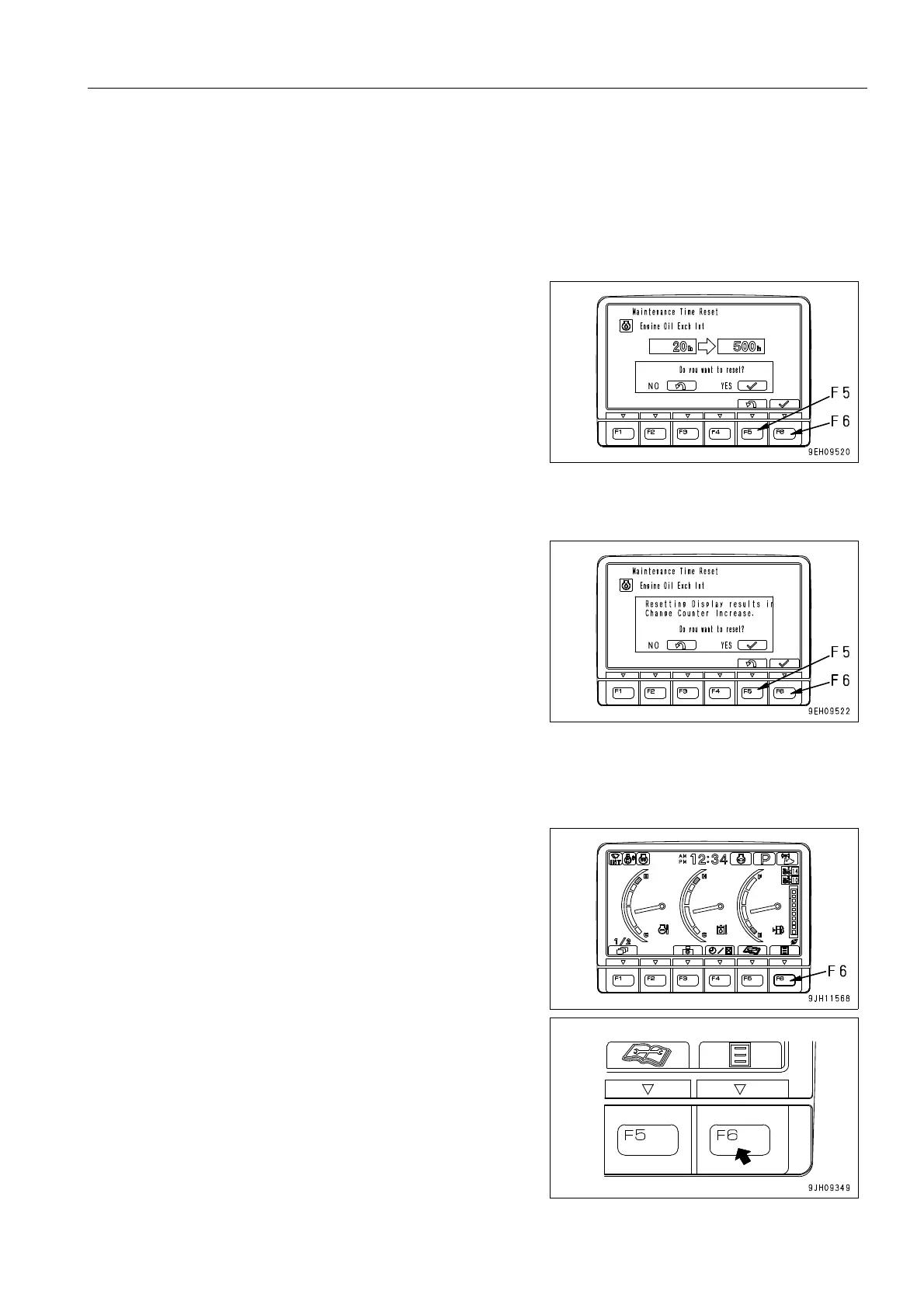
Operations on Maintenance Interval Reset Screen
On the maintenance list screen, if switch F6 is kept pressed for at least 1.5 seconds, the screen changes to the
maintenance time reset screen.
Reset the remaining time on this screen.
1. Press switch F6 when the reset screen is in the condition
shown in the diagram on the right. The screen switches to
the reconfirmation screen.
It is desired to cancel the reset, press switch F5. The screen
returns to the maintenance list screen.
On the reset screen, if no switch is operated for more than 30
seconds, the screen automatically switches to the maintenance
list screen.
2. The reconfirmation screen shown on the right is displayed.
3. If switch F6 is pressed again, the remaining time is reset
and the screen switches to the maintenance list screen.
It is desired to cancel the reset, press switch F5. The screen
returns to the maintenance list screen.
On the reconfirmation screen, if no switch is operated for more
than 30 seconds, the screen automatically switches to the
maintenance list screen.
User Mode Selector Switch 3
When the switch F6 is pressed, the monitor display screen
switches to the setting mode screen for the machine.











 To Next Page