System Settings
3-58
3
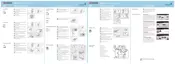
Press [b], [c], [d] and [e] in order.
4
When entering all characters are complete, press the [End] key.
Entering Characters When Using Document Management Functions
Enter text as follows for form names, document names, and so on.
Input Screen
1 Character display: Displays characters entered.
2[][]: Press these keys to move the cursor left or right.
3 [Back] key: Press this key to delete the character to the left of the cursor.
4 [Stop] key: Press this key to stop entering text and return to the previous screen.
5 [Del.] key: Press this key to delete all characters to the right of the cursor at once.
6 [Shift] key: Press this key to toggle between entry of capital letters and lowercase letters.
7 [Space] key: Press this key to enter a space.
8 [End] key: Press this key to confirm your entry. The touch panel will return to the previous
screen.
NOTE: Use the numeric keys to enter numbers.
Entering Characters
The following is an example of how to enter ‘abcde’ using the keyboard.
1
Press the [Shift] key to select lowercase
letters.
Nam e to d i s p l ay
Capital
Stop
Letter Nu m ./ S ym. Space
Char.Limit:32 including #
AllDel.
Char.Limit:32 including #










 To Next Page