EasyManua.ls Logo

Kyocera TASKalfa 620 - Page 23

Kyocera TASKalfa 620
212 pages
Print Icon
To Next Page IconTo Next Page
To Previous Page IconTo Previous Page
Loading...
Copying Functions
1-17
2
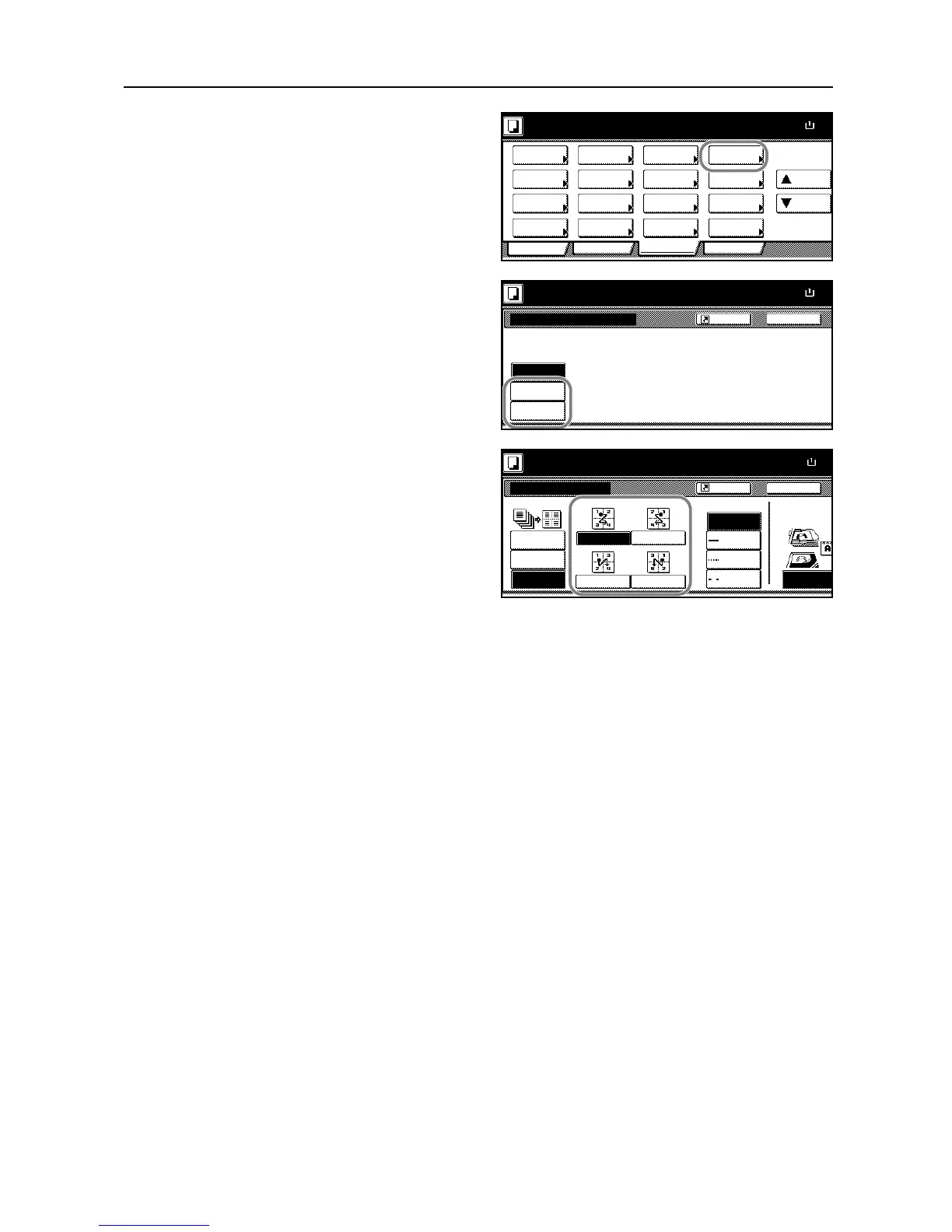
Press [Combine] ([Merge copy]).
3
Press [2 in 1] ([2-in-1]) or [4 in 1]
([4-in-1]).
4
Select the desired layout.
5
Select the type of the lines to indicate page boundaries.
6
Place the originals in the document processor or on the platen and press the Start key.
If the original is placed on the platen, Scan next original(s) will be displayed. Place the next original
and press the Start key.
After scanning all originals, press [Scanning finished] to start copying.

Ready to copy.
11x8
Paper Size
Program
Functi on
User choiceBasic
Density Zoom
Cover
Booklet
Up
Continuous
Scan
Mixed Size
Originals
Border
Paper
Original
Duplex
Margin/
Centering
Collate/
Offset
Original
Size
Page #
Combine
Fo rm
Overlay
Down
100%
Selection
Erase
Im ag e
BackCombine
Ready to copy.
Off
2 in 1
Paper Size
11x8
4 in 1
2 or 4 original pages can combine
one page.
100%
Shortcut
Back
Select Original
Off
2 in 1
Orientation.
Top Edge
Combine
Ready to copy.
Layout
4 in 1
Paper Size
11x8
Border line
Solid
None
Dotte d
Position
50%
Shortcut
Top
Mark

Table of Contents

Other manuals for Kyocera TASKalfa 620

Related product manuals