X75HD/X75SD Installation and Operation Manual 37
Chapter 2: Applications
Table 2-1. Input Video Processing for Mobile or Outside Broadcast Vehicles
Description Products
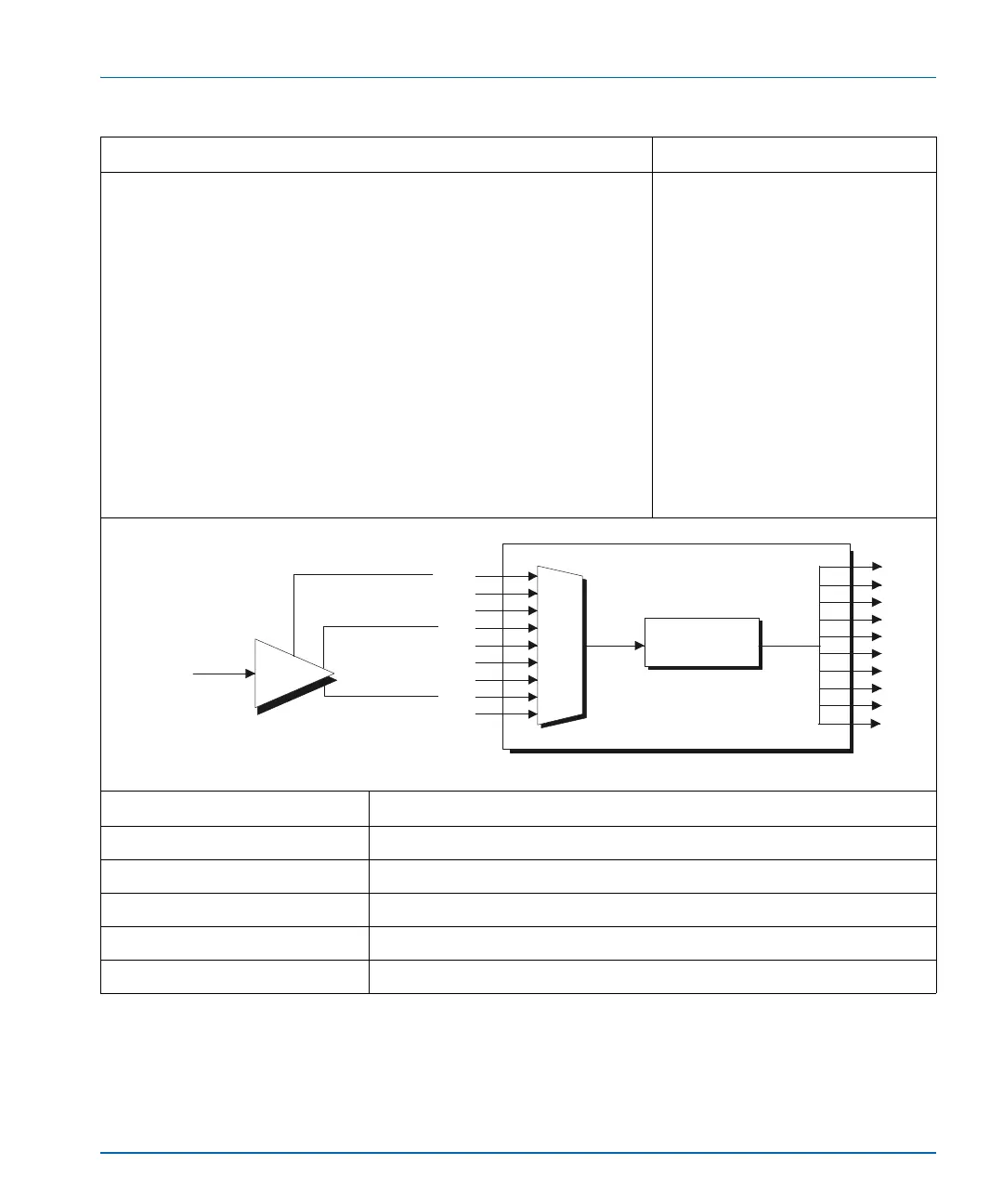
The X75HD auto-detects a composite, SD-SDI or HD-SDI input and
then sends it through the video processing engine to provide multiple
types of outputs.
The X75HD automatically converts any composite, SD-SDI or HD-SDI
signal to the required output format. A single BNC connector on the
bulkhead of a mobile or outside broadcast vehicle feeds a wideband
distribution amplifier. The wideband distribution amplifier feeds into
the composite, SD-SDI and HD-SDI inputs of the X75HD. The X75HD
is set up to auto-detect any of the three types of inputs and provide
processed video to all of the outputs.
You can preset the HDTV output to provide the required format (for
example, 1080i or 720p) for production.
X75HD with these options:
• X75OPT-A3D analog video
input option
• INT-EX6X1 (16 channel video
wideband distribution amplifier)
Required Settings Navigation Path
I/P Video Mode Video Setup>Routing Setup>Auto Detect
Analog Video Source Video Setup>Analog Input (A3D or PQM)>Composite
Analog In Video Setup>Routing Setup>Auto Detect Setup>Normal
SD 1 In Video Setup>Routing Setup>Auto Detect Setup>Normal
HD 1/HD-Fiber In Video Setup>Routing Setup>Auto Detect Setup>Normal
CBVS
Synchronizer,
up/down/cross
conversion
X75HD
SVID
SD1
HD1
HD2
HDF
SD2
DV
CAV
BNC
(Bulkhead)
INT-EX6X1
AUX
CBVS
SVID
RGB/S
HD
ENET
HDF
SD
DV
CAV



 To Next Page