Chapter 10: Editing Cues and Using Track Modes
Software Version 3.05
131
tracking levels transfer to the new cue to allow hard levels to track into the new
cue location.
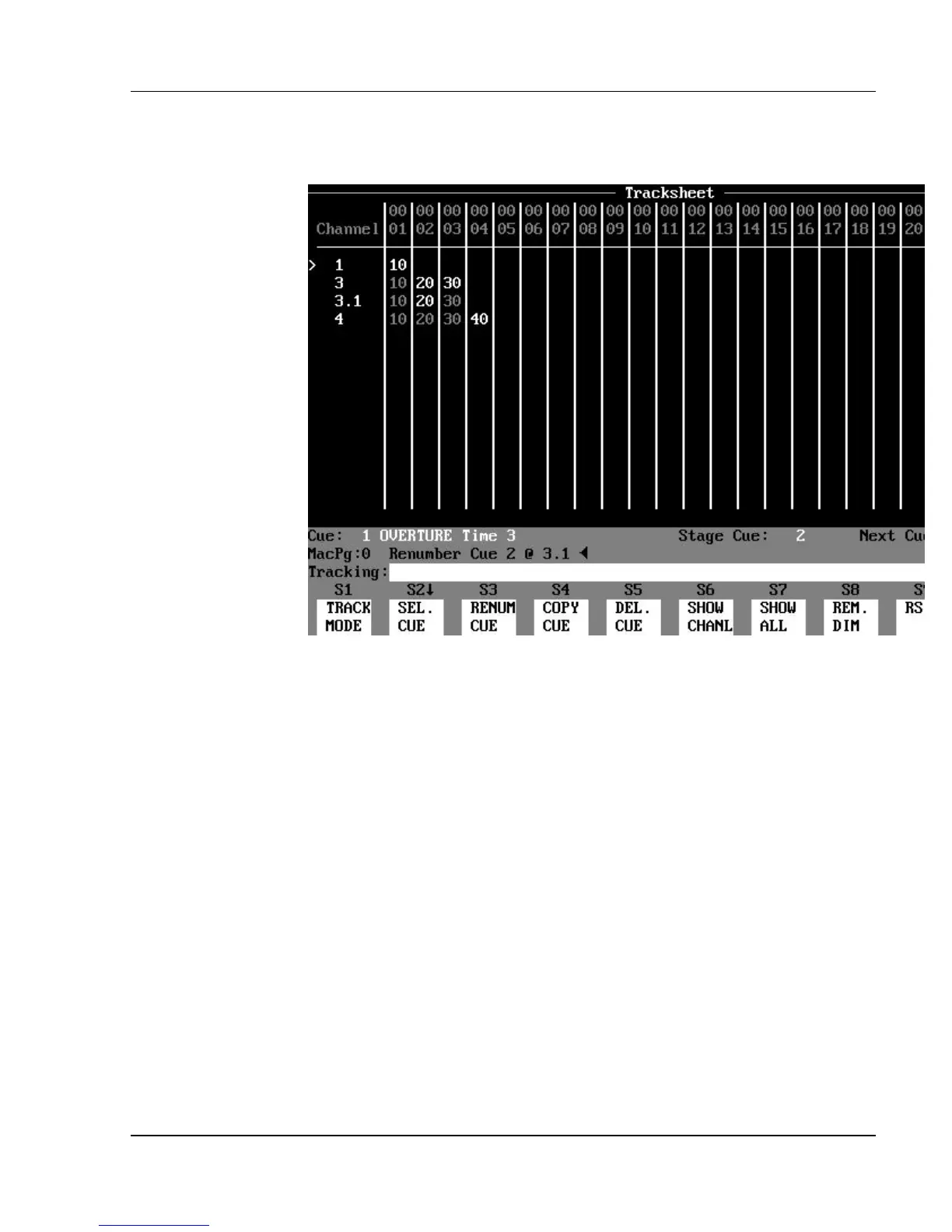
Figure 10.5.b, Renumbering Cues in Tracking Mode (after)
In the example above, you can see the results of cue 2 being renumbered as cue
3.1 while in Tracking mode. The results are described below:
In cue 3.1:
?? Channel 1 remained a soft level and did not change value.
?? Channel 2 remained a hard level at 20%.
?? Channel 3 remained a soft level and changed value from zero to 30%.
(Don’t forget-- no level
shown in Tracking and Cue Only modes means a tracking zero!)
?? Channel 4 remained a soft level and did not change value (stayed at
zero).
In cue 4:
?? No changes occurred (all level values are the same for cue 3.1 and cue
3), otherwise the soft levels
in channels 1 - 3 would have taken on whatever new levels were in cue 3.1.



 To Next Page