4. Parameters
4-47
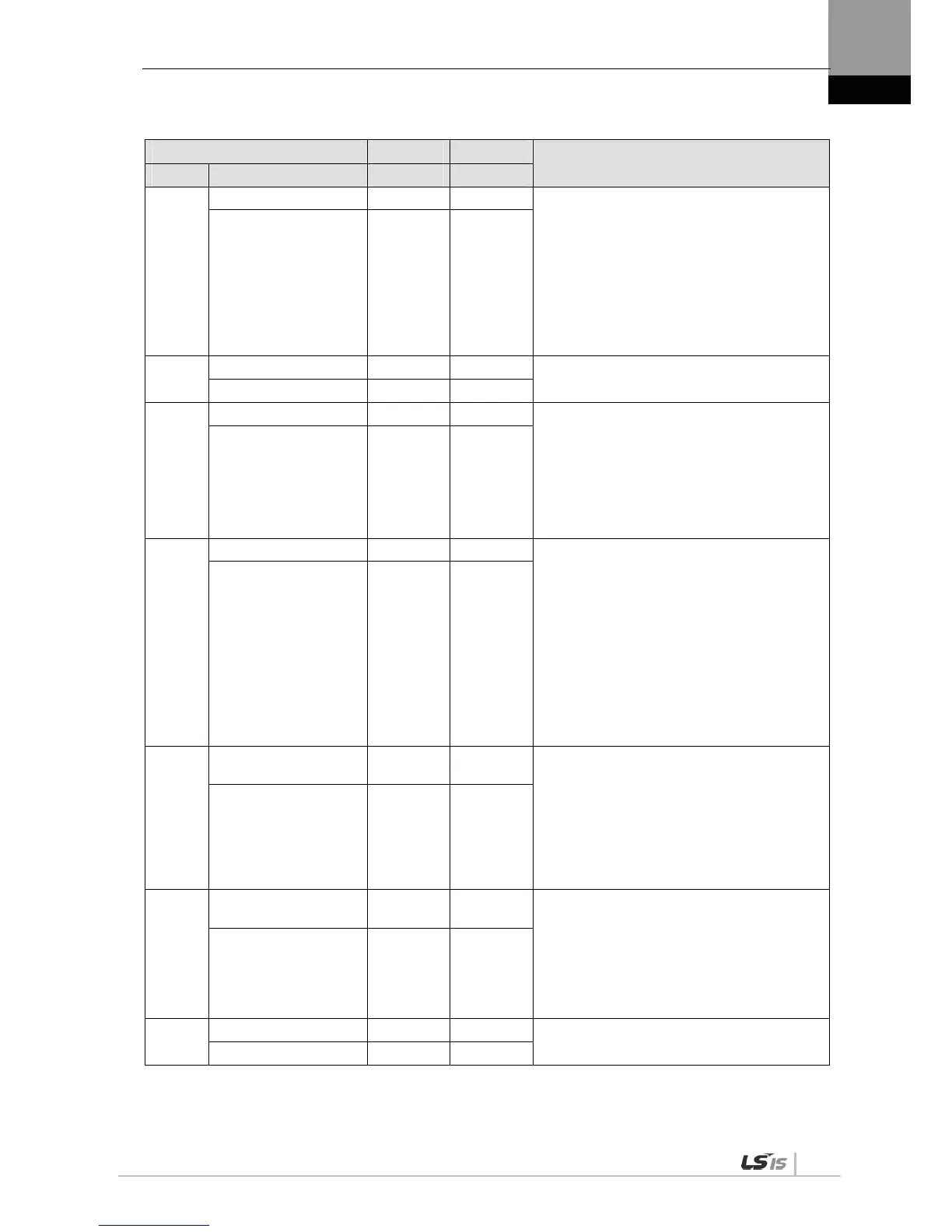
Parameter Unit Initial
Details
Code Name Minimum Maximum
Cn-03
Get alarm history - - Check the saved alarm code history.
[UP] or [DOWN]: Reads alarm codes.
E.g.) Recent first history [AL-42]:
RST_PFAIL occurs.
01: Latest alarm
20: 20th previous alarm
(Details: Refer to "5.2 Handling.")
Get alarm history - -
Cn-04
Alarm history clear - -
Deletes the entire saved alarm code history.
(Details: Refer to "5.2 Handling.")
Alarm history clear - -
Cn-05
Auto gain tuning - - Performs automatic gain tuning operation.
Related parameters are as follows.
[P1-22]: Auto gain tuning speed
[P1-23]: Auto gain tuning distance
(Details: Refer to "5.2 Handling.")
Auto gain tuning - -
Cn-06
Z search - - Perform Z detection.
[SET]: Mode entering and servo ON status
[UP]: Phase Z forward search
[DOWN]: Phase Z reverse search
Related parameters are as follows.
[P3-07]: Sets Z-phase search operation
speed [RPM].
(Details: Refer to "5.2 Handling.")
Z detection - -
Cn-07
Input contact forced
ON/OFF
- -
Forcibly turns on/off the input contact
temporarily.
[UP]: (A),(8),(6),(4), and (2) signals forced
ON/OFF
[DOWN]: (9),(7),(5),(3), and (1) signals
forced ON/OFF
[MODE]: Move to another digit.
(Details: Refer to "5.2 Handling.")
Forced input test - -
Cn-08
Output contact forced
ON / OFF
- -
Forcibly turns on/off the output contact
temporarily.
[UP]: (4) and (2) signals forced ON/OFF
[DOWN]: (5),(3), and (1) signals forced
ON/OFF
[MODE]: Move to another digit.
(Details: Refer to "5.2 Handling.")
Forced output test - -
Cn-09
Parameter initialization - -
Initializes parameter data.
(Details: Refer to "5.2 Handling.")
Parameter Initialization - -


 To Next Page
 Loading...