Section 4 –
DESCRIPTION ON OUTRIGGER AND CRANE SAFETY DEVICES
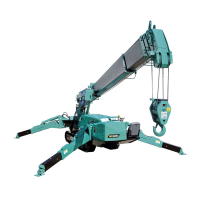
Mini-Crawler Crane M A E D A
4-30 1/2019 MC405C-3
The table below shows what kind of "display and warning" will be issued and the resulting action of the
safety devices when this machine is used in the standard condition.
The standard operation sequence shown here is as follows.
Check before setting outriggers => Outrigger setting operation => Crane operation => Crane stowing
operation => Outrigger stowing operation => Machine travelling operation
The columns of the table below are described below.
Standard Operation Sequence,
Machine Status
Display and Warning Activation of Safety Devices
This field shows the standard
operation sequence and the
operation position of operation
levers and switches, and machine
This field shows the "display" and
"warning" issued as a result of the
operation.
This field shows the name of
the safety device that prevents
the resulted error and its
action.
Check Before Setting Outriggers
Standard Operation Sequence,
Machine Status
Display and Warning Activation of Safety Devices
• Travelling lock lever at
Check if the machine is in the
posture of stowing the boom
• Fully retract the boom
• Boom horizontal stowing position
• Boom slewing stowing position
• Boom stowing lamp on display
panel ON
[Outrigger un-set warning lamp
flashes]
[Working status lamp (red) ON]
Outrigger interlock device
• All the outrigger operations
stop if the boom stowing
lamp does not light up.
Outrigger Setting Operation
Standard Operation Sequence,
Machine Status
Display and Warning Activation of Safety Devices
1. Extend the outriggers.
• Rotate the outrigger rotary and
secure them at the specified
position with the position pin
• Work selector switch "Outrigger"
• Outrigger extension switches
• Extension lamps on display panel
ON
[Outrigger un-set warning lamp
flashes]
[Working status lamp (red) ON]
Outrigger interlock device
• All the outrigger operations
stop if one of the four
extension lamps does not
light up.
2. Set the outriggers.
• Outrigger grounding switch
"OUT"
• Check the level with the level.
• Setting lamps on display panel
ON
[Outrigger un-set warning lamp
OFF]
[Working status lamp (red) OFF]
When the machine tilts for 3
degrees or more during outrigger
• Warning buzzer sounds
continuously
Crane inclination alarm device
is activated


 To Next Page