Section 5 – GENERAL MACHINE MAINTENANCE Mini-Crawler Crane M A E D A
5-58 1/2019 MC405C-3
Remove / Install Battery
CAUTION: Verify that the battery does not
move after securing the battery. If it moves,
secure it again.
Removal
1. Remove the machinery cover as described
in "Removing Machinery Cover" on page 5-
18.
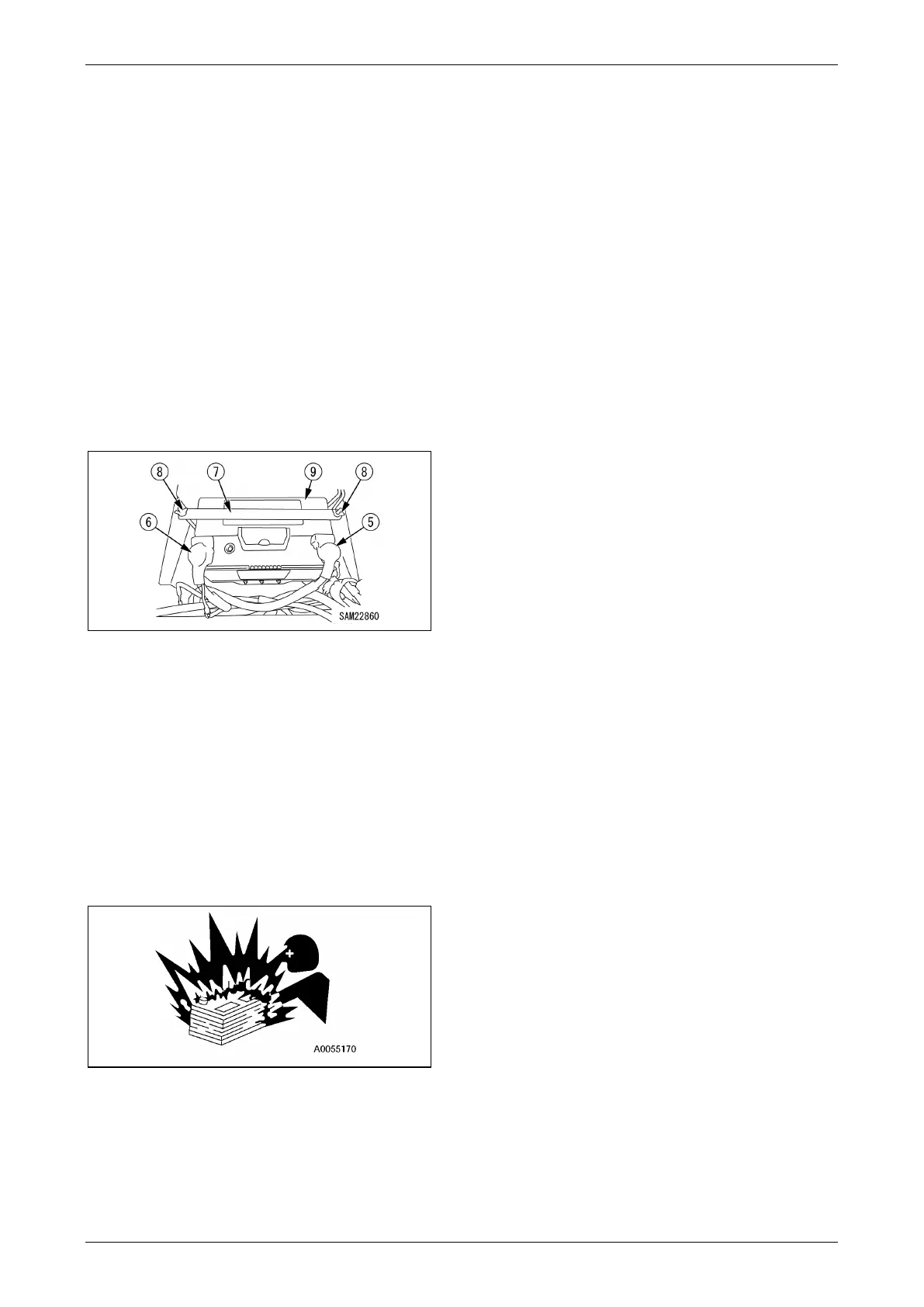
2. Disconnect the (-) terminal (5) on the ground
side first and then the (+) terminal (6) to
disconnect the battery cable.
3. Remove the wing nut (8), battery fixing
brackets (7), and then remove the battery
(9).
Fig. 5-123
Reattach the machinery cover as described
in "Installing Machinery Cover" on page 5-
18.
Installation
• Reverse the removal procedure to install the
battery.
NOTICE: Connect the (-) terminal (5) on the
ground side last when connecting the battery.
Cautions on Charging Battery
Fig. 5-124
Improper handling when charging the battery
may cause the battery to explode. Follow the
manuals attached to the machine and the
charger, and always observe the followings.
• Adjust the charger voltage to suit the voltage of
the battery to charge. Mistake in adjusting the
voltage may cause explosions due to overheat
and ignition of the charger.
• Securely fix the (+) charge clip of the charger to
the (+) terminal of the battery, then securely fix
the (-) charge clip to (-) terminal of the battery.
• Set the charge current to no more than 1/10 of
the rated capacity of the battery.
• Do not use quick charging.
• Excessive charge current may cause leap fire
and explosion caused by fluid leak or fluid
deficiency.
When charging the battery mounted to the
machine:
• Abnormal voltage may be applied to the
alternator, resulting in the breakage.
Disconnect the battery terminal wires before
charging the battery.
• Stop charging when the battery was
overheated (fluid temperature exceeded
45 °C).
• Stop charging promptly once the charging is
completed.
Charging even after the charging is completed
will;
(1) overheat the battery
(2) reduce the electrolyte level
(3) cause failures in battery
• Never inverse the connection of [(+) terminal
and (-) terminal]. Doing so can cause damage
on alternator.
• Remove the battery cable when handling the
battery other than for battery electrolyte level
check and specific gravity measurement.



 To Next Page