Section 4 – MODE SETTING OF THE TRANSMITTER Mini-Crawler Crane M A E D A
4-100 1/2019 MC405C-3
MODE SETTING OF THE
TRANSMITTER
This device provides the "A MODE" in which the
initial values of the Transmitter are established,
the "OUTRIGGER MODE" in which the
outriggers are set or stowed, and the "CRANE
MODE" where the Crane is operated. This
device is designed to switch to the applicable
mode for the operation by the Transmitter.
A Mode
WARNING!
• Before entering into A MODE, always turn
the main switch of the Receiver to the OFF
position.
• Before the setting of values for A MODE,
ensure that "A MODE" is correctly indicated
in the LCD screen. Otherwise, un-expected
motion of the Crane may result a serious
accident, due to entry of values in the other
mode, by mistake.
Opening A Mode Screen
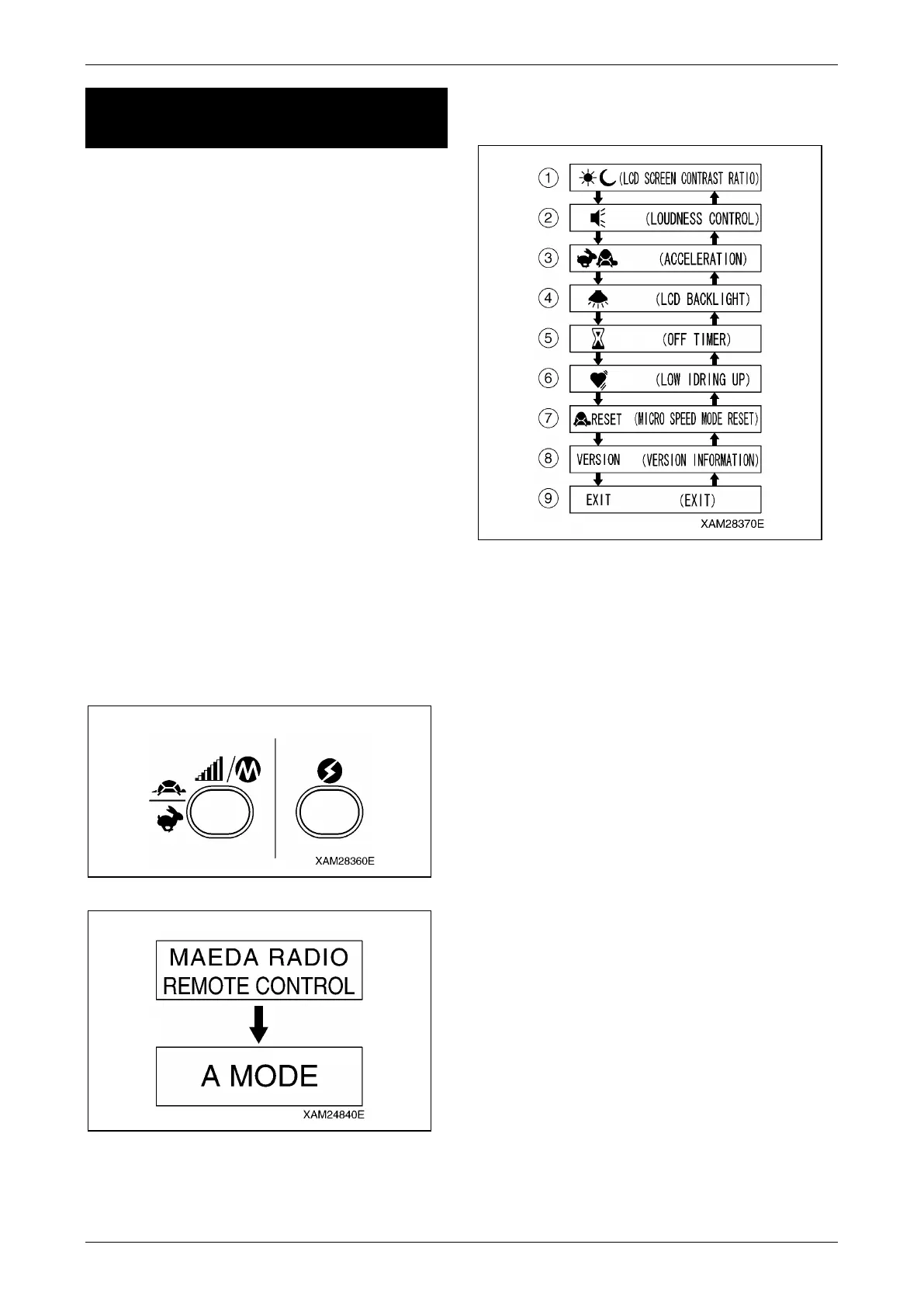
Push the Speed/Mode button and Power switch
jointly for 2 seconds. A message as "A MODE"
appears in the LCD screen for 2 seconds.
Fig. 4-258
Fig. 4-259
Messages in the A Mode Screen
Refer to the figure below for the A MODE screen:
Fig. 4-260
It contains eight function items ((1) to (8)) and the
Exit command ((9)).
NOTICE: In the A MODE, following applicable
items are adjustable, as required:
(1) "Contrast ratio" of LCD screen
(2) "Loudness control"
(3) The "Engine speed limit", controllable by the
Accelerator lever.
(4) LCD backlight, "Time for lighting, until the
auto-cut".
(5) "Auto Shut-OFF time" of the Transmitter
power.
(6) "Low idling rate" of the engine. (Idling only
while the crane operation levers are
manipulated.)
(7) Reset of "user values" by the speed set-up
mode.
(8) Version information of the Transmitter
firmware.



 To Next Page